> This is part 1 of 2 of the full documentation (pages 1–100 of 151).
> The content is paginated: fetch every part to see all of it.
> Next part: https://developer.perculus.com/llms-full.txt/1
> Page index: https://developer.perculus.com/llms.txt

# Genel Bakış

Platformumuzdaki tüm fonksiyonları, CURL komutlarıyla veya tercih ettiğiniz programlama dilinde hazırlanan SDK'larımızı kullanarak API üzerinden gerçekleştirebilirsiniz.&#x20;

Bu sayede, ihtiyaçlarınızı API ile otomatize ederek arayüze bağımlı kalmadan daha hızlı ve esnek bir şekilde hayata geçirebilirsiniz.&#x20;

Aşağıda, bu doküman kapsamında yer alan servislerimizi görebilirsiniz:

* [Yetkilendirme](/perculus-api/services/yetkilendirme)
* [Oturum Yönetimi](/perculus-api/services/oturum-yonetimi)
* [Kullanıcı Yönetimi](/perculus-api/services/kullanici-yonetimi)
* [Katılımcı Yönetimi](/perculus-api/services/katilimci-yonetimi)
* [Raporlar](/perculus-api/services/raporlar)

Bu dokümantasyon içerisinde, yukarıda belirtilen servislerle ilgili endpoint'ler, SDK kullanımı, örnek kodlar ve request/response yapılarını bulabileceksiniz.

### Jump right in

<table data-view="cards"><thead><tr><th></th><th></th><th data-hidden data-card-cover data-type="files"></th><th data-hidden></th><th data-hidden data-card-target data-type="content-ref"></th></tr></thead><tbody><tr><td><strong>Getting Started</strong></td><td></td><td><a href="https://3119204134-files.gitbook.io/~/files/v0/b/gitbook-x-prod.appspot.com/o/spaces%2FutFCKCNGAraDGh5gVAfX%2Fuploads%2FaMcffUxNdkSb1cVenPw0%2Fconstructortech_logo.jpeg?alt=media&amp;token=465bf284-f429-40c8-8cc2-a125518e8eb6">constructortech_logo.jpeg</a></td><td></td><td><a href="/perculus-api/getting-started/quickstart">Hızlı Başlangıç</a></td></tr><tr><td><strong>Servisler</strong></td><td></td><td><a href="https://3119204134-files.gitbook.io/~/files/v0/b/gitbook-x-prod.appspot.com/o/spaces%2FutFCKCNGAraDGh5gVAfX%2Fuploads%2FaMcffUxNdkSb1cVenPw0%2Fconstructortech_logo.jpeg?alt=media&amp;token=465bf284-f429-40c8-8cc2-a125518e8eb6">constructortech_logo.jpeg</a></td><td></td><td><a href="broken://pages/7aUFmnCMx9m4smGncsXL">Broken link</a></td></tr></tbody></table>


# Hızlı Başlangıç

İlk isteğinizi atabilmek için aşağıdaki adımları takip etmeniz gerekmektedir:

* [Hesap oluşturma](#hesap-olusturma)
* [API Kullanıcısı oluşturma](#api-kullanicisi-olusturma)
* [Yetkilendirme](#yetkilendirme)
* [İlk istek ](#ilk-istek):rocket:

### Hesap Oluşturma

İlk olarak [Perculus](https://perculus.com) platformumuzdan bir hesap açmanız gerekmektedir. Hesabınız var ise  bu adımı atlayabilirsiniz.&#x20;

{% hint style="warning" %}
Hesap ayarlarınızda bulunan "Unvan" alanını dokuman içerisinde domain olarak isimlendireceğiz, bu alanı istek atarken kullacağımız için bu alanı not etmeniz önemlidir.
{% endhint %}

<figure><img src="https://3119204134-files.gitbook.io/~/files/v0/b/gitbook-x-prod.appspot.com/o/spaces%2FutFCKCNGAraDGh5gVAfX%2Fuploads%2FyWHDPvVrim6Zcumclk86%2FScreenshot%202024-08-15%20at%2016.49.02.png?alt=media&amp;token=5ecf2d1d-14b1-48e6-8e5d-6772be4e4ee4" alt=""><figcaption></figcaption></figure>

### API Kullanıcısı Oluşturma

Daha önce oluşturmuş olduğunuz hesabınıza giriş yapıp PerculusAPI'yi kullanabilmek için bir API kullanıcısı oluşturmanız gerekmektedir.&#x20;

Bu işlem için aşağıdaki adımları takip edebilirsiniz;

1. **Perculus platformuna** [**buradan**](https://perculus.com/tr/login) **giriş yapınız.**<br>

   <figure><img src="https://3119204134-files.gitbook.io/~/files/v0/b/gitbook-x-prod.appspot.com/o/spaces%2FutFCKCNGAraDGh5gVAfX%2Fuploads%2Fp7uV67eWiWzzPKejpSfK%2FScreenshot%202024-08-15%20at%2016.33.05.png?alt=media&amp;token=a9dd2c55-0661-44e4-8d66-d669a9ec32fc" alt=""><figcaption></figcaption></figure>

2. **Giriş yaptıktan sonra "Kullanıcılar" bölümünden "Yeni Kullanıcı" butonuna tıklayarak yeni kullanıcı ekleme alanını açınız.**<br>

   <figure><img src="https://3119204134-files.gitbook.io/~/files/v0/b/gitbook-x-prod.appspot.com/o/spaces%2FutFCKCNGAraDGh5gVAfX%2Fuploads%2FBLDPfIgdCkfqfkUjqACD%2FScreenshot%202024-08-16%20at%2012.18.46.png?alt=media&amp;token=a61d99b5-8c60-458b-9e2e-9e1bc77db7c5" alt=""><figcaption></figcaption></figure>

{% hint style="danger" %}
Bu aşamada kullanıcı oluşturma formunda email ve şifre alanlarına yazacağınız bilgileri API'ye istek atarken kullanacağız. Bu nedenle bu kullanıcının ***silinmemesi*** gerektiğini unutmayın.
{% endhint %}

### Yetkilendirme

API'ye isteğimizi atmadan önce, daha önce oluşturduğumuz API kullanıcımız için bir ACCESS\_TOKEN almamız gerekmektedir.&#x20;

ACCESS\_TOKEN alabilmek için atacağımız istekte ACCOUNT\_ID verisine ihtiyacımız olacaktır.

{% hint style="warning" %}
ACCOUNT\_ID verisi için sistem yöneticiniz ile iletişime geçip hesabınıza ait olan "ACCOUNT\_ID" verisine sahip olabilirsiniz
{% endhint %}

Son olarak ACCESS\_TOKEN almak için ihtiyacınız olan parametreler ile beraber örnek bir CURL yapısını aşağıda görebilirsiniz:

* DOMAIN: Yukarda belirtilen "Unvan" alanındaki veri
* EMAIL: API için oluşturduğumuz kullanıcının email adresi
* PASSWORD:  API için oluşturduğumuz kullanıcının şifresi
* ACCOUNT\_ID

```bash
curl --location 'https://<DOMAIN>/connect/token' \
--header 'Content-Type: application/x-www-form-urlencoded' \
--data-urlencode 'username=<EMAIL>' \
--data-urlencode 'password=<PASSWORD>' \
--data-urlencode 'client_id=api' \
--data-urlencode 'grant_type=password' \
--data-urlencode 'account_id=<ACCOUNT_ID>'
```

Parametrelerinizi doğru bir şekilde attığınızda aşağıdaki gibi bir response gelecektir.&#x20;

```json
{
    "access_token": "<ACCESS_TOKEN>",
    "expires_in": 36000,
    "token_type": "Bearer",
    "scope": "api"
}
```

{% hint style="danger" %}
**ACCESS\_TOKEN daha sonra kullanılacak tüm servislerde gerekecektir. Bu nedenle ACCESS\_TOKEN'inizi güvenli bir yerde saklamayı unutmayın.**
{% endhint %}

### İlk İstek  :rocket:

GroupsAPI'ye ilk isteğinizi atabilmeniz için gerekli tüm adımları yukarıda belirttik ve artık ilk isteğinizi atmak için hazırsınız.

İstek atarken CURL yöntemini kullanacağız. Bu işlemi sistemdeki tüm oturumlarınızı listeleyebileceğiniz `/session` endpointi ile örnekleyeceğiz.

İstek atabilmek için ihtiyaçlarımız:

* Domain
* Access Token

Şimdi örnek servisimiz olan oturum listesi için CURL yapısını görebilirsiniz:

```bash
curl --location 'https://<DOMAIN>/xapi/session' \
--header 'Authorization: Bearer <ACCESS_TOKEN>'
```

Yukardaki örnek isteği attığınızda response olarak tüm oturumlarınızı listeleyebileceksiniz.

Bu sayede ilk isteğimizi atmayı başardık  :rocket:&#x20;


# Yetkilendirme

GroupsApi üzerinden servislere gönderilecek tüm isteklerde "HEADER" alanına Authentication key olarak Bearer token eklenmelidir.

Bearer token olarak kullanacağımız ACCESS\_TOKEN'i oluşturmak için gerekli parametreleri aşağıda görebilirsiniz:

* DOMAIN: QuickStart alanında belirtilen "Unvan"
* EMAIL: API için oluşturduğumuz kullanıcının email adresi
* PASSWORD:  API için oluşturduğumuz kullanıcının şifresi
* ACCOUNT\_ID

{% hint style="warning" %}
ACCOUNT\_ID verisi için sistem yöneticiniz ile iletişime geçip hesabınıza ait olan "ACCOUNT\_ID" verisine sahip olabilirsiniz
{% endhint %}

Tüm parametrelerimiz hazır ise, aşağıdaki alanda bulunan örneği uygulayarak ACCESS\_TOKEN verisine erişebilirsiniz.

{% tabs %}
{% tab title="CURL" %}
Aşağıdaki CURL isteğini attıktan sonra response olarak ACCESS\_TOKEN gelecektir.

```bash
curl --location 'https://<DOMAIN>/connect/token' \
--header 'Content-Type: application/x-www-form-urlencoded' \
--data-urlencode 'username=<EMAIL>' \
--data-urlencode 'password=<PASSWORD>' \
--data-urlencode 'client_id=api' \
--data-urlencode 'grant_type=password' \
--data-urlencode 'account_id=<ACCOUNT_ID>'
```

Aşağıda örnek response modelini görebilirsiniz:

```json
{
    "access_token": "<ACCESS_TOKEN>",
    "expires_in": 36000,
    "token_type": "Bearer",
    "scope": "api"
}
```

{% endtab %}

{% tab title="Python" %}
İlk olarak Python SDK'sı yüklenmelidir:

```bash
pip install perculus-sdk
```

SDK'nın yüklendiğinden emin olunduktan sonra ilgili kod bloğuna SDK import edilmelidir:

```python
from perculus_sdk.client import APIClient
```

Son olarak;  parametreleriniz ile ***"set\_credentials"*** metodunu kullanarak  authentication işlemini tamamlayabilirsiniz.

```python
# API client
client = APIClient()

# Set your domain
client.set_domain("<DOMAIN>")

# Set your credentials
client.set_credentials(
    access_key="<EMAIL>",
    secret_key="<PASSWORD>",
    account_id="<ACCOUNT_ID>"
)
```

Bu akış sonrasında SDK'da bulunan her bir servis için  tekrar tekrar yetkilendirme işlemi yapmadan diğer metodları istediğiniz gibi kullanabilirsiniz.
{% endtab %}

{% tab title="C#" %}

```
// ASAP :)
```

{% endtab %}

{% tab title="NodeJS" %}

```
// ASAP :)
```

{% endtab %}

{% tab title="Go" %}

```
// ASAP :)
```

{% endtab %}
{% endtabs %}

{% hint style="danger" %}
**ACCESS\_TOKEN daha sonra kullanılacak tüm servislerde gerekecektir. Bu nedenle ACCESS\_TOKEN'inizi güvenli bir yerde saklamayı unutmayın.**
{% endhint %}


# Oturum Yönetimi


# Oturum Listesi

Bu alan, tüm oturumlarınızın listesini GroupsAPI ile nasıl çekebileceğinizi gösterir.

Aşağıdaki alanda oturum listesini nasıl çekebileceğinizi gösteren örnek kod bloğunu görebilirsiniz:

{% tabs %}
{% tab title="CURL" %}

```bash
curl --location 'https://<DOMAIN>/xapi/session' \
--header 'Authorization: Bearer <ACCESS_TOKEN>' \
--data ''
```

{% endtab %}

{% tab title="Python" %}
İlk olarak Python SDK'sı yüklenmelidir:

```bash
pip install perculus-sdk
```

SDK'nın yüklendiğinden emin olunduktan sonra aşağıdaki şekilde oturumlarınızı listeleyebilirsiniz:

```python
from perculus_sdk.client import APIClient

# API client
client = APIClient()

# Set your domain (if you haven't set it before)
client.set_domain("<DOMAIN>")

# Set your credentials(if you haven't set it before)
client.set_credentials(
    access_key="<EMAIL>",
    secret_key="<PASSWORD>",
    account_id="<ACCOUNT_ID>"
)

#List sessions 
sessions = client.sessions.list_sessions()
print(sessions)
```

İstek sonrasında aşağıdaki örnek response modelini görebilirsiniz:

```json
[
    {
        "session_id": "<SESSION_ID>",
        "name": "test session",
        "description": "",
        "tags": "",
        "start_date": "2024-09-25T14:00:25.699+03:00",
        "timezone": "Europe/Istanbul",
        "duration": 10,
        "lang": "tr-TR",
        "status": 1,
        "replay_status": 0,
        "options": {
            "allow_rating": true,
            "preparation_time": 15,
            "session_duration": 60,
            "chat": {
                "offMessageModule": false,
                "offGeneralMsging": false,
                "offGeneralMsgLimitForUser": false,
                "offSpecialMsging": false,
                "offSpecialMsgToAdmin": false,
                "offSpecialMsgToUser": false,
                "offNewMsgSound": false,
                "offClearForReplay": false,
                "onNewMsgSoundInAll": false,
                "onNewMsgNotifyInAll": false
            },
            "duration": {
                "allowExtendTime": true,
                "useRemainingTime": false
            },
            "allow_users_stream_self_cam_mic": true,
            "hide_user_streams": false,
            "enable_attendance_check": false,
            "enable_simultaneous_interpretation": false,
            "enable_simultaneous_interpretation_for_users": false,
            "start_active": false,
            "return_url": ""
        },
        "creation_date": "2024-08-08T10:05:58.663361+00:00",
        "updating_date": null
    }
]

```

{% endtab %}

{% tab title="C#" %}

```
// ASAP :)
```

{% endtab %}

{% tab title="NodeJS" %}

```
// ASAP :)
```

{% endtab %}

{% tab title="Go" %}

```
// ASAP :)
```

{% endtab %}
{% endtabs %}

{% hint style="warning" %}
Bu istek ile servisten gelen response'da bulunan listedeki herhangi bir oturumda işlem yapmak isterseniz ilgili oturumun ***SESSION\_ID*** verisini güvenli bir şekilde saklamanız gerekmektedir.
{% endhint %}


# Oturum Detay

Bu alan, herhangi bir oturumunuzun detayını GroupsAPI ile nasıl çekebileceğinizi gösterir.

Aşağıdaki alanda oturum detayını nasıl çekebileceğinizi gösteren örnek kod bloğunu görebilirsiniz:

{% tabs %}
{% tab title="CURL" %}

```bash
curl --location 'https://<DOMAIN>/xapi/session/<SESSION_ID>' \
--header 'Authorization: Bearer <ACCESS_TOKEN>' \
--data ''
```

{% endtab %}

{% tab title="Python" %}
İlk olarak Python SDK'sı yüklenmelidir:

```bash
pip install perculus-sdk
```

SDK'nın yüklendiğinden emin olunduktan sonra aşağıdaki şekilde oturumlarınızı listeleyebilirsiniz:

```python
from perculus_sdk.client import APIClient

# API client
client = APIClient()

# Set your domain (if you haven't set it before)
client.set_domain("<DOMAIN>")

# Set your credentials(if you haven't set it before)
client.set_credentials(
    access_key="<EMAIL>",
    secret_key="<PASSWORD>",
    account_id="<ACCOUNT_ID>"
)

#List sessions 
session = client.sessions.get_session("<SESSION_ID>")
print(session)
```

{% endtab %}

{% tab title="C#" %}

```
// ASAP :)
```

{% endtab %}

{% tab title="NodeJS" %}

```
// ASAP :)
```

{% endtab %}

{% tab title="Go" %}

```
// ASAP :)
```

{% endtab %}
{% endtabs %}

İstek sonrasında aşağıdaki örnek response modelini görebilirsiniz:

```json
{
    "session_id": "<SESSION_ID>",
    "name": "test session",
    "description": "",
    "tags": "",
    "start_date": "2024-09-25T14:00:25.699+03:00",
    "timezone": "Europe/Istanbul",
    "duration": 10,
    "lang": "tr-TR",
    "status": 1,
    "replay_status": 0,
    "options": {
        "allow_rating": true,
        "preparation_time": 15,
        "session_duration": 60,
        "chat": {
            "offMessageModule": false,
            "offGeneralMsging": false,
            "offGeneralMsgLimitForUser": false,
            "offSpecialMsging": false,
            "offSpecialMsgToAdmin": false,
            "offSpecialMsgToUser": false,
            "offNewMsgSound": false,
            "offClearForReplay": false,
            "onNewMsgSoundInAll": false,
            "onNewMsgNotifyInAll": false
        },
        "duration": {
            "allowExtendTime": true,
            "useRemainingTime": false
        },
        "allow_users_stream_self_cam_mic": true,
        "hide_user_streams": false,
        "enable_attendance_check": false,
        "enable_simultaneous_interpretation": false,
        "enable_simultaneous_interpretation_for_users": false,
        "start_active": false,
        "return_url": ""
    },
    "creation_date": "2024-08-08T10:05:58.663361+00:00",
    "updating_date": null
}
```


# Oturum Oluşturma

Bu alan, bir oturumu GroupsAPI ile nasıl oluşturabileceğiniz gösterir.

Aşağıdaki listede bir oturum oluştururken ekleyebileceğiniz tüm parametrelerin listesini görebilirsiniz:

<table><thead><tr><th width="210">Parametre</th><th>Tip</th><th>Zorunlu</th><th>Açıklama</th></tr></thead><tbody><tr><td>name</td><td>string</td><td>Evet</td><td>Oturum adı</td></tr><tr><td>description</td><td>string</td><td>Hayır</td><td>Açıklama</td></tr><tr><td>tags</td><td>string</td><td>Hayır</td><td></td></tr><tr><td>start_date</td><td>datetime(ISO 8601 )</td><td>Evet</td><td>Başlangıç tarihi</td></tr><tr><td>duration</td><td>integer(min: 5)</td><td>Evet</td><td>Oturum süresi</td></tr><tr><td>lang</td><td>string(IETF language tag)</td><td>Hayır</td><td></td></tr><tr><td>status</td><td>integer</td><td>Hayır</td><td></td></tr><tr><td>allow_recording</td><td>bool</td><td>no</td><td>Oturumun kayıt edilip edilmeyeceğini belirler. Varsayılan değeri 'true'.</td></tr><tr><td>timezone</td><td>string</td><td>Hayır</td><td>Zaman dilimi (<a href="/perculus-api/desteklenen-formatlar/zaman-dilimleri">bkz.</a>)</td></tr><tr><td>options</td><td><a href="#options-objesi"><em><mark style="color:blue;"><strong>Options</strong></mark></em></a></td><td>Hayır</td><td>Oturum ayarlarını içerir</td></tr></tbody></table>

### Options Objesi

<table><thead><tr><th width="399">Parametre</th><th width="92">Tip</th><th width="81">Zorunlu</th><th>Açıklama</th></tr></thead><tbody><tr><td>allow_rating</td><td>boolean</td><td>Hayır</td><td></td></tr><tr><td>preparation_time</td><td>integer</td><td>Hayır</td><td></td></tr><tr><td>session_duration</td><td>integer</td><td>Hayır</td><td></td></tr><tr><td>allow_users_stream_self_cam_mic</td><td>boolean</td><td>Hayır</td><td></td></tr><tr><td>hide_user_streams</td><td>boolean</td><td>Hayır</td><td></td></tr><tr><td>enable_attendance_check</td><td>boolean</td><td>Hayır</td><td></td></tr><tr><td>enable_simultaneous_interpretation</td><td>boolean</td><td>Hayır</td><td></td></tr><tr><td>enable_simultaneous_interpretation_for_users</td><td>boolean</td><td>Hayır</td><td></td></tr><tr><td>start_active</td><td>boolean</td><td>Hayır</td><td></td></tr><tr><td>return_url</td><td>string</td><td>Hayır</td><td></td></tr><tr><td>chat</td><td><a href="#chat-objesi"><mark style="color:blue;">Chat</mark></a></td><td>Hayır</td><td>Chat ayarlarını içerir</td></tr><tr><td>duration</td><td><a href="#duration-objesi"><mark style="color:blue;">Duration</mark></a></td><td>Hayır</td><td></td></tr></tbody></table>

### Chat Objesi

<table><thead><tr><th width="281">Parametre</th><th width="96">Tip</th><th width="94">Zorunlu</th><th>Açıklama</th></tr></thead><tbody><tr><td>offMessageModule</td><td>boolean</td><td>Hayır</td><td></td></tr><tr><td>offGeneralMsging</td><td>boolean</td><td>Hayır</td><td></td></tr><tr><td>offGeneralMsgLimitForUser</td><td>boolean</td><td>Hayır</td><td></td></tr><tr><td>offSpecialMsging</td><td>boolean</td><td>Hayır</td><td></td></tr><tr><td>offSpecialMsgToAdmin</td><td>boolean</td><td>Hayır</td><td></td></tr><tr><td>offSpecialMsgToUser</td><td>boolean</td><td>Hayır</td><td></td></tr><tr><td>offNewMsgSound</td><td>boolean</td><td>Hayır</td><td></td></tr><tr><td>offClearForReplay</td><td>boolean</td><td>Hayır</td><td></td></tr><tr><td>onNewMsgSoundInAll</td><td>boolean</td><td>Hayır</td><td></td></tr><tr><td>onNewMsgNotifyInAll</td><td>boolean</td><td>Hayır</td><td></td></tr></tbody></table>

### Duration Objesi

<table><thead><tr><th width="208">Parametre</th><th width="100">Tip</th><th>Zorunlu</th><th>Açıklama</th></tr></thead><tbody><tr><td>allowExtendTime</td><td>boolean</td><td>Hayır</td><td></td></tr><tr><td>useRemainingTime</td><td>boolean</td><td>Hayır</td><td></td></tr></tbody></table>

**Tüm parametrelerden sonra aşağıdaki şekilde örnek bir oturum oluşturabilirsiniz:**

{% tabs %}
{% tab title="CURL" %}

```bash
curl --location 'https://<DOMAIN>/xapi/session' \
--header 'Authorization: Bearer <ACCESS_TOKEN>' \
--header 'Content-Type: application/json' \
--data '{
    "name": "test session ",
    "start_date": "2024-09-27T14:00:25.699Z",
    "duration": "6",
    "options": {
        "allow_rating": false,
        "chat": {
            "offMessageModule": true,
            "offGeneralMsging": false
        },
        "duration": {
            "allowExtendTime": false,
            "useRemainingTime": true
        },
        "allow_users_stream_self_cam_mic": false,
    }
}'
```

{% endtab %}

{% tab title="Python" %}
İlk olarak Python SDK'sı yüklenmelidir:

```bash
pip install perculus-sdk
```

SDK'nın yüklendiğinden emin olunduktan sonra aşağıdaki şekilde yeni oturum oluşturabilirsiniz:

```python
from perculus_sdk.client import APIClient

# API client
client = APIClient()

# Set your domain (if you haven't set it before)
client.set_domain("<DOMAIN>")

# Set your credentials(if you haven't set it before)
client.set_credentials(
    access_key="<EMAIL>",
    secret_key="<PASSWORD>",
    account_id="<ACCOUNT_ID>"
)

#Create session 
session = client.sessions.create_session({
    "name": "test session",
    "start_date": "2024-09-27T14:00:25.699Z",
    "duration": "6",
    "options": {
        "allow_rating": false,
        "chat": {
            "offMessageModule": true,
            "offGeneralMsging": false
        },
        "duration": {
            "allowExtendTime": false,
            "useRemainingTime": true
        },
        "allow_users_stream_self_cam_mic": false,
    }
})
print(session)
```

{% endtab %}

{% tab title="C#" %}

```
// ASAP :)
```

{% endtab %}

{% tab title="NodeJS" %}

```
// ASAP :)
```

{% endtab %}

{% tab title="Go" %}

```
// ASAP :)
```

{% endtab %}
{% endtabs %}

İstek sonrasında aşağıdaki örnek response modelini görebilirsiniz:

```json
{
    "session_id": "<SESSION_ID>",
    "name": "test session",
    "description": "",
    "tags": "",
    "start_date": "2024-09-27T14:00:25.699+03:00",
    "timezone": "Europe/Istanbul",
    "duration": 6,
    "lang": "tr-TR",
    "status": 1,
    "replay_status": 0,
    "options": {
        "allow_rating": false,
        "preparation_time": 15,
        "session_duration": 60,
        "chat": {
            "offMessageModule": true,
            "offGeneralMsging": false,
            "offGeneralMsgLimitForUser": false,
            "offSpecialMsging": false,
            "offSpecialMsgToAdmin": false,
            "offSpecialMsgToUser": false,
            "offNewMsgSound": false,
            "offClearForReplay": false,
            "onNewMsgSoundInAll": false,
            "onNewMsgNotifyInAll": false
        },
        "duration": {
            "allowExtendTime": false,
            "useRemainingTime": true
        },
        "allow_users_stream_self_cam_mic": false,
        "hide_user_streams": false,
        "enable_attendance_check": false,
        "enable_simultaneous_interpretation": false,
        "enable_simultaneous_interpretation_for_users": false,
        "start_active": false,
        "return_url": ""
    },
    "creation_date": "2024-08-01T22:53:46.5570837+00:00",
    "updating_date": null
}
```


# Oturum Filtreleme

Bu alan, tüm oturumlarınız arasından filtreleme işlemini GroupsAPI ile nasıl yapabileceğinizi gösterir.

**Aşağıdaki örnekte filtreleme örneğini görebilirsiniz:**

{% tabs %}
{% tab title="CURL" %}

```bash
curl --location --request GET 'https://<DOMAIN>/xapi/session' \
--header 'Authorization: Bearer <ACCESS_TOKEN>' \
--header 'Content-Type: application/x-www-form-urlencoded' \
--data-urlencode 'name=test'
--data-urlencode 'duration=6'
```

{% endtab %}

{% tab title="Python" %}
İlk olarak Python SDK'sı yüklenmelidir:

```bash
pip install perculus-sdk
```

SDK'nın yüklendiğinden emin olunduktan sonra aşağıdaki şekilde oturum filtresi oluşturabilirsiniz:

```python
from perculus_sdk.client import APIClient

# API client
client = APIClient()

# Set your domain (if you haven't set it before)
client.set_domain("<DOMAIN>")

# Set your credentials(if you haven't set it before)
client.set_credentials(
    access_key="<EMAIL>",
    secret_key="<PASSWORD>",
    account_id="<ACCOUNT_ID>"
)

#Create session 
session = client.sessions.search_session({
    "name": "test session",
    "description": "test",
    "duration": "6"
})
print(session)
```

{% endtab %}

{% tab title="C#" %}

```
// ASAP :)
```

{% endtab %}

{% tab title="NodeJS" %}

```
// ASAP :)
```

{% endtab %}

{% tab title="Go" %}

```
// ASAP :)
```

{% endtab %}
{% endtabs %}

**İstek sonrasında aşağıdaki örnek response modelini görebilirsiniz:**

```json
[{
    "session_id": "<SESSION_ID>",
    "name": "test session",
    "description": "test",
    "tags": "",
    "start_date": "2024-09-27T14:00:25.699+03:00",
    "timezone": "Europe/Istanbul",
    "duration": 6,
    "lang": "tr-TR",
    "status": 1,
    "replay_status": 0,
    "options": {
        "allow_rating": false,
        "preparation_time": 15,
        "session_duration": 60,
        "chat": {
            "offMessageModule": true,
            "offGeneralMsging": false,
            "offGeneralMsgLimitForUser": false,
            "offSpecialMsging": false,
            "offSpecialMsgToAdmin": false,
            "offSpecialMsgToUser": false,
            "offNewMsgSound": false,
            "offClearForReplay": false,
            "onNewMsgSoundInAll": false,
            "onNewMsgNotifyInAll": false
        },
        "duration": {
            "allowExtendTime": false,
            "useRemainingTime": true
        },
        "allow_users_stream_self_cam_mic": false,
        "hide_user_streams": false,
        "enable_attendance_check": false,
        "enable_simultaneous_interpretation": false,
        "enable_simultaneous_interpretation_for_users": false,
        "start_active": false,
        "return_url": ""
    },
    "creation_date": "2024-08-01T22:53:46.5570837+00:00",
    "updating_date": null
}]
```


# Oturum Güncelleme

Bu alan, bir oturumu GroupsAPI ile nasıl güncelleyebileceğinizi gösterir.

Aşağıdaki alanda bir oturum için güncelleyebileceğiniz tüm parametrelerin listesini görebilirsiniz:

<table><thead><tr><th width="210">Parametre</th><th>Tip</th><th>Zorunlu</th><th>Açıklama</th></tr></thead><tbody><tr><td>name</td><td>string</td><td>Evet</td><td>Oturum adı</td></tr><tr><td>description</td><td>string</td><td>Hayır</td><td>Açıklama</td></tr><tr><td>tags</td><td>string</td><td>Hayır</td><td></td></tr><tr><td>start_date</td><td>datetime(ISO 8601 )</td><td>Evet</td><td>Başlangıç tarihi</td></tr><tr><td>duration</td><td>integer(min: 5)</td><td>Evet</td><td>Oturum süresi</td></tr><tr><td>lang</td><td>string(IETF language tag)</td><td>Hayır</td><td></td></tr><tr><td>status</td><td>integer</td><td>Hayır</td><td></td></tr><tr><td>replay_status</td><td>integer</td><td>Hayır</td><td></td></tr><tr><td>options</td><td><a href="#options-objesi"><em><mark style="color:blue;"><strong>Options</strong></mark></em></a></td><td>hayır</td><td>Oturum ayarlarını içerir</td></tr></tbody></table>

### Options Objesi

<table><thead><tr><th width="187">Parametre</th><th>Tip</th><th>Zorunlu</th><th>Açıklama</th></tr></thead><tbody><tr><td>allow_rating</td><td>boolean</td><td>Hayır</td><td></td></tr><tr><td>preparation_time</td><td>integer</td><td>Hayır</td><td></td></tr><tr><td>session_duration</td><td>integer</td><td>Hayır</td><td></td></tr><tr><td>allow_users_stream_self_cam_mic</td><td>boolean</td><td>Hayır</td><td></td></tr><tr><td>hide_user_streams</td><td>boolean</td><td>Hayır</td><td></td></tr><tr><td>enable_attendance_check</td><td>boolean</td><td>Hayır</td><td></td></tr><tr><td>enable_simultaneous_interpretation</td><td>boolean</td><td>Hayır</td><td></td></tr><tr><td>enable_simultaneous_interpretation_for_users</td><td>boolean</td><td>Hayır</td><td></td></tr><tr><td>start_active</td><td>boolean</td><td>Hayır</td><td></td></tr><tr><td>return_url</td><td>string</td><td>Hayır</td><td></td></tr><tr><td>chat</td><td><a href="#chat-objesi"><mark style="color:blue;">Chat</mark></a></td><td>Hayır</td><td>Chat ayarlarını içerir</td></tr><tr><td>duration</td><td><a href="#duration-objesi"><mark style="color:blue;">Duration</mark></a></td><td>Hayır</td><td></td></tr></tbody></table>

### Chat Objesi

| Parametre                 | Tip     | Zorunlu | Açıklama |
| ------------------------- | ------- | ------- | -------- |
| offMessageModule          | boolean | Hayır   |          |
| offGeneralMsging          | boolean | Hayır   |          |
| offGeneralMsgLimitForUser | boolean | Hayır   |          |
| offSpecialMsging          | boolean | Hayır   |          |
| offSpecialMsgToAdmin      | boolean | Hayır   |          |
| offSpecialMsgToUser       | boolean | Hayır   |          |
| offNewMsgSound            | boolean | Hayır   |          |
| offClearForReplay         | boolean | Hayır   |          |
| onNewMsgSoundInAll        | boolean | Hayır   |          |
| onNewMsgNotifyInAll       | boolean | Hayır   |          |

### Duration Objesi

| Parametre        | Tip     | Zorunlu | Açıklama |
| ---------------- | ------- | ------- | -------- |
| allowExtendTime  | boolean | Hayır   |          |
| useRemainingTime | boolean | Hayır   |          |

**Tüm parametrelerden sonra aşağıdaki şekilde parametre olarak SESSION\_ID vererek oturum güncelleme işlemi yapabilirsiniz:**

**Tüm parametrelerden sonra aşağıdaki şekilde parametre olarak SESSION\_ID vererek oturum güncelleme işlemi yapabilirsiniz:**

{% tabs %}
{% tab title="CURL" %}

```bash
curl --location --request PUT 'https://<DOMAIN>/xapi/session/<SESSION_ID>' \
--header 'Authorization: Bearer <ACCESS_TOKEN>' \
--header 'Content-Type: application/json' \
--data '{
    "name": "test session ",
    "start_date": "2024-09-27T14:00:25.699Z",
    "duration": "6",
    "options": {
        "allow_rating": false,
        "chat": {
            "offMessageModule": true,
            "offGeneralMsging": false
        },
        "duration": {
            "allowExtendTime": false,
            "useRemainingTime": true
        },
        "allow_users_stream_self_cam_mic": false,
    }
}'
```

{% endtab %}

{% tab title="Python" %}
İlk olarak Python SDK'sı yüklenmelidir:

```bash
pip install perculus-sdk
```

SDK'nın yüklendiğinden emin olunduktan sonra aşağıdaki şekilde oturum güncelleyebilirsiniz:

```python
from perculus_sdk.client import APIClient

# API client
client = APIClient()

# Set your domain (if you haven't set it before)
client.set_domain("<DOMAIN>")

# Set your credentials(if you haven't set it before)
client.set_credentials(
    access_key="<EMAIL>",
    secret_key="<PASSWORD>",
    account_id="<ACCOUNT_ID>"
)

#Update session 
session = client.sessions.update_session("<SESSION_ID>",{
    "name": "test session",
    "start_date": "2024-09-27T14:00:25.699Z",
    "duration": "6",
    "options": {
        "allow_rating": false,
        "chat": {
            "offMessageModule": true,
            "offGeneralMsging": false
        },
        "duration": {
            "allowExtendTime": false,
            "useRemainingTime": true
        },
        "allow_users_stream_self_cam_mic": false,
    }
})
print(session)
```

{% endtab %}

{% tab title="C#" %}

```
// ASAP :)
```

{% endtab %}

{% tab title="NodeJS" %}

```
// ASAP :)
```

{% endtab %}

{% tab title="Go" %}

```
// ASAP :)
```

{% endtab %}
{% endtabs %}

**İstek sonrasında aşağıdaki örnek response modelini görebilirsiniz:**

```json
{
    "session_id": "<SESSION_ID>",
    "name": "test session",
    "description": "",
    "tags": "",
    "start_date": "2024-09-27T14:00:25.699+03:00",
    "timezone": "Europe/Istanbul",
    "duration": 6,
    "lang": "tr-TR",
    "status": 1,
    "replay_status": 0,
    "options": {
        "allow_rating": false,
        "preparation_time": 15,
        "session_duration": 60,
        "chat": {
            "offMessageModule": true,
            "offGeneralMsging": false,
            "offGeneralMsgLimitForUser": false,
            "offSpecialMsging": false,
            "offSpecialMsgToAdmin": false,
            "offSpecialMsgToUser": false,
            "offNewMsgSound": false,
            "offClearForReplay": false,
            "onNewMsgSoundInAll": false,
            "onNewMsgNotifyInAll": false
        },
        "duration": {
            "allowExtendTime": false,
            "useRemainingTime": true
        },
        "allow_users_stream_self_cam_mic": false,
        "hide_user_streams": false,
        "enable_attendance_check": false,
        "enable_simultaneous_interpretation": false,
        "enable_simultaneous_interpretation_for_users": false,
        "start_active": false,
        "return_url": ""
    },
    "creation_date": "2024-08-01T22:53:46.5570837+00:00",
    "updating_date": null
}
```


# Oturum Silme

Bu alan, herhangi bir oturumunuzu GroupsAPI ile silme yönteminizi gösterir.

Aşağıdaki alanda herhangi bir oturumu silme işlemini örnekleyen kod bloğunu görebilirsiniz:

{% tabs %}
{% tab title="CURL" %}

```bash
curl --location --request DELETE 'https://<DOMAIN>/xapi/session/<SESSION_ID>' \
--header 'Authorization: Bearer <ACCESS_TOKEN>' \
--data ''
```

{% endtab %}

{% tab title="Python" %}
İlk olarak Python SDK'sı yüklenmelidir:

```bash
pip install perculus-sdk
```

SDK'nın yüklendiğinden emin olunduktan sonra aşağıdaki şekilde ***SESSION\_ID*** parametresi vererek istediğiniz oturumu silebilirsiniz:

```python
from perculus_sdk.client import APIClient

# API client
client = APIClient()

# Set your domain (if you haven't set it before)
client.set_domain("<DOMAIN>")

# Set your credentials(if you haven't set it before)
client.set_credentials(
    access_key="<EMAIL>",
    secret_key="<PASSWORD>",
    account_id="<ACCOUNT_ID>"
)

#Delete session 
client.sessions.delete_by_session_id("<SESSION_ID>")
```

{% endtab %}

{% tab title="C#" %}

```
// ASAP :)
```

{% endtab %}

{% tab title="NodeJS" %}

```
// ASAP :)
```

{% endtab %}

{% tab title="Go" %}

```
// ASAP :)
```

{% endtab %}
{% endtabs %}


# Kullanıcı Yönetimi


# Kullanıcı Oluşturma

Bu alan, bir kullanıcıyı GroupsAPI ile nasıl oluşturabileceğiniz gösterir.

Aşağıdaki listede bir kullanıcı oluştururken ekleyebileceğiniz tüm parametrelerin listesini görebilirsiniz:

<table><thead><tr><th width="165">Parametre</th><th width="106">Tip</th><th>Zorunlu</th><th>Açıklama</th></tr></thead><tbody><tr><td>name</td><td>string</td><td>Evet</td><td></td></tr><tr><td>surname</td><td>string</td><td>Evet</td><td></td></tr><tr><td>email</td><td>string</td><td>Evet</td><td></td></tr><tr><td>username</td><td>string</td><td>Evet</td><td></td></tr><tr><td>role</td><td>string</td><td>Hayır</td><td>a=Admin<br>u=User<br>e=Öğretmen</td></tr></tbody></table>

**Tüm parametrelerden sonra aşağıdaki şekilde örnek bir kullanıcı oluşturabilirsiniz:**

{% tabs %}
{% tab title="CURL" %}

<pre class="language-bash"><code class="lang-bash"><strong>curl --location 'https://&#x3C;DOMAIN>/xapi/user' \
</strong>--header 'Authorization: Bearer &#x3C;ACCESS_TOKEN>' \
--header 'Content-Type: application/json' \
--data '{
    "name": "John",
    "surname": "Doe",
    "username": "johndoe",
    "email": "john@doe.com",
    "role": "u"
}'
</code></pre>

{% endtab %}

{% tab title="Python" %}
İlk olarak Python SDK'sı yüklenmelidir:

```bash
pip install perculus-sdk
```

SDK'nın yüklendiğinden emin olunduktan sonra aşağıdaki şekilde yeni kullanıcı oluşturabilirsiniz:

```python
from perculus_sdk.client import APIClient

# API client
client = APIClient()

# Set your domain (if you haven't set it before)
client.set_domain("<DOMAIN>")

# Set your credentials(if you haven't set it before)
client.set_credentials(
    access_key="<EMAIL>",
    secret_key="<PASSWORD>",
    account_id="<ACCOUNT_ID>"
)

#Create user 
user = client.users.create_user({
                "name": "<USER_NAME>",
                "surname": "<USER_SURNAME>",
                "username": "<USERNAME>",
                "email": "<USER_EMAIL>"
          })
print(user)
```

{% endtab %}

{% tab title="C#" %}

```
// ASAP :)
```

{% endtab %}

{% tab title="NodeJS" %}

```
// ASAP :)
```

{% endtab %}

{% tab title="Go" %}

```
// ASAP :)
```

{% endtab %}
{% endtabs %}

İstek sonrasında aşağıdaki örnek response modelini görebilirsiniz:

```json
{
    "user_id": "<USER_ID>",
    "name": "john",
    "surname": "Doe",
    "username": "johndoe",
    "email": "john@doe.com",
    "role": "u",
    "mobile": "",
    "login_allowed": true,
    "status": 1,
    "lang": "tr-TR",
    "timezone": null,
    "expires_at": null,
    "creation_date": "2024-08-01T00:45:03.8888474+00:00",
    "updating_date": null
}
```

{% hint style="info" %}
Kullanıcı ile ilgili güncelleme/silme işlemleri yapabilmek için response olarak gelen veri içerisinde USER\_ID verisini güvenli bir şekilde saklamanız gerekmektedir.
{% endhint %}


# Kullanıcı Güncelleme

Bu alan, bir kullanıcıyı GroupsAPI ile güncelleme işlemini gösterir.

Aşağıdaki alanda bir kullanıcı için güncelleyebileceğiniz tüm parametrelerin listesini görebilirsiniz:

| Parametre      | Tip    | Zorunlu | Açıklama                               |
| -------------- | ------ | ------- | -------------------------------------- |
| name           | string | Evet    |                                        |
| surname        | string | Evet    |                                        |
| email          | string | Evet    |                                        |
| username       | string | Evet    |                                        |
| login\_allowed | string | Hayır   |                                        |
| role           | string | Hayır   | <p>a=Admin<br>u=User<br>e=Öğretmen</p> |

**Tüm parametrelerden sonra aşağıdaki şekilde parametre olarak USER\_ID vererek kullanıcı güncelleme işlemi yapabilirsiniz:**

{% tabs %}
{% tab title="CURL" %}

```bash
curl --location --request PUT 'https://<DOMAIN>/xapi/user/<USER_ID>' \
--header 'Authorization: Bearer <ACCESS_TOKEN>' \
--header 'Content-Type: application/json' \
--data '{
    "name": "John1",
    "surname": "Doe1",
    "username": "johndoe1",
    "email": "john@doe.com1",
    "role": "u"
}'
```

{% endtab %}

{% tab title="Python" %}
İlk olarak Python SDK'sı yüklenmelidir:

```bash
pip install perculus-sdk
```

SDK'nın yüklendiğinden emin olunduktan sonra aşağıdaki şekilde kullanıcı güncelleme işlemi yapabilirsiniz:

```python
from perculus_sdk.client import APIClient

# API client
client = APIClient()

# Set your domain (if you haven't set it before)
client.set_domain("<DOMAIN>")

# Set your credentials(if you haven't set it before)
client.set_credentials(
    access_key="<EMAIL>",
    secret_key="<PASSWORD>",
    account_id="<ACCOUNT_ID>"
)

#Update user 
user = client.users.update_user("<USER_ID>",{
                "name": "john1",
                "surname": "Doe1",
                "username": "johndoe1",
                "email": "john@doe.com1"
          })
print(user)
```

{% endtab %}

{% tab title="C#" %}

```
// ASAP :)
```

{% endtab %}

{% tab title="NodeJS" %}

```
// ASAP :)
```

{% endtab %}

{% tab title="Go" %}

```
// ASAP :)
```

{% endtab %}
{% endtabs %}

İstek sonrasında aşağıdaki örnek response modelini görebilirsiniz:

```json
{
    "user_id": "<USER_ID>",
    "name": "john1",
    "surname": "Doe1",
    "username": "johndoe1",
    "email": "john@doe.com1",
    "role": "u",
    "mobile": "",
    "login_allowed": true,
    "status": 1,
    "lang": "tr-TR",
    "timezone": null,
    "expires_at": null,
    "creation_date": "2024-08-01T00:45:03.8888474+00:00",
    "updating_date": null
}
```


# Kullanıcı Silme

Bu alan, bir kullanıcıyı GroupsAPI ile silme işlemini gösterir.

**Aşağıdaki alanda bir kullanıcı için \<USER\_ID> parametresi ile silme işlemini örnekleyen yapıyı görebilirsiniz:**

{% tabs %}
{% tab title="CURL" %}

```bash
curl --location --request DELETE 'https://<DOMAIN>/xapi/user/<USER_ID>' \
--header 'Authorization: Bearer <ACCESS_TOKEN>' \
--header 'Content-Type: application/json' \
--data ''
```

{% endtab %}

{% tab title="Python" %}
İlk olarak Python SDK'sı yüklenmelidir:

```bash
pip install perculus-sdk
```

SDK'nın yüklendiğinden emin olunduktan sonra aşağıdaki şekilde kullanıcı silebilirsiniz:

```python
from perculus_sdk.client import APIClient

# API client
client = APIClient()

# Set your domain (if you haven't set it before)
client.set_domain("<DOMAIN>")

# Set your credentials(if you haven't set it before)
client.set_credentials(
    access_key="<EMAIL>",
    secret_key="<PASSWORD>",
    account_id="<ACCOUNT_ID>"
)

#Delete User 
client.users.delete_by_user_id("<USER_ID>")
```

{% endtab %}

{% tab title="C#" %}

```
// ASAP :)
```

{% endtab %}

{% tab title="NodeJS" %}

```
// ASAP :)
```

{% endtab %}

{% tab title="Go" %}

```
// ASAP :)
```

{% endtab %}
{% endtabs %}


# Kullanıcı Filtreleme

Bu alan, tüm kullanıcılar için GroupsAPI ile filtreleme işlemini gösterir.

Aşağıdaki alanda filtreme işleminde kullanabileceğiniz tüm parametrelerin listesini görebilirsiniz:

<table><thead><tr><th width="337">Parametre</th><th>Tip</th></tr></thead><tbody><tr><td>name</td><td>string</td></tr><tr><td>surname</td><td>string</td></tr><tr><td>email</td><td>string</td></tr><tr><td>username</td><td>string</td></tr><tr><td>user_id</td><td>string</td></tr><tr><td>role</td><td>string</td></tr><tr><td>mobile</td><td>string</td></tr><tr><td>page_size</td><td>integer</td></tr><tr><td>page_number</td><td>integer</td></tr></tbody></table>

**Tüm parametrelerden sonra aşağıdaki şekilde parametre olarak USER\_ID vererek kullanıcı filtreleme işlemi yapabilirsiniz:**

{% tabs %}
{% tab title="CURL" %}

```bash
curl --location --request GET 'https://<DOMAIN>/xapi/user' \
--header 'Authorization: Bearer <ACCESS_TOKEN>' \
--header 'Content-Type: x-www-form-urlencoded' \
--data-urlencode 'name=john' \
--data-urlencode 'username=doe'
```

{% endtab %}

{% tab title="Python" %}
İlk olarak Python SDK'sı yüklenmelidir:

```bash
pip install perculus-sdk
```

SDK'nın yüklendiğinden emin olunduktan sonra aşağıdaki şekilde kullanıcı arama işlemi yapabilirsiniz:

```python
from perculus_sdk.client import APIClient

# API client
client = APIClient()

# Set your domain (if you haven't set it before)
client.set_domain("<DOMAIN>")

# Set your credentials(if you haven't set it before)
client.set_credentials(
    access_key="<EMAIL>",
    secret_key="<PASSWORD>",
    account_id="<ACCOUNT_ID>"
)

#Search user 
user = client.users.search_user({
                "name": "john",
                "surname": "Doe"
          })
print(user)
```

{% endtab %}

{% tab title="C#" %}

```
// ASAP :)
```

{% endtab %}

{% tab title="NodeJS" %}

```
// ASAP :)
```

{% endtab %}

{% tab title="Go" %}

```
// ASAP :)
```

{% endtab %}
{% endtabs %}

İstek sonrasında aşağıdaki örnek response modelini görebilirsiniz:

```json
[
    {
        "user_id": "<USER_ID>",
        "name": "john",
        "surname": "Doe",
        "username": "johndoe",
        "email": "john@doe.com",
        "role": "u",
        "mobile": "",
        "login_allowed": true,
        "status": 1,
        "lang": "tr-TR",
        "timezone": null,
        "expires_at": null,
        "creation_date": "2024-08-01T00:45:03.8888474+00:00",
        "updating_date": null
    }
]
```


# Kullanıcı Detay

Bu alan, herhangi bir kullanıcının GroupsAPI ile detayını gösterme işlemini gösterir.

Bir kullanıcın iki farklı şekilde detayını görüntüleyebilirsiniz:

* [User\_ID parametresi ile](#user_id-parametresi-ile-kullanici-goruntuleme)
* [UserName parametresi ile](#username-parametresi-ile-kullanici-detay-goruntuleme)

### User\_ID Parametresi ile Kullanıcı Görüntüleme

**Aşağıdaki şekilde parametre olarak USER\_ID vererek kullanıcı detayı görüntüleme işlemi yapabilirsiniz:**

{% tabs %}
{% tab title="CURL" %}

```bash
curl --location --request GET 'https://<DOMAIN>/xapi/user/<USER_ID>' \
--header 'Authorization: Bearer <ACCESS_TOKEN>' \
--header 'Content-Type: x-www-form-urlencoded'
```

{% endtab %}

{% tab title="Python" %}
İlk olarak Python SDK'sı yüklenmelidir:

```bash
pip install perculus-sdk
```

SDK'nın yüklendiğinden emin olunduktan sonra aşağıdaki şekilde kullanıcı detay görüntüleme işlemi yapabilirsiniz:

```python
from perculus_sdk.client import APIClient

# API client
client = APIClient()

# Set your domain (if you haven't set it before)
client.set_domain("<DOMAIN>")

# Set your credentials(if you haven't set it before)
client.set_credentials(
    access_key="<EMAIL>",
    secret_key="<PASSWORD>",
    account_id="<ACCOUNT_ID>"
)

#Get user by id
user = client.users.get_user_by_id("<USER_ID>")
print(user)
```

{% endtab %}

{% tab title="C#" %}

```
// ASAP :)
```

{% endtab %}

{% tab title="NodeJS" %}

```
// ASAP :)
```

{% endtab %}

{% tab title="Go" %}

```
// ASAP :)
```

{% endtab %}
{% endtabs %}

İstek sonrasında aşağıdaki örnek response modelini görebilirsiniz:

```json
{
    "user_id": "<USER_ID>",
    "name": "john",
    "surname": "Doe",
    "username": "johndoe",
    "email": "john@doe.com",
    "role": "u",
    "mobile": "",
    "login_allowed": true,
    "status": 1,
    "lang": "tr-TR",
    "timezone": null,
    "expires_at": null,
    "creation_date": "2024-08-01T00:45:03.8888474+00:00",
    "updating_date": null
}
```

### UserName Parametresi ile Kullanıcı Detay Görüntüleme

**Aşağıdaki şekilde parametre olarak USERNAME vererek kullanıcı detayı görüntüleme işlemi yapabilirsiniz:**

{% tabs %}
{% tab title="CURL" %}

```bash
curl --location --request GET 'https://<DOMAIN>/xapi/user/<USERNAME>' \
--header 'Authorization: Bearer <ACCESS_TOKEN>' \
--header 'Content-Type: x-www-form-urlencoded'
```

{% endtab %}

{% tab title="Python" %}
İlk olarak Python SDK'sı yüklenmelidir:

```bash
pip install perculus-sdk
```

SDK'nın yüklendiğinden emin olunduktan sonra aşağıdaki şekilde kullanıcı detay görüntüleme işlemi yapabilirsiniz:

```python
from perculus_sdk.client import APIClient

# API client
client = APIClient()

# Set your domain (if you haven't set it before)
client.set_domain("<DOMAIN>")

# Set your credentials(if you haven't set it before)
client.set_credentials(
    access_key="<EMAIL>",
    secret_key="<PASSWORD>",
    account_id="<ACCOUNT_ID>"
)

#Get user by username
user = client.users.get_user_by_username("<USERNAME>")
print(user)
```

{% endtab %}

{% tab title="C#" %}

```
// ASAP :)
```

{% endtab %}

{% tab title="NodeJS" %}

```
// ASAP :)
```

{% endtab %}

{% tab title="Go" %}

```
// ASAP :)
```

{% endtab %}
{% endtabs %}

İstek sonrasında aşağıdaki örnek response modelini görebilirsiniz:

```json
{
    "user_id": "<USER_ID>",
    "name": "john",
    "surname": "Doe",
    "username": "johndoe",
    "email": "john@doe.com",
    "role": "u",
    "mobile": "",
    "login_allowed": true,
    "status": 1,
    "lang": "tr-TR",
    "timezone": null,
    "expires_at": null,
    "creation_date": "2024-08-01T00:45:03.8888474+00:00",
    "updating_date": null
}
```


# Katılımcı Yönetimi


# Katılımcı Ekleme

Bu alan, bir oturuma bir veya birden fazla kullanıcıyı katılımcı olarak GroupsAPI ile eklemenin yöntemini gösterir.

{% hint style="info" %}
Bir kullanıcıyı bir oturuma katılımcı olarak eklemeden önce ilgili kullanıcının USER\_ID verisi ve ilgili oturumun SESSION\_ID verilerine ihtiyacınız olacaktır.
{% endhint %}

Aşağıdaki listede gerekli parametreleri görebilirsiniz:

| Parameter | Tip    | Açıklama                               |
| --------- | ------ | -------------------------------------- |
| user\_id  | string |                                        |
| role      | string | <p>a=Admin<br>u=User<br>e=Öğretmen</p> |
|           |        |                                        |

A**şağıdaki şekilde bir kullanıcıyı bir oturuma katılımcı olarak ekleyebilirsiniz:**

{% tabs %}
{% tab title="CURL" %}

```bash
curl --location 'https://<DOMAIN>/xapi/session/<SESSION_ID>/attendees' \
--header 'Authorization: Bearer <ACCESS_TOKEN>' \
--header 'Content-Type: application/json' \
--data '[{
    "user_id": "<USER_ID>",
    "role": "u"
}]'
```

{% endtab %}

{% tab title="Python" %}
İlk olarak Python SDK'sı yüklenmelidir:

```bash
pip install perculus-sdk
```

SDK'nın yüklendiğinden emin olunduktan sonra aşağıdaki şekilde kullanıcılarınızı oturumlarınıza katılımcı olarak ekleyebilirsiniz:

```python
from perculus_sdk.client import APIClient

# API client
client = APIClient()

# Set your domain (if you haven't set it before)
client.set_domain("<DOMAIN>")

# Set your credentials(if you haven't set it before)
client.set_credentials(
    access_key="<EMAIL>",
    secret_key="<PASSWORD>",
    account_id="<ACCOUNT_ID>"
)

#Add an Attendee
attendee = client.attendees.add_by_user_id("<SESSION_ID>", "<USER_ID>")
print(attendee)

#Add Multiple Attendees
attendees = client.attendees.add_multiple_by_user_id("<SESSION_ID>", [
    {
        "user_id": "<USER_ID1>",
    },{
        "user_id": "<USER_ID2>",
    }
])
print(attendees)
```

{% endtab %}

{% tab title="C#" %}

```
// ASAP :)
```

{% endtab %}

{% tab title="NodeJS" %}

```
// ASAP :)
```

{% endtab %}

{% tab title="GO" %}

```
// ASAP :)
```

{% endtab %}
{% endtabs %}

Aşağıda örnek bir response model görebilirsiniz:

<pre class="language-json"><code class="lang-json">{
    "approved": [
        {
            "session_id": "&#x3C;SESSION_ID>",
            "user_id": "&#x3C;USER_ID>",
            "attendee_id": "***",
            <a data-footnote-ref href="#user-content-fn-1">"attendance_code": "&#x3C;ATTENDANCE_CODE>"</a>,
            "name": "john",
            "surname": "Doe",
            "email": "john@doe.com",
            "role": "u",
            "mobile": "",
            "avatar": null,
            "creation_date": "2024-08-16T01:55:15.7991084Z",
            "updating_date": null
        }
    ],
    "rejected": []
}
</code></pre>

{% hint style="danger" %}
İlgili katılımcının ilgili oturumdaki ayarları ile ilgili bir düzenleme yapacak olursanız, yukarıda gördüğünüz response içerisinde bulunan"***ATTENDANCE\_CODE"*** verisi ile işlem yapmanız gerekecektir. Bu nedenle bu veriyi güvenli bir şekilde saklanız gerekmektedir.
{% endhint %}

:red\_circle: Response içerisinde approved ve rejected olarak iki obje göreceksiniz, bunların detaylarını aşağıda görebilirsiniz:

* approved:
  * Katılımcı olarak eklenmeye çalışılan kullanıcılardan başarılı bir şekilde eklene kayıtları listeler.
* rejected:
  * Katılımcı olarak eklenmeye çalışılan kullanıcılardan başarılı bir şekilde eklenemeyen kayıtları hata kodları ve hata mesajları ile birlikte listeler, aşağıda hatalı eklenmeye çalışılan bir kaydın response'unu görebilirsiniz

```json
{
    "approved": [],
    "rejected": [
        {
            "model": null,
            "state": {
                "code": 10,
                "details": "Object reference not set to an instance of an object."
            }
        }
    ]
}
```

[^1]: İlgili katılımcının, ilgili oturumdaki kimlik numarası anlamına gelir.


# Katılımcı Güncelleme

Bu alan, GroupsAPI ile bir oturumadaki katılımcınızı güncellemenin yöntemini gösterir.

Bir oturumda bulunan bir katılımcınızın verilerini iki farklı parametre ile güncelleyebilirsiniz:

* [ATTENDANCE\_CODE](#attendance_code-parametresi-ile-katilimci-guncelleme)
* [EMAIL](#email-parametresi-ile-katilimci-guncelleme)

### ATTENDANCE\_CODE Parametresi ile Katılımcı Güncelleme

{% hint style="warning" %}
Bir oturumdaki katılımcınızı güncelleyebilmek için ilgili oturumun **SESSION\_ID** verisi ve ilgili kullanıcının katılımcı kimlik numarası olan  **ATTENDANCE\_CODE** verilerine ihtiyacınız olacaktır.
{% endhint %}

Aşağıda listede güncellenebilecek parametreleri görebilirsiniz:

| Parameters | Tip    | Açıklama                               |
| ---------- | ------ | -------------------------------------- |
| name       | string |                                        |
| surname    | string |                                        |
| email      | string |                                        |
| role       | string | <p>a=Admin<br>u=User<br>e=Öğretmen</p> |
| mobile     | string |                                        |
| avatar     | string |                                        |

A**şağıdaki örnekte bir oturumdaki katılımcınızı ATTENDANCE\_CODE parametresi ile güncellemenin yöntemini görebilirsiniz:**

{% tabs %}
{% tab title="CURL" %}

```bash
curl --location --request PUT 'https://<DOMAIN>/xapi/session/<SESSION_ID>/attendee/<ATTENDANCE_CODE>' \
--header 'Authorization: Bearer <ACCESS_TOKEN>' \
--header 'Content-Type: application/json' \
--data '{
    "name": "test",
    "surname": "surname"
    "role": "u"
}'
```

{% endtab %}

{% tab title="Python" %}
İlk olarak Python SDK'sı yüklenmelidir:

```bash
pip install perculus-sdk
```

SDK'nın yüklendiğinden emin olunduktan sonra aşağıdaki şekilde katılımcılarınızı güncelleyebilirsiniz:

```python
from perculus_sdk.client import APIClient

# API client
client = APIClient()

# Set your domain (if you haven't set it before)
client.set_domain("<DOMAIN>")

# Set your credentials(if you haven't set it before)
client.set_credentials(
    access_key="<EMAIL>",
    secret_key="<PASSWORD>",
    account_id="<ACCOUNT_ID>"
)

#Update an Attendee by ATTENDANCE_CODE
attendee = client.attendees.update_by_attendance_code(
    session_id="<SESSION_ID>",
    attendance_code="<ATTENDANCE_CODE>",
    attendee={
        "name": "test",
        "surname": "surname"
        "role": "u"
    }
)
print(attendee)

```

{% endtab %}

{% tab title="C#" %}

```
// ASAP :)
```

{% endtab %}

{% tab title="NodeJS" %}

```
// ASAP :)
```

{% endtab %}

{% tab title="GO" %}

```
// ASAP :)
```

{% endtab %}
{% endtabs %}

### EMAIL Parametresi ile Katılımcı Güncelleme

{% hint style="warning" %}
Bir oturumdaki katılımcınızı **EMAIL** ile güncelleyebilmek için ilgili oturumun **SESSION\_ID** verisi ve  ilgili kullanıcının **EMAIL** verilerine ihtiyacınız olacaktır.
{% endhint %}

Aşağıda listede güncellenebilecek parametreleri görebilirsiniz:

| Parameters | Tip    | Açıklama                               |
| ---------- | ------ | -------------------------------------- |
| name       | string |                                        |
| surname    | string |                                        |
| email      | string |                                        |
| role       | string | <p>a=Admin<br>u=User<br>e=Öğretmen</p> |
| mobile     | string |                                        |
| avatar     | string |                                        |

A**şağıdaki örnekte bir oturumdaki katılımcınızı EMAIL parametresi ile güncellemenin yöntemini görebilirsiniz:**

{% tabs %}
{% tab title="CURL" %}

```bash
curl --location --request PUT 'https://<DOMAIN>/xapi/session/<SESSION_ID>/attendee/<EMAIL>' \
--header 'Authorization: Bearer <ACCESS_TOKEN>' \
--header 'Content-Type: application/json' \
--data '{
    "name": "test",
    "surname": "surname"
    "role": "u"
}'
```

{% endtab %}

{% tab title="Python" %}
İlk olarak Python SDK'sı yüklenmelidir:

```bash
pip install perculus-sdk
```

SDK'nın yüklendiğinden emin olunduktan sonra aşağıdaki şekilde katılımcılarınızı güncelleyebilirsiniz:

```python
from perculus_sdk.client import APIClient

# API client
client = APIClient()

# Set your domain (if you haven't set it before)
client.set_domain("<DOMAIN>")

# Set your credentials(if you haven't set it before)
client.set_credentials(
    access_key="<EMAIL>",
    secret_key="<PASSWORD>",
    account_id="<ACCOUNT_ID>"
)

#Update an Attendee by EMAIL
attendee = client.attendees.update_by_email(
    session_id="<SESSION_ID>",
    email="<EMAIL>",
    attendee={
        "name": "test",
        "surname": "surname"
        "role": "u"
    }
)
print(attendee)
```

{% endtab %}

{% tab title="C#" %}

```
// ASAP :)
```

{% endtab %}

{% tab title="NodeJS" %}

```
// ASAP :)
```

{% endtab %}

{% tab title="GO" %}

```
// ASAP :)
```

{% endtab %}
{% endtabs %}


# Katılımcı Filtreleme

Bu alan, GroupsAPI ile bir oturumadaki katılımcılarınızı filtrelemenin yöntemini gösterir.

Bir oturumda bulunan katılımcılarınızı 3 farklı şekilde ile filtreleyebilirsiniz:

* [ATTENDANCE\_CODE ile](#attendance_code-parametresi-ile-katilimci-guncelleme)
* [EMAIL ile](#email-parametresi-ile-katilimci-guncelleme)
* [Katılımcı bilgileri ile](#katilimci-bilgileri-ile-filtreleme)

### ATTENDANCE\_CODE Parametresi ile Katılımcı Filtreleme

{% hint style="warning" %}
Bir oturumdaki katılımcınızın verilerine ulaşabilmek için ilgili oturumun **SESSION\_ID** verisi ve ilgili kullanıcının katılımcı kimlik numarası olan  **ATTENDANCE\_CODE** verilerine ihtiyacınız olacaktır.
{% endhint %}

A**şağıdaki örnekte bir oturumdaki katılımcınızın verilerine ATTENDANCE\_CODE parametresi ile erişmenin yöntemini görebilirsiniz:**

{% tabs %}
{% tab title="CURL" %}

```bash
curl --location --request GET 'https://<DOMAIN>/xapi/session/<SESSION_ID>/attendee/<ATTENDANCE_CODE>' \
--header 'Authorization: Bearer <ACCESS_TOKEN>' \
--header 'Content-Type: application/json' \
--data ''
```

{% endtab %}

{% tab title="Python" %}
İlk olarak Python SDK'sı yüklenmelidir:

```bash
pip install perculus-sdk
```

SDK'nın yüklendiğinden emin olunduktan sonra aşağıdaki şekilde katılımcınızın verilerine erişebilirsiniz:

```python
from perculus_sdk.client import APIClient

# API client
client = APIClient()

# Set your domain (if you haven't set it before)
client.set_domain("<DOMAIN>")

# Set your credentials(if you haven't set it before)
client.set_credentials(
    access_key="<EMAIL>",
    secret_key="<PASSWORD>",
    account_id="<ACCOUNT_ID>"
)

#Get the attandee by ATTENDANCE_CODE
attendee = client.attendees.get_by_attendance_code(
    session_id="<SESSION_ID>",
    attendance_code="<ATTENDANCE_CODE>"
)
print(attendee)

```

{% endtab %}

{% tab title="C#" %}

```
// ASAP :)
```

{% endtab %}

{% tab title="NodeJS" %}

```
// ASAP :)
```

{% endtab %}

{% tab title="GO" %}

```
// ASAP :)
```

{% endtab %}
{% endtabs %}

### EMAIL Parametresi ile Katılımcı Filtreleme

{% hint style="warning" %}
Bir oturumdaki katılımcınızın verilerine **EMAIL** parametresi ile erişebilmek için ilgili oturumun **SESSION\_ID** verisi ve ilgili kullanıcının **EMAIL** verilerine ihtiyacınız olacaktır.
{% endhint %}

A**şağıdaki örnekte bir oturumdaki katılımcınızın verilerine EMAIL parametresi ile erişmenin yöntemini görebilirsiniz:**

{% tabs %}
{% tab title="CURL" %}

```bash
curl --location --request GET 'https://<DOMAIN>/xapi/session/<SESSION_ID>/attendee/<EMAIL>' \
--header 'Authorization: Bearer <ACCESS_TOKEN>' \
--header 'Content-Type: application/json' \
--data ''
```

{% endtab %}

{% tab title="Python" %}
İlk olarak Python SDK'sı yüklenmelidir:

```bash
pip install perculus-sdk
```

SDK'nın yüklendiğinden emin olunduktan sonra aşağıdaki şekilde katılımcınızın verilerine erişebilirsiniz:

```python
from perculus_sdk.client import APIClient

# API client
client = APIClient()

# Set your domain (if you haven't set it before)
client.set_domain("<DOMAIN>")

# Set your credentials(if you haven't set it before)
client.set_credentials(
    access_key="<EMAIL>",
    secret_key="<PASSWORD>",
    account_id="<ACCOUNT_ID>"
)

#Get the attandee by EMAIL
attendee = client.attendees.get_by_email(
    session_id="<SESSION_ID>",
    email="<EMAIL>"
)
print(attendee)
```

{% endtab %}

{% tab title="C#" %}

```
// ASAP :)
```

{% endtab %}

{% tab title="NodeJS" %}

```
// ASAP :)
```

{% endtab %}

{% tab title="GO" %}

```
// ASAP :)
```

{% endtab %}
{% endtabs %}

### Katılımcı Bilgileri ile Filtreleme

Aşağıdaki alanda filtreme işleminde kullanabileceğiniz tüm parametrelerin listesini görebilirsiniz:

| Parametre        | Tip     |
| ---------------- | ------- |
| user\_id         | string  |
| attendance\_code | string  |
| name             | string  |
| surname          | string  |
| email            | string  |
| role             | string  |
| mobile           | string  |
| page\_size       | integer |
| page\_number     | integer |
|                  |         |

**Tüm parametrelerden sonra aşağıdaki şekilde parametre olarak SESSION\_ID vererek katılımcı filtreleme işlemi yapabilirsiniz:**

{% tabs %}
{% tab title="CURL" %}

```bash
curl --location --request GET 'https://<DOMAIN>/xapi/session/<SESSION_ID>/attendee/<EMAIL>' \
--header 'Authorization: Bearer <ACCESS_TOKEN>' \
--header 'Content-Type: x-www-form-urlencoded' \
--data-urlencode 'name=john' \
--data-urlencode 'surname=doe'
```

{% endtab %}

{% tab title="Python" %}
İlk olarak Python SDK'sı yüklenmelidir:

```bash
pip install perculus-sdk
```

SDK'nın yüklendiğinden emin olunduktan sonra aşağıdaki şekilde katılımcınızı filtreleyebilirsiniz:

```python
from perculus_sdk.client import APIClient

# API client
client = APIClient()

# Set your domain (if you haven't set it before)
client.set_domain("<DOMAIN>")

# Set your credentials(if you haven't set it before)
client.set_credentials(
    access_key="<EMAIL>",
    secret_key="<PASSWORD>",
    account_id="<ACCOUNT_ID>"
)

#Filter Attendees
attendees = client.attendees.search_attendees(
        session_id="<SESSION_ID>",
        params={
            "name": "test name",
            "role": "u"
        }
)
print(attendees)
```

{% endtab %}

{% tab title="C#" %}

```
// ASAP :)
```

{% endtab %}

{% tab title="NodeJS" %}

```
// ASAP :)
```

{% endtab %}

{% tab title="GO" %}

```
// ASAP :)
```

{% endtab %}
{% endtabs %}


# Katılımcı Silme

Bu alan, GroupsAPI ile bir oturumadaki katılımcılarınızı silmenin yöntemini gösterir.

Bir oturumda bulunan katılımcılarınızı 3 farklı parametre ile silebilirsiniz:

* ATTENDANCE\_CODE&#x20;
* USER\_ID&#x20;
* EMAIL

A**şağıdaki örnekte bir oturumdaki katılımcınızın silmenin yöntemini görebilirsiniz:**

{% tabs %}
{% tab title="CURL" %}
**ATTENDANCE\_CODE parametresi ile silme işlemi**

```bash
curl --location --request DELETE 'https://<DOMAIN>/xapi/session/<SESSION_ID>/attendee/<ATTENDANCE_CODE>' \
--header 'Authorization: Bearer <ACCESS_TOKEN>' \
--header 'Content-Type: application/json' \
--data ''
```

**USER\_ID parametresi ile silme işlemi**

```bash
curl --location --request DELETE 'https://<DOMAIN>/xapi/session/<SESSION_ID>/attendee/<USER_ID>' \
--header 'Authorization: Bearer <ACCESS_TOKEN>' \
--header 'Content-Type: application/json' \
--data ''
```

**EMAIL parametresi ile silme işlemi**

```bash
curl --location --request DELETE 'https://<DOMAIN>/xapi/session/<SESSION_ID>/attendee/<EMAIL>' \
--header 'Authorization: Bearer <ACCESS_TOKEN>' \
--header 'Content-Type: application/json' \
--data ''
```

{% endtab %}

{% tab title="Python" %}
İlk olarak Python SDK'sı yüklenmelidir:

```bash
pip install perculus-sdk
```

SDK'nın yüklendiğinden emin olunduktan sonra aşağıdaki şekilde katılımcılarınızı silebilirsiniz:

```python
from perculus_sdk.client import APIClient

# API client
client = APIClient()

# Set your domain (if you haven't set it before)
client.set_domain("<DOMAIN>")

# Set your credentials(if you haven't set it before)
client.set_credentials(
    access_key="<EMAIL>",
    secret_key="<PASSWORD>",
    account_id="<ACCOUNT_ID>"
)

#DELETE the attandee by ATTENDANCE_CODE
client.attendees.delete_by_attendance_code_or_user_id(
    session_id="<SESSION_ID>",
    attendance_code_or_user_id="<ATTENDANCE_CODE>"
)

#DELETE the attandee by USER_ID
client.attendees.delete_by_attendance_code_or_user_id(
    session_id="<SESSION_ID>",
    attendance_code_or_user_id="<USER_ID>"
)

#DELETE the attandee by EMAIL
client.attendees.delete_by_email(
    session_id="<SESSION_ID>",
    email="<EMAIL>"
)

```

{% endtab %}

{% tab title="C#" %}

```
// ASAP :)
```

{% endtab %}

{% tab title="NodeJS" %}

```
// ASAP :)
```

{% endtab %}

{% tab title="GO" %}

```
// ASAP :)
```

{% endtab %}
{% endtabs %}


# Raporlar


# Kurulum Hataları


# Hata Kodları


# Zaman Dilimleri

Groups'a gönderilecek zaman dilimleri parametreleri string olmalıdır ve İngilizce isimlendirme kullanılarak [IANA TZ](https://data.iana.org/time-zones/tzdb-2024b/zone1970.tab) standartını takip etmelidir. Aşağıda kabul edilen zaman dilimlerini görebilirsiniz:

```json
[
    "Pacific/Niue",
    "Pacific/Midway",
    "Pacific/Pago_Pago",
    "Pacific/Rarotonga",
    "America/Adak",
    "Pacific/Honolulu",
    "Pacific/Tahiti",
    "Pacific/Marquesas",
    "America/Anchorage",
    "America/Juneau",
    "America/Metlakatla",
    "America/Nome",
    "America/Sitka",
    "America/Yakutat",
    "Pacific/Gambier",
    "America/Los_Angeles",
    "America/Tijuana",
    "America/Vancouver",
    "Pacific/Pitcairn",
    "America/Hermosillo",
    "America/Mazatlan",
    "America/Boise",
    "America/Cambridge_Bay",
    "America/Ciudad_Juarez",
    "America/Creston",
    "America/Dawson_Creek",
    "America/Denver",
    "America/Edmonton",
    "America/Fort_Nelson",
    "America/Inuvik",
    "America/Phoenix",
    "America/Dawson",
    "America/Whitehorse",
    "America/Bahia_Banderas",
    "America/Belize",
    "America/North_Dakota/Beulah",
    "America/North_Dakota/Center",
    "America/Chicago",
    "America/Chihuahua",
    "America/Costa_Rica",
    "America/El_Salvador",
    "America/Guatemala",
    "America/Indiana/Knox",
    "America/Managua",
    "America/Matamoros",
    "America/Menominee",
    "America/Mexico_City",
    "America/Monterrey",
    "America/Merida",
    "America/North_Dakota/New_Salem",
    "America/Ojinaga",
    "America/Rankin_Inlet",
    "America/Regina",
    "America/Resolute",
    "America/Swift_Current",
    "America/Tegucigalpa",
    "America/Indiana/Tell_City",
    "America/Winnipeg",
    "Pacific/Easter",
    "Pacific/Galapagos",
    "America/Eirunepe",
    "America/Rio_Branco",
    "America/Bogota",
    "America/Havana",
    "America/Atikokan",
    "America/Cancun",
    "America/Cayman",
    "America/Detroit",
    "America/Grand_Turk",
    "America/Indiana/Indianapolis",
    "America/Iqaluit",
    "America/Jamaica",
    "America/Kentucky/Louisville",
    "America/Indiana/Marengo",
    "America/Kentucky/Monticello",
    "America/Nassau",
    "America/New_York",
    "America/Panama",
    "America/Indiana/Petersburg",
    "America/Port-au-Prince",
    "America/Toronto",
    "America/Indiana/Vevay",
    "America/Indiana/Vincennes",
    "America/Indiana/Winamac",
    "America/Guayaquil",
    "America/Lima",
    "America/Boa_Vista",
    "America/Campo_Grande",
    "America/Cuiaba",
    "America/Manaus",
    "America/Porto_Velho",
    "America/Anguilla",
    "America/Antigua",
    "America/Aruba",
    "America/Barbados",
    "Atlantic/Bermuda",
    "America/Blanc-Sablon",
    "America/Curacao",
    "America/Dominica",
    "America/Glace_Bay",
    "America/Goose_Bay",
    "America/Grenada",
    "America/Guadeloupe",
    "America/Halifax",
    "America/Kralendijk",
    "America/Lower_Princes",
    "America/Marigot",
    "America/Martinique",
    "America/Moncton",
    "America/Montserrat",
    "America/Port_of_Spain",
    "America/Puerto_Rico",
    "America/Santo_Domingo",
    "America/St_Barthelemy",
    "America/St_Kitts",
    "America/St_Lucia",
    "America/St_Thomas",
    "America/St_Vincent",
    "America/Thule",
    "America/Tortola",
    "America/La_Paz",
    "America/Santiago",
    "America/Guyana",
    "America/Asuncion",
    "America/Caracas",
    "America/St_Johns",
    "America/Argentina/Buenos_Aires",
    "America/Argentina/Catamarca",
    "America/Argentina/Cordoba",
    "America/Argentina/Jujuy",
    "America/Argentina/La_Rioja",
    "America/Argentina/Mendoza",
    "America/Argentina/Rio_Gallegos",
    "America/Argentina/Salta",
    "America/Argentina/San_Juan",
    "America/Argentina/San_Luis",
    "America/Argentina/Tucuman",
    "America/Argentina/Ushuaia",
    "America/Araguaina",
    "America/Bahia",
    "America/Belem",
    "America/Fortaleza",
    "America/Maceio",
    "America/Recife",
    "America/Santarem",
    "America/Sao_Paulo",
    "Atlantic/Stanley",
    "America/Cayenne",
    "Antarctica/Palmer",
    "America/Punta_Arenas",
    "Antarctica/Rothera",
    "America/Miquelon",
    "America/Paramaribo",
    "America/Montevideo",
    "America/Noronha",
    "America/Nuuk",
    "Atlantic/South_Georgia",
    "Atlantic/Azores",
    "Atlantic/Cape_Verde",
    "America/Scoresbysund",
    "UTC",
    "Africa/Ouagadougou",
    "Africa/Abidjan",
    "America/Danmarkshavn",
    "Africa/Banjul",
    "Africa/Accra",
    "Europe/Guernsey",
    "Africa/Conakry",
    "Africa/Bissau",
    "Atlantic/Reykjavik",
    "Europe/Dublin",
    "Europe/Isle_of_Man",
    "Europe/Jersey",
    "Africa/Monrovia",
    "Africa/Bamako",
    "Africa/Nouakchott",
    "Africa/Casablanca",
    "Africa/Dakar",
    "Africa/Freetown",
    "Atlantic/St_Helena",
    "Africa/Sao_Tome",
    "Africa/Lome",
    "Antarctica/Troll",
    "Europe/London",
    "Atlantic/Canary",
    "Atlantic/Faroe",
    "Europe/Lisbon",
    "Atlantic/Madeira",
    "Africa/El_Aaiun",
    "Africa/Algiers",
    "Europe/Amsterdam",
    "Europe/Andorra",
    "Europe/Belgrade",
    "Europe/Berlin",
    "Europe/Bratislava",
    "Europe/Brussels",
    "Europe/Budapest",
    "Europe/Busingen",
    "Africa/Ceuta",
    "Europe/Copenhagen",
    "Europe/Gibraltar",
    "Europe/Ljubljana",
    "Arctic/Longyearbyen",
    "Europe/Luxembourg",
    "Europe/Madrid",
    "Europe/Malta",
    "Europe/Monaco",
    "Europe/Oslo",
    "Europe/Paris",
    "Europe/Podgorica",
    "Europe/Prague",
    "Europe/Rome",
    "Europe/San_Marino",
    "Europe/Sarajevo",
    "Europe/Skopje",
    "Europe/Stockholm",
    "Europe/Tirane",
    "Africa/Tunis",
    "Europe/Vaduz",
    "Europe/Vatican",
    "Europe/Vienna",
    "Europe/Warsaw",
    "Europe/Zagreb",
    "Europe/Zurich",
    "Africa/Bangui",
    "Africa/Brazzaville",
    "Africa/Douala",
    "Africa/Kinshasa",
    "Africa/Lagos",
    "Africa/Libreville",
    "Africa/Luanda",
    "Africa/Malabo",
    "Africa/Ndjamena",
    "Africa/Niamey",
    "Africa/Porto-Novo",
    "Africa/Blantyre",
    "Africa/Bujumbura",
    "Africa/Gaborone",
    "Africa/Harare",
    "Africa/Juba",
    "Africa/Khartoum",
    "Africa/Kigali",
    "Africa/Lubumbashi",
    "Africa/Lusaka",
    "Africa/Maputo",
    "Africa/Windhoek",
    "Europe/Athens",
    "Asia/Beirut",
    "Europe/Bucharest",
    "Africa/Cairo",
    "Europe/Chisinau",
    "Asia/Gaza",
    "Asia/Hebron",
    "Europe/Helsinki",
    "Europe/Kaliningrad",
    "Europe/Kyiv",
    "Europe/Mariehamn",
    "Asia/Nicosia",
    "Europe/Riga",
    "Europe/Sofia",
    "Europe/Tallinn",
    "Africa/Tripoli",
    "Europe/Vilnius",
    "Asia/Famagusta",
    "Asia/Jerusalem",
    "Africa/Johannesburg",
    "Africa/Maseru",
    "Africa/Mbabane",
    "Asia/Aden",
    "Asia/Baghdad",
    "Asia/Bahrain",
    "Asia/Kuwait",
    "Asia/Qatar",
    "Asia/Riyadh",
    "Europe/Minsk",
    "Africa/Addis_Ababa",
    "Indian/Antananarivo",
    "Africa/Asmara",
    "Indian/Comoro",
    "Africa/Dar_es_Salaam",
    "Africa/Djibouti",
    "Africa/Kampala",
    "Indian/Mayotte",
    "Africa/Mogadishu",
    "Africa/Nairobi",
    "Asia/Amman",
    "Europe/Kirov",
    "Europe/Moscow",
    "Europe/Simferopol",
    "Antarctica/Syowa",
    "Asia/Damascus",
    "Europe/Istanbul",
    "Europe/Volgograd",
    "Asia/Tehran",
    "Asia/Yerevan",
    "Europe/Astrakhan",
    "Asia/Baku",
    "Asia/Tbilisi",
    "Asia/Dubai",
    "Asia/Muscat",
    "Indian/Mauritius",
    "Indian/Reunion",
    "Europe/Samara",
    "Europe/Saratov",
    "Indian/Mahe",
    "Europe/Ulyanovsk",
    "Asia/Kabul",
    "Indian/Kerguelen",
    "Indian/Maldives",
    "Antarctica/Mawson",
    "Asia/Karachi",
    "Asia/Dushanbe",
    "Asia/Ashgabat",
    "Asia/Samarkand",
    "Asia/Tashkent",
    "Antarctica/Vostok",
    "Asia/Almaty",
    "Asia/Aqtau",
    "Asia/Aqtobe",
    "Asia/Atyrau",
    "Asia/Qostanay",
    "Asia/Oral",
    "Asia/Qyzylorda",
    "Asia/Yekaterinburg",
    "Asia/Colombo",
    "Asia/Kolkata",
    "Asia/Kathmandu",
    "Asia/Dhaka",
    "Asia/Thimphu",
    "Indian/Chagos",
    "Asia/Bishkek",
    "Asia/Omsk",
    "Asia/Urumqi",
    "Indian/Cocos",
    "Asia/Yangon",
    "Asia/Barnaul",
    "Indian/Christmas",
    "Antarctica/Davis",
    "Asia/Hovd",
    "Asia/Bangkok",
    "Asia/Ho_Chi_Minh",
    "Asia/Phnom_Penh",
    "Asia/Vientiane",
    "Asia/Krasnoyarsk",
    "Asia/Novokuznetsk",
    "Asia/Novosibirsk",
    "Asia/Tomsk",
    "Asia/Jakarta",
    "Asia/Pontianak",
    "Antarctica/Casey",
    "Australia/Perth",
    "Asia/Brunei",
    "Asia/Makassar",
    "Asia/Macau",
    "Asia/Shanghai",
    "Asia/Hong_Kong",
    "Asia/Irkutsk",
    "Asia/Kuala_Lumpur",
    "Asia/Kuching",
    "Asia/Manila",
    "Asia/Singapore",
    "Asia/Taipei",
    "Asia/Ulaanbaatar",
    "Asia/Choibalsan",
    "Australia/Eucla",
    "Asia/Dili",
    "Asia/Jayapura",
    "Asia/Tokyo",
    "Asia/Pyongyang",
    "Asia/Seoul",
    "Pacific/Palau",
    "Asia/Yakutsk",
    "Asia/Chita",
    "Asia/Khandyga",
    "Australia/Adelaide",
    "Australia/Broken_Hill",
    "Australia/Darwin",
    "Pacific/Guam",
    "Pacific/Saipan",
    "Pacific/Chuuk",
    "Antarctica/DumontDUrville",
    "Australia/Brisbane",
    "Australia/Hobart",
    "Australia/Lindeman",
    "Antarctica/Macquarie",
    "Australia/Melbourne",
    "Australia/Sydney",
    "Pacific/Port_Moresby",
    "Asia/Vladivostok",
    "Asia/Ust-Nera",
    "Australia/Lord_Howe",
    "Pacific/Bougainville",
    "Pacific/Kosrae",
    "Asia/Magadan",
    "Pacific/Noumea",
    "Pacific/Norfolk",
    "Pacific/Pohnpei",
    "Asia/Sakhalin",
    "Pacific/Guadalcanal",
    "Asia/Srednekolymsk",
    "Pacific/Efate",
    "Asia/Anadyr",
    "Pacific/Fiji",
    "Pacific/Tarawa",
    "Pacific/Majuro",
    "Pacific/Kwajalein",
    "Pacific/Nauru",
    "Pacific/Auckland",
    "Antarctica/McMurdo",
    "Asia/Kamchatka",
    "Pacific/Funafuti",
    "Pacific/Wake",
    "Pacific/Wallis",
    "Pacific/Chatham",
    "Pacific/Kanton",
    "Pacific/Apia",
    "Pacific/Fakaofo",
    "Pacific/Tongatapu",
    "Pacific/Kiritimati"
]
```


# Overview

{% hint style="danger" %}
**Important Note!**\
\
Constructor Groups’ XAPI V1 has been retired and is no longer available to new customers. Please use the Groups V2 API going forward.\
\
Link to V2 API documentation: <https://developer.perculus.com/v2-en>
{% endhint %}

You can integrate Groups into your platform or application with the help of our REST API. It allows you to carry out most of the functions that can be performed on Groups, such as managing sessions and users and creating reports.

The API can be utilized in two ways:

* Direct access: You can directly call the API endpoints. We provide sample [cURL](https://curl.se) commands throughout the documentation.&#x20;
* Software development kits (SDKs): Currently, we have SDKs for C# and Python. We plan to release SDKs for Go and Node.Js soon.

The documentation covers the following services in detail and provides information about the API endpoints and using SDKs with sample code snippets.

* [Authorization](/services/authorization)
* [Session Management](/services/session-management)
* [User Management](/services/user-management)
* [Participant Management](/services/participant-management)
* [Reports](/services/reports)
* [Webhooks](/miscellaneous/webhooks)

### Jump right in

<table data-view="cards"><thead><tr><th></th><th></th><th data-type="content-ref"></th><th data-type="files"></th><th data-hidden data-card-cover data-type="files"></th><th data-hidden></th><th data-hidden data-card-target data-type="content-ref"></th></tr></thead><tbody><tr><td><strong>Getting Started</strong></td><td></td><td></td><td></td><td><a href="https://4016223279-files.gitbook.io/~/files/v0/b/gitbook-x-prod.appspot.com/o/spaces%2FPrQpx3eau0f4PguooXLv%2Fuploads%2F6UCryYkSIwQh56THZfuF%2Fconstructortech_logo.jpeg?alt=media&amp;token=ca65686a-1234-4f17-b6b5-7f6fc50eab32">constructortech_logo.jpeg</a></td><td></td><td><a href="/getting-started/quickstart">Quick Start</a></td></tr><tr><td><strong>Services</strong></td><td></td><td></td><td></td><td><a href="https://4016223279-files.gitbook.io/~/files/v0/b/gitbook-x-prod.appspot.com/o/spaces%2FPrQpx3eau0f4PguooXLv%2Fuploads%2F6UCryYkSIwQh56THZfuF%2Fconstructortech_logo.jpeg?alt=media&amp;token=ca65686a-1234-4f17-b6b5-7f6fc50eab32">constructortech_logo.jpeg</a></td><td></td><td><a href="/services/authorization">Services</a></td></tr><tr><td><strong>FAQ</strong></td><td></td><td></td><td></td><td><a href="https://4016223279-files.gitbook.io/~/files/v0/b/gitbook-x-prod.appspot.com/o/spaces%2FPrQpx3eau0f4PguooXLv%2Fuploads%2F6UCryYkSIwQh56THZfuF%2Fconstructortech_logo.jpeg?alt=media&amp;token=ca65686a-1234-4f17-b6b5-7f6fc50eab32">constructortech_logo.jpeg</a></td><td></td><td><a href="/faq/setup-issues">FAQ</a></td></tr></tbody></table>


# Quick Start

In order to make your first request, you must follow the steps below:

{% hint style="danger" %}
**Important Note!**\
\
Constructor Groups’ XAPI V1 has been retired and is no longer available to new customers. Please use the Groups V2 API going forward.\
\
Link to V2 API documentation: <https://developer.perculus.com/v2-en>
{% endhint %}

* [Creating an Account](#creating-an-account)
* [Creating an API User](#creating-api-user)
* [Authorization](#authorization)
* [First Request](#first-request)

### Creating an Account

Firstly, you need to open an account on [Perculus](https://perculus.com). If you have an account, you can skip this step.

{% hint style="warning" %}
We will name the ‘Account Title’ field in your account settings as a domain in the document, and it is essential to note this field as we will use it when sending requests.
{% endhint %}

<figure><img src="https://4016223279-files.gitbook.io/~/files/v0/b/gitbook-x-prod.appspot.com/o/spaces%2FPrQpx3eau0f4PguooXLv%2Fuploads%2FtogExBdZ8rIh84K8VPnz%2FCleanShot%202024-08-16%20at%2013.07.09.png?alt=media&amp;token=ca3f4ea1-c8b8-497b-a030-57e554ca4567" alt=""><figcaption></figcaption></figure>

### Creating API User

To use the Groups API, you need to create an API user. You can follow the steps below for this process;

1. **Login to your** Groups **account from** [**here**](https://perculus.com/login)

<figure><img src="https://4016223279-files.gitbook.io/~/files/v0/b/gitbook-x-prod.appspot.com/o/spaces%2FPrQpx3eau0f4PguooXLv%2Fuploads%2Fim4Fr4g09X0BgUhTQKiZ%2FCleanShot%202024-08-16%20at%2013.10.38.png?alt=media&amp;token=74f1475b-d676-4aab-8e91-49547cb86c33" alt=""><figcaption></figcaption></figure>

1. **After logging in, click on the ‘New User’ button in the ‘Users’ section to open the new user creation screen.**<br>

   <figure><img src="https://4016223279-files.gitbook.io/~/files/v0/b/gitbook-x-prod.appspot.com/o/spaces%2FPrQpx3eau0f4PguooXLv%2Fuploads%2FJA9mSdYl0Ta3FvigQ7lG%2FCleanShot%202024-08-16%20at%2013.13.48.png?alt=media&amp;token=670fd97b-47fb-46b4-a871-df71c9d1cef2" alt=""><figcaption></figcaption></figure>

{% hint style="danger" %}
At this stage, we will use the information you will write in the email and password fields in the user creation form when sending requests to the API. Therefore, remember that this user **should not be deleted.**
{% endhint %}

### Authorization

Please follow steps that is in [Authorization](/services/authorization) section.

### First Request  :rocket:

We have outlined all the steps necessary to make your first request to GroupsAPI above. You are now ready to make your first request.

We will use the CURL method to make a request. We will illustrate this with the `/session` endpoint where you can list all your sessions on the system.

Requirements

* Domain
* Access Token

For our example service, session list, you can now see the CURL structure:

```bash
curl --location 'https://<DOMAIN>/xapi/session' \
--header 'Authorization: Bearer <ACCESS_TOKEN>'
```

You can list all your sessions in the response when you send the sample request above.

It's that easy to send requests in Groups.  :rocket:&#x20;


# Authorization

This page describes how to authenticate your requests to Groups API

{% hint style="danger" %}
**Important Note!**\
\
Constructor Groups’ XAPI V1 has been retired and is no longer available to new customers. Please use the Groups V2 API going forward.\
\
Link to V2 API documentation: <https://developer.perculus.com/v2-en>
{% endhint %}

{% hint style="info" %}
Bearer token must be added as Authentication key in the “HEADER” field for all requests to be sent to PerculusAPI.
{% endhint %}

Below are the parameters required to create ACCESS\_TOKEN. This is the token we will use as the Bearer:

* DOMAIN: The subdomain of Perculus that is used to access your Panel
* ACCESS\_KEY: The email address of the user we created for the API&#x20;
* SECRET\_KEY: The password of the user we created for the API&#x20;
* ACCOUNT\_ID: The GUID of your account

{% hint style="danger" %}
For **ACCOUNT\_ID** data, you can contact your customer success manager and get the **‘ACCOUNT\_ID**’  belonging to your account.
{% endhint %}

{% hint style="info" %}
All of these data can be collected from your environment variables as well. Just suffix each variable with `PERCULUS_` , and SDKs will try to collect those information.
{% endhint %}

Use the following example to access ACCESS\_TOKEN data.

{% tabs %}
{% tab title="CURL" %}
After sending the following CURL request, ACCESS\_TOKEN will be returned as the response.

```bash
curl --location --request POST 'https://<DOMAIN>/connect/token' \
--header 'Content-Type: application/x-www-form-urlencoded' \
--data-urlencode 'username=<EMAIL>' \
--data-urlencode 'password=<PASSWORD>' \
--data-urlencode 'client_id=api' \
--data-urlencode 'grant_type=password' \
--data-urlencode 'account_id=<ACCOUNT_ID>'
```

Below you can see a sample response model:

```json
{
    "access_token": "<ACCESS_TOKEN>",
    "expires_in": 36000,
    "token_type": "Bearer",
    "scope": "api"
}
```

{% endtab %}

{% tab title="Python" %}
The Python SDK must be installed first:

```bash
pip install perculus-sdk
```

The SDK should be imported into the appropriate code block after ensuring that the SDK is installed:

```python
from perculus_sdk.client import APIClient
```

Complete the authentication process using the **'set\_credentials'** method with your parameters.

```python
# API client
client = APIClient()

# Set your domain
client.set_domain("<DOMAIN>")

# Set your credentials
client.set_credentials(
    access_key="<EMAIL>",
    secret_key="<PASSWORD>",
    account_id="<ACCOUNT_ID>"
)
```

After this step, you can use the other methods as you wish without having to authorize each service in the SDK over and over again.
{% endtab %}

{% tab title="C#" %}

```
// ASAP :)
```

{% endtab %}

{% tab title="NodeJS" %}
The Node.js SDK must be installed first:

```bash
npm install perculus-sdk
```

The SDK should be imported into the appropriate code block after ensuring that the SDK is installed:

```javascript
import APIClient from "perculus-sdk"
```

Complete the authentication process using the **'setCredentials'** method with your parameters.

```javascript
// API client
const client = new APIClient()

// Set your domain
client.setDomain("<DOMAIN>")

// Set your credentials
client.setCredentials(
    access_key="<EMAIL>",
    secret_key="<PASSWORD>",
    account_id="<ACCOUNT_ID>"
)
```

After this step, you can use the other methods as you wish without having to authorize each service in the SDK over and over again.
{% endtab %}

{% tab title="Go" %}

```
// ASAP :)
```

{% endtab %}
{% endtabs %}

{% hint style="danger" %}
**The ACCESS\_TOKEN will be required for all future services. Therefore, remember to keep your ACCESS\_TOKEN in a safe place.**
{% endhint %}


# User Management

{% hint style="danger" %}
**Important Note!**\
\
Constructor Groups’ XAPI V1 has been retired and is no longer available to new customers. Please use the Groups V2 API going forward.\
\
Link to V2 API documentation: <https://developer.perculus.com/v2-en>
{% endhint %}


# Creating Users

This step shows how to create Groups users via GroupsAPI

{% hint style="danger" %}
**Important Note!**\
\
Constructor Groups’ XAPI V1 has been retired and is no longer available to new customers. Please use the Groups V2 API going forward.\
\
Link to V2 API documentation: <https://developer.perculus.com/v2-en>
{% endhint %}

Below is a list of available parameters when creating a user.

<table data-full-width="true"><thead><tr><th>Parameter</th><th width="134">Type</th><th width="113">Required</th><th width="116">Default</th><th>Description</th></tr></thead><tbody><tr><td>name</td><td>string</td><td>Yes</td><td>n/a</td><td>Name of the user</td></tr><tr><td>surname</td><td>string</td><td>Yes</td><td>n/a</td><td>Surname of the user</td></tr><tr><td>email</td><td>string</td><td>Yes</td><td>n/a</td><td>Email of the user</td></tr><tr><td>username</td><td>string</td><td>Yes</td><td>n/a</td><td>Username of the user</td></tr><tr><td>role</td><td>string</td><td>No</td><td>u</td><td>Role of the user(<a href="/accepted-formats/roles">see</a>)</td></tr><tr><td>psd</td><td>string</td><td>No</td><td>null</td><td>Password of the user</td></tr><tr><td>mobile</td><td>string</td><td>No</td><td>null</td><td>Mobile of the user</td></tr><tr><td>login_allowed</td><td>bool</td><td>No</td><td>true</td><td>Flag if the login is allowed</td></tr><tr><td>active</td><td>bool</td><td>No</td><td>true</td><td>Flag if the user is active</td></tr><tr><td>lang</td><td>string</td><td>No</td><td>tr-TR</td><td>Language of the user(<a href="/accepted-formats/languages">see</a>). This option modifies: <mark style="color:green;">session interface, panel interface and mails.</mark></td></tr><tr><td>timezone</td><td>string</td><td>No</td><td>Europe/Istanbul</td><td>Timezone of the user(<a href="/accepted-formats/timezones">see</a>) This option modifies: how the user sees <mark style="color:green;">sessions' hours.</mark></td></tr><tr><td>expires_at</td><td>string</td><td>No</td><td>null</td><td>Date which the user will expire(<a href="/accepted-formats/dates">see</a>)</td></tr></tbody></table>

{% hint style="warning" %}
For an account, `email` and `username` of a user should be **unique** across **its users**.
{% endhint %}

**Example payload:**

{% tabs %}
{% tab title="CURL" %}

<pre class="language-bash"><code class="lang-bash"><strong>curl --location 'https://&#x3C;DOMAIN>/xapi/user' \
</strong>--header 'Authorization: Bearer &#x3C;ACCESS_TOKEN>' \
--header 'Content-Type: application/json' \
--data '{
    "name": "John",
    "surname": "Doe",
    "username": "johndoe",
    "email": "john@doe.com",
    "role": "u"
}'
</code></pre>

{% endtab %}

{% tab title="Python" %}

```python
from perculus_sdk.client import APIClient

# API client
client = APIClient()
...

# Create user 
user = client.users.create_user({
    "name": "<USER_NAME>",
    "surname": "<USER_SURNAME>",
    "username": "<USERNAME>",
    "email": "<USER_EMAIL>",
    "role": "<USER_ROLE>"
})
print(user)
```

{% endtab %}

{% tab title="C#" %}

```
// ASAP :)
```

{% endtab %}

{% tab title="NodeJS" %}

```javascript
import APIClient from "perculus-sdk"

// API client
const client = new APIClient()
...

// Create user 
const user = client.users.createUser({
    name: "<USER_NAME>",
    surname: "<USER_SURNAME>",
    username: "<USERNAME>",
    email: "<USER_EMAIL>",
    role: "<USER_ROLE>"
})
console.log(user)
```

{% endtab %}

{% tab title="Go" %}

```
// ASAP :)
```

{% endtab %}
{% endtabs %}

**Example response:**

```json
{
    "user_id": "<USER_ID>",
    "name": "john",
    "surname": "Doe",
    "username": "johndoe",
    "email": "john@doe.com",
    "role": "u",
    "mobile": "",
    "login_allowed": true,
    "status": 1,
    "lang": "tr-TR",
    "timezone": null,
    "expires_at": null,
    "creation_date": "2024-08-01T00:45:03.8888474+00:00",
    "updating_date": null
}
```

{% hint style="danger" %}
You must securely store the **USER\_ID** data in the data received in response to perform update/delete/assign operations on the user.
{% endhint %}


# Updating Users

This step shows how to update Groups users.

{% hint style="danger" %}
**Important Note!**\
\
Constructor Groups’ XAPI V1 has been retired and is no longer available to new customers. Please use the Groups V2 API going forward.\
\
Link to V2 API documentation: <https://developer.perculus.com/v2-en>
{% endhint %}

Below is a list of available parameters for updating users:

<table><thead><tr><th>Parameter</th><th width="134">Type</th><th>Description</th></tr></thead><tbody><tr><td>name</td><td>string</td><td>Name of the user</td></tr><tr><td>surname</td><td>string</td><td>Surname of the user</td></tr><tr><td>email</td><td>string</td><td>Email of the user</td></tr><tr><td>username</td><td>string</td><td>Username of the user</td></tr><tr><td>role</td><td>string</td><td>Role of the user(<a href="/accepted-formats/roles">see</a>)</td></tr><tr><td>psd</td><td>string</td><td>Password of the user</td></tr><tr><td>mobile</td><td>string</td><td>Mobile of the user</td></tr><tr><td>login_allowed</td><td>bool</td><td>Flag if the login is allowed</td></tr><tr><td>active</td><td>bool</td><td>Flag if the user is active</td></tr><tr><td>lang</td><td>string</td><td>Language of the user(<a href="/accepted-formats/languages">see</a>). This option modifies: <mark style="color:green;">session interface, panel interface and mails.</mark></td></tr><tr><td>timezone</td><td>string</td><td>Timezone of the user(<a href="/accepted-formats/timezones">see</a>) This option modifies: how the user sees <mark style="color:green;">sessions' hours.</mark></td></tr><tr><td>expires_at</td><td>string</td><td>Date which the user will expire(<a href="/accepted-formats/dates">see</a>)</td></tr></tbody></table>

{% hint style="info" %}
If a parameter is not sent or if its null, it won't be applied. So if you only want to update the field email for a user, you don't have to send other parameters.&#x20;

A request like so would achieve that:

```bash
curl --location --request PUT 'https://<DOMAIN>/xapi/user/<USER_ID>' \
--header 'Authorization: Bearer <ACCESS_TOKEN>' \
--header 'Content-Type: application/json' \
--data '{
    "role": "a"
}'
```

{% endhint %}

**Example payload:**

{% tabs %}
{% tab title="CURL" %}

```bash
curl --location --request PUT 'https://<DOMAIN>/xapi/user/<USER_ID>' \
--header 'Authorization: Bearer <ACCESS_TOKEN>' \
--header 'Content-Type: application/json' \
--data '{
    "name": "John1",
    "surname": "Doe1",
    "username": "johndoe1",
    "email": "john@doe.com1"
}'
```

{% endtab %}

{% tab title="Python" %}

```python
from perculus_sdk.client import APIClient

# API client
client = APIClient()
...

# Update user 
user = client.users.update_user("<USER_ID>",{
    "name": "john1",
    "surname": "Doe1",
    "username": "johndoe1",
    "email": "john@doe.com1"
})
print(user)
```

{% endtab %}

{% tab title="C#" %}

```
// ASAP :)
```

{% endtab %}

{% tab title="NodeJS" %}

```javascript
import APIClient from "perculus-sdk"

// API client
const client = new APIClient()
...

// Update user 
const user = client.users.updateUser("<USER_ID>", {
    name: "<USER_NAME>",
    surname: "<USER_SURNAME>",
    username: "<USERNAME>",
    email: "<USER_EMAIL>",
    role: "<USER_ROLE>"
})
console.log(user)
```

{% endtab %}

{% tab title="Go" %}

```
// ASAP :)
```

{% endtab %}
{% endtabs %}

**Example response:**

```json
{
    "user_id": "<USER_ID>",
    "name": "john1",
    "surname": "Doe1",
    "username": "johndoe1",
    "email": "john@doe.com1",
    "role": "u",
    "mobile": "",
    "login_allowed": true,
    "status": 1,
    "lang": "tr-TR",
    "timezone": null,
    "expires_at": null,
    "creation_date": "2024-08-01T00:45:03.8888474+00:00",
    "updating_date": null
}
```


# Removing Users

This step shows how to remove users from your Groups platform.

{% hint style="danger" %}
**Important Note!**\
\
Constructor Groups’ V1 API has been retired and is no longer available to new customers. Please use the Groups V2 API going forward.\
\
Link to V2 API documentation: <https://developer.perculus.com/v2-en>
{% endhint %}

Below is an example of the delete operation with the \<USER\_ID> parameter for a user:

{% tabs %}
{% tab title="CURL" %}

```bash
curl --location --request DELETE 'https://<DOMAIN>/xapi/user/<USER_ID>' \
--header 'Authorization: Bearer <ACCESS_TOKEN>' \
--header 'Content-Type: application/json' \
--data ''
```

{% endtab %}

{% tab title="Python" %}

```python
from perculus_sdk.client import APIClient

# API client
client = APIClient()
...

# Delete User 
client.users.delete_by_user_id("<USER_ID>")
```

{% endtab %}

{% tab title="C#" %}

```
// ASAP :)
```

{% endtab %}

{% tab title="NodeJS" %}

```javascript
import APIClient from "perculus-sdk"

// API client
const client = new APIClient()
...

// Create user 
client.users.deleteUser("<USER_ID>")
```

{% endtab %}

{% tab title="Go" %}

```
// ASAP :)
```

{% endtab %}
{% endtabs %}


# Filtering Users

This step shows how to filter users

{% hint style="danger" %}
**Important Note!**\
\
Constructor Groups’ V1 API has been retired and is no longer available to new customers. Please use the Groups V2 API going forward.\
\
Link to V2 API documentation: <https://developer.perculus.com/v2-en>
{% endhint %}

Available parameters:

<table><thead><tr><th width="337">Parameter</th><th>Type</th><th>Description</th></tr></thead><tbody><tr><td>name</td><td>string</td><td>Name of the user</td></tr><tr><td>surname</td><td>string</td><td>Surname of the user</td></tr><tr><td>email</td><td>string</td><td>Email of the user</td></tr><tr><td>username</td><td>string</td><td>Username of the user</td></tr><tr><td>user_id</td><td>string</td><td>GUID of the user</td></tr><tr><td>role</td><td>string</td><td>Role of the user (<a href="/accepted-formats/roles">see</a>)</td></tr><tr><td>mobile</td><td>string</td><td>Mobile of the user</td></tr><tr><td>page_size</td><td>integer</td><td>Page size</td></tr><tr><td>page_number</td><td>integer</td><td>Page number</td></tr></tbody></table>

{% hint style="info" %}
If you like to see all users belonging to your account, you can achieve this by not sending any parameters to the request.
{% endhint %}

**Example request:**

{% tabs %}
{% tab title="CURL" %}

```bash
curl --location --request GET 'https://<DOMAIN>/xapi/user' \
--header 'Authorization: Bearer <ACCESS_TOKEN>' \
--header 'Content-Type: x-www-form-urlencoded' \
--data-urlencode 'name=john' \
--data-urlencode 'username=doe'
```

{% endtab %}

{% tab title="Python" %}

```python
from perculus_sdk.client import APIClient

# API client
client = APIClient()
...

# Search user 
user = client.users.search_user({
    "name": "<USER_NAME>",
    "surname": "<USER_SURNAME>"
})
print(user)
```

{% endtab %}

{% tab title="C#" %}

```
// ASAP :)
```

{% endtab %}

{% tab title="NodeJS" %}

```javascript
import APIClient from "perculus-sdk"

// API client
const client = new APIClient()
...

// Search users 
const users = client.users.searchUsers({
    name: "<USER_NAME>",
    surname: "<USER_SURNAME>"
})
console.log(users)
```

{% endtab %}

{% tab title="Go" %}

```
// ASAP :)
```

{% endtab %}
{% endtabs %}

Example response:

```json
[
    {
        "user_id": "<USER_ID>",
        "name": "john",
        "surname": "Doe",
        "username": "johndoe",
        "email": "john@doe.com",
        "role": "u",
        "mobile": "",
        "login_allowed": true,
        "status": 1,
        "lang": "tr-TR",
        "timezone": null,
        "expires_at": null,
        "creation_date": "2024-08-01T00:45:03.8888474+00:00",
        "updating_date": null
    }
]
```


# User Details

This step shows how to get details of a specific user.

{% hint style="danger" %}
**Important Note!**\
\
Constructor Groups’ V1 API has been retired and is no longer available to new customers. Please use the Groups V2 API going forward.\
\
Link to V2 API documentation: <https://developer.perculus.com/v2-en>
{% endhint %}

You can view the details of a user in two different ways:

* [With USER\_ID parameter](#getting-user-details-with-user_id)
* [With USERNAME parameter](#getting-user-details-with-username)

### Getting User Details with USER\_ID

**Example payload:**

{% tabs %}
{% tab title="CURL" %}

```bash
curl --location --request GET 'https://<DOMAIN>/xapi/user/<USER_ID>' \
--header 'Authorization: Bearer <ACCESS_TOKEN>' \
--header 'Content-Type: x-www-form-urlencoded'
```

{% endtab %}

{% tab title="Python" %}

```python
from perculus_sdk.client import APIClient

# API client
client = APIClient()
...

# Get user by id
user = client.users.get_user_by_id("<USER_ID>")
print(user)
```

{% endtab %}

{% tab title="C#" %}

```
// ASAP :)
```

{% endtab %}

{% tab title="NodeJS" %}

```javascript
import APIClient from "perculus-sdk"

// API client
const client = new APIClient()
...

// Get user 
const user = client.users.getUser("<USER_ID>")
console.log(user)
```

{% endtab %}

{% tab title="Go" %}

```
// ASAP :)
```

{% endtab %}
{% endtabs %}

Example response:

```json
{
    "user_id": "<USER_ID>",
    "name": "john",
    "surname": "Doe",
    "username": "johndoe",
    "email": "john@doe.com",
    "role": "u",
    "mobile": "",
    "login_allowed": true,
    "status": 1,
    "lang": "tr-TR",
    "timezone": null,
    "expires_at": null,
    "creation_date": "2024-08-01T00:45:03.8888474+00:00",
    "updating_date": null
}
```

### Getting User Details with USERNAME

**Example payload:**

{% tabs %}
{% tab title="CURL" %}

```bash
curl --location --request GET 'https://<DOMAIN>/xapi/user/<USERNAME>' \
--header 'Authorization: Bearer <ACCESS_TOKEN>' \
--header 'Content-Type: x-www-form-urlencoded'
```

{% endtab %}

{% tab title="Python" %}

```python
from perculus_sdk.client import APIClient

# API client
client = APIClient()
...

# Get user by username
user = client.users.get_user_by_username("<USERNAME>")
print(user)
```

{% endtab %}

{% tab title="C#" %}

```
// ASAP :)
```

{% endtab %}

{% tab title="NodeJS" %}

```javascript
import APIClient from "perculus-sdk"

// API client
const client = new APIClient()
...

// Get user 
const user = client.users.getUser("<USERNAME>")
console.log(user)
```

{% endtab %}

{% tab title="Go" %}

```
// ASAP :)
```

{% endtab %}
{% endtabs %}

Example response:

```json
{
    "user_id": "<USER_ID>",
    "name": "john",
    "surname": "Doe",
    "username": "johndoe",
    "email": "john@doe.com",
    "role": "u",
    "mobile": "",
    "login_allowed": true,
    "status": 1,
    "lang": "tr-TR",
    "timezone": null,
    "expires_at": null,
    "creation_date": "2024-08-01T00:45:03.8888474+00:00",
    "updating_date": null
}
```


# Session Management

{% hint style="danger" %}
**Important Note!**\
\
Constructor Groups’ V1 API has been retired and is no longer available to new customers. Please use the Groups V2 API going forward.\
\
Link to V2 API documentation: <https://developer.perculus.com/v2-en>
{% endhint %}


# Creating a Session

This step shows how to create a session with GroupsAPI.

{% hint style="danger" %}
**Important Note!**\
\
Constructor Groups’ V1 API has been retired and is no longer available to new customers. Please use the Groups V2 API going forward.\
\
Link to V2 API documentation: <https://developer.perculus.com/v2-en>
{% endhint %}

The list below explains all the parameters available when creating a session.

<table data-full-width="true"><thead><tr><th width="209">Parameter</th><th width="155">Type</th><th width="128">Required</th><th width="102">Default</th><th>Description</th></tr></thead><tbody><tr><td>name</td><td>string</td><td>Yes</td><td>n/a</td><td>Session's name</td></tr><tr><td>description</td><td>string</td><td>Yes</td><td><em>n/a</em></td><td>Session's description</td></tr><tr><td>tags</td><td>string</td><td>No</td><td>null</td><td>A comma separated list of tags</td></tr><tr><td>start_date</td><td>string</td><td>Yes</td><td>n/a</td><td>Date which the session will start(<a href="/accepted-formats/dates">see</a>)</td></tr><tr><td>duration</td><td>integer</td><td>Yes</td><td>n/a</td><td>Session duration in minutes. It can be between 5 and 360 minutes.</td></tr><tr><td>lang</td><td>string</td><td>No</td><td>tr-TR</td><td>Language code(<a href="/accepted-formats/languages">see</a>)</td></tr><tr><td>timezone</td><td>string</td><td>No</td><td>Europe/Istanbul</td><td>TZ identifier (<a href="/accepted-formats/timezones">see</a>)</td></tr><tr><td>options</td><td><a href="/services/session-management/session-create/session-options-object">Session Options Object</a></td><td>No</td><td><em>See object</em></td><td>Contains various session options(<a href="#options-object">see</a>)</td></tr><tr><td>allow_recording</td><td>bool</td><td>No</td><td>true</td><td>Flag to determine if the session will be recorded</td></tr><tr><td>inaccessible_replay</td><td>bool</td><td>No</td><td>false</td><td>Flag to determine if the session's replay should be inaccessible</td></tr></tbody></table>

**Example below shows how to create a new session with a specified set of parameters.**

{% tabs %}
{% tab title="CURL" %}

```bash
curl --location --request POST 'https://<DOMAIN>/xapi/session' \
--header 'Authorization: Bearer <ACCESS_TOKEN>' \
--header 'Content-Type: application/json' \
--data '{
    "name": "test session ",
    "start_date": "2024-09-27T14:00:25.699Z",
    "duration": "6",
    "options": {
        "allow_rating": false,
        "chat": {
            "offMessageModule": true,
            "offGeneralMsging": false
        },
        "duration": {
            "allowExtendTime": false,
            "useRemainingTime": true
        },
        "allow_users_stream_self_cam_mic": false,
    }
}'
```

{% endtab %}

{% tab title="Python" %}

```python
from perculus_sdk.client import APIClient

# API client
client = APIClient()
...

# Create session 
session = client.sessions.create_session({
    "name": "test session",
    "start_date": "2024-09-27T14:00:25.699Z",
    "duration": "6",
    "options": {
        "allow_rating": false,
        "chat": {
            "offMessageModule": true,
            "offGeneralMsging": false
        },
        "duration": {
            "allowExtendTime": false,
            "useRemainingTime": true
        },
        "allow_users_stream_self_cam_mic": false,
    }
})
print(session)
```

{% endtab %}

{% tab title="C#" %}

```
// ASAP :)
```

{% endtab %}

{% tab title="NodeJS" %}

```javascript
import APIClient from "perculus-sdk"

// API client
const client = new APIClient()
...

// Create session 
const session = client.sessions.createSession({
    name: "test session",
    start_date: "2024-09-27T14:00:25.699Z",
    duration: "6",
    options: {
        allow_rating: false,
        chat: {
            offMessageModule: true,
            offGeneralMsging: false
        },
        duration: {
            allowExtendTime: false,
            useRemainingTime: true
        },
        allow_users_stream_self_cam_mic: false,
    }
})
console.log(session)
```

{% endtab %}

{% tab title="Go" %}

```
// ASAP :)
```

{% endtab %}
{% endtabs %}

Below is an example response from the service:

```json
{
    "session_id": "<SESSION_ID>",
    "name": "test session",
    "description": "",
    "tags": "",
    "start_date": "2024-09-27T14:00:25.699+03:00",
    "timezone": "Europe/Istanbul",
    "duration": 6,
    "lang": "tr-TR",
    "status": 1, 
    "replay_status": 0,
    "options": {
        "allow_rating": false,
        "preparation_time": 15,
        "session_duration": 60,
        "chat": {
            "offMessageModule": true,
            "offGeneralMsging": false,
            "offGeneralMsgLimitForUser": false,
            "offSpecialMsging": false,
            "offSpecialMsgToAdmin": false,
            "offSpecialMsgToUser": false,
            "offNewMsgSound": false,
            "offClearForReplay": false,
            "onNewMsgSoundInAll": false,
            "onNewMsgNotifyInAll": false
        },
        "duration": {
            "allowExtendTime": false,
            "useRemainingTime": true
        },
        "allow_users_stream_self_cam_mic": false,
        "hide_user_streams": false,
        "enable_attendance_check": false,
        "enable_simultaneous_interpretation": false,
        "enable_simultaneous_interpretation_for_users": false,
        "start_active": false,
        "return_url": ""
    },
    "creation_date": "2024-08-01T22:53:46.5570837+00:00",
    "updating_date": null
}
```


# Session Options Object

This page describes the Options objects that Create Session and Update Session endpoints use

{% hint style="danger" %}
**Important Note!**\
\
Constructor Groups’ V1 API has been retired and is no longer available to new customers. Please use the Groups V2 API going forward.\
\
Link to V2 API documentation: <https://developer.perculus.com/v2-en>
{% endhint %}

{% hint style="info" %}
**Since usage of** [***Options Object***](#options-object) **is optional, none of the fields are required by default.**
{% endhint %}

### Options Object

<table data-full-width="true"><thead><tr><th>Parameter</th><th width="165">Type</th><th>Default</th><th>Description</th></tr></thead><tbody><tr><td>allow_rating</td><td>boolean</td><td>true</td><td>Show 5-scale likert evaluation question at the end of the session. </td></tr><tr><td>preparation_time</td><td>integer</td><td>15</td><td>It allows administrators and instructors to join the session specified minutes before the planned time.</td></tr><tr><td>session_duration</td><td>integer</td><td>60</td><td>When the session is finished by the instructor, the session duration is also updated. If you want to store the planned session duration, you can use this option.</td></tr><tr><td>allow_users_stream_self_cam_mic</td><td>boolean</td><td>true</td><td>If it's set to true, the participants other than admins and instructors can open up their cameras and microphones.</td></tr><tr><td>hide_user_streams</td><td>boolean</td><td>false</td><td>Participants other than admins and instructors (unprivileged participants) cannot see other unprivileged participants.</td></tr><tr><td>enable_attendance_check</td><td>boolean</td><td>true</td><td>If it is set to true, a pop-up is displayed periodically to take attendance of (every 10 minutes) to every participant to let them click and engage. This option can be used to take attendance during session.</td></tr><tr><td>enable_simultaneous_interpretation</td><td>boolean</td><td>false</td><td>If this is set to true, the simultaneous interpretation module can be used.</td></tr><tr><td>enable_simultaneous_interpretation_for_users</td><td>boolean</td><td>false</td><td>If this is set to true, the simultaneous interpretation module can be used by all the participants.</td></tr><tr><td>start_active</td><td>boolean</td><td>false</td><td>By default, a Perculus session should be started by an instructor. If this is set to true, all users are sent in without waiting in the lobby.</td></tr><tr><td>return_url</td><td>string</td><td>null</td><td>If a valid URL is provided, the user is redirected to this URL at the end of the session. This is a useful feature for integrating Perculus into other platforms.</td></tr><tr><td>chat</td><td><a href="#chat-options"><mark style="color:blue;">Chat</mark></a></td><td>See object</td><td>Please see the Chat object below.</td></tr><tr><td>duration</td><td><a href="#duration-object"><mark style="color:blue;">Duration</mark></a></td><td>See object</td><td>Please see the Duration object below.</td></tr></tbody></table>

### Chat Options

<table data-full-width="true"><thead><tr><th width="292">Parameter</th><th width="167">Type</th><th>Default</th><th>Description</th></tr></thead><tbody><tr><td>offMessageModule</td><td>boolean</td><td>false</td><td>Disable all chat messaging, including private and public messaging.</td></tr><tr><td>offGeneralMsging</td><td>boolean</td><td>false</td><td>Disable public messaging</td></tr><tr><td>offGeneralMsgLimitForUser</td><td>boolean</td><td>false</td><td>Only admins and instructors can see participants' messages</td></tr><tr><td>offSpecialMsging</td><td>boolean</td><td>false</td><td>Disable private messaging</td></tr><tr><td>offSpecialMsgToAdmin</td><td>boolean</td><td>false</td><td>Disable sending private messages to admins</td></tr><tr><td>offSpecialMsgToUser</td><td>boolean</td><td>false</td><td>Disable private messaging between users</td></tr><tr><td>offClearForReplay</td><td>boolean</td><td>false</td><td>Clear messaging history and delete all of the chat messages when the session is finished</td></tr><tr><td>onNewMsgSoundInAll</td><td>boolean</td><td>false</td><td>Play sound for each new message</td></tr><tr><td>onNewMsgNotifyInAll</td><td>boolean</td><td>false</td><td>Show browser notification for each new message</td></tr></tbody></table>

### Duration Object

<table><thead><tr><th width="297">Parameter</th><th width="162">Type</th><th>Default</th><th>Description</th></tr></thead><tbody><tr><td>allowExtendTime</td><td>boolean</td><td>true</td><td>Allow time extension</td></tr><tr><td>useRemainingTime</td><td>boolean</td><td>false</td><td>Forces a session to finish at the remaining time regardless of active participation.</td></tr></tbody></table>


# Updating Sessions

This step shows how to update sessions through GroupsAPI

{% hint style="danger" %}
**Important Note!**\
\
Constructor Groups’ V1 API has been retired and is no longer available to new customers. Please use the Groups V2 API going forward.\
\
Link to V2 API documentation: <https://developer.perculus.com/v2-en>
{% endhint %}

The below list explains all the available parameters when updating a session.

{% hint style="info" %}
Only the SESSION\_ID is required for a session update request; all other parameters default to their original values in the record.
{% endhint %}

<table data-full-width="true"><thead><tr><th width="210">Parameter</th><th width="217">Type</th><th>Description</th></tr></thead><tbody><tr><td>name</td><td>string</td><td>Session name</td></tr><tr><td>description</td><td>string</td><td>Session description</td></tr><tr><td>tags</td><td>string</td><td>A comma separated list of tags</td></tr><tr><td>start_date</td><td>string</td><td>Date which the session will start(<a href="/accepted-formats/dates">see</a>)</td></tr><tr><td>duration</td><td>integer(min: 5)</td><td>Session duration</td></tr><tr><td>lang</td><td>string</td><td>Language code(<a href="/accepted-formats/languages">see</a>)</td></tr><tr><td>allow_recording</td><td>bool</td><td>Flag to determine if the session will be recorded</td></tr><tr><td>inaccessible_replay</td><td>bool</td><td>Flag to determine if the session's replay should be inaccessible</td></tr><tr><td>timezone</td><td>string</td><td>TZ identifier (<a href="/accepted-formats/timezones">see</a>)</td></tr><tr><td>options</td><td><a href="/services/session-management/session-create/session-options-object">Session Options Object</a></td><td>Contains various session options(see)</td></tr></tbody></table>

**You can update the session by passing SESSION\_ID as a parameter after all parameters. Example:**

{% tabs %}
{% tab title="CURL" %}

```bash
curl --location --request PUT 'https://<DOMAIN>/xapi/session/<SESSION_ID>' \
--header 'Authorization: Bearer <ACCESS_TOKEN>' \
--header 'Content-Type: application/json' \
--data '{
    "name": "test session ",
    "start_date": "2024-09-27T14:00:25.699Z",
    "duration": "6",
    "options": {
        "allow_rating": false,
        "chat": {
            "offMessageModule": true,
            "offGeneralMsging": false
        },
        "duration": {
            "allowExtendTime": false,
            "useRemainingTime": true
        },
        "allow_users_stream_self_cam_mic": false,
    }
}'
```

{% endtab %}

{% tab title="Python" %}

```python
from perculus_sdk.client import APIClient

# API client
client = APIClient()
...

# Update session 
session = client.sessions.update_session("<SESSION_ID>",{
    "name": "test session",
    "start_date": "2024-09-27T14:00:25.699Z",
    "duration": "6",
    "options": {
        "allow_rating": false,
        "chat": {
            "offMessageModule": true,
            "offGeneralMsging": false
        },
        "duration": {
            "allowExtendTime": false,
            "useRemainingTime": true
        },
        "allow_users_stream_self_cam_mic": false,
    }
})
print(session)
```

{% endtab %}

{% tab title="C#" %}

```
// ASAP :)
```

{% endtab %}

{% tab title="NodeJS" %}

<pre class="language-javascript"><code class="lang-javascript">import APIClient from "perculus-sdk"

// API client
const client = new APIClient()
...

// Update session 
<strong>const session = client.sessions.updateSession("&#x3C;SESSION_ID>", {
</strong>    name: "test session",
    start_date: "2024-09-27T14:00:25.699Z",
    duration: "6",
    options: {
        allow_rating: false,
        chat: {
            offMessageModule: true,
            offGeneralMsging: false
        },
        duration: {
            allowExtendTime: false,
            useRemainingTime: true
        },
        allow_users_stream_self_cam_mic: false,
    }
})
console.log(session)
</code></pre>

{% endtab %}

{% tab title="Go" %}

```
// ASAP :)
```

{% endtab %}
{% endtabs %}

**Example Response:**

```json
{
    "session_id": "<SESSION_ID>",
    "name": "test session",
    "description": "",
    "tags": "",
    "start_date": "2024-09-27T14:00:25.699+03:00",
    "timezone": "Europe/Istanbul",
    "duration": 6,
    "lang": "tr-TR",
    "status": 1,
    "replay_status": 0,
    "options": {
        "allow_rating": false,
        "preparation_time": 15,
        "session_duration": 60,
        "chat": {
            "offMessageModule": true,
            "offGeneralMsging": false,
            "offGeneralMsgLimitForUser": false,
            "offSpecialMsging": false,
            "offSpecialMsgToAdmin": false,
            "offSpecialMsgToUser": false,
            "offNewMsgSound": false,
            "offClearForReplay": false,
            "onNewMsgSoundInAll": false,
            "onNewMsgNotifyInAll": false
        },
        "duration": {
            "allowExtendTime": false,
            "useRemainingTime": true
        },
        "allow_users_stream_self_cam_mic": false,
        "hide_user_streams": false,
        "enable_attendance_check": false,
        "enable_simultaneous_interpretation": false,
        "enable_simultaneous_interpretation_for_users": false,
        "start_active": false,
        "return_url": ""
    },
    "creation_date": "2024-08-01T22:53:46.5570837+00:00",
    "updating_date": null
}
```


# Filtering Sessions

This step shows to how to filter sessions with GroupsAPI.

{% hint style="danger" %}
**Important Note!**\
\
Constructor Groups’ V1 API has been retired and is no longer available to new customers. Please use the Groups V2 API going forward.\
\
Link to V2 API documentation: <https://developer.perculus.com/v2-en>
{% endhint %}

**Below is an example of session filtering:**

{% tabs %}
{% tab title="CURL" %}

```bash
curl --location 'https://<DOMAIN>/xapi/session' \
--header 'Authorization: Bearer <ACCESS_TOKEN>' \
--header 'Content-Type: application/json' \
--data '{
    "name": "test session ",
    "duration": "6"
}'
```

{% endtab %}

{% tab title="Python" %}

```python
from perculus_sdk.client import APIClient

# API client
client = APIClient()
...

# Search sessions 
sessions = client.sessions.search_session({
    "name": "test session",
    "description": "test",
    "duration": "6"
})
print(sessions)
```

{% endtab %}

{% tab title="C#" %}

```
// ASAP :)
```

{% endtab %}

{% tab title="NodeJS" %}

```javascript
import APIClient from "perculus-sdk"

// API client
const client = new APIClient()
...

// Search sessions 
const sessions = client.sessions.searchSessions({
    name: "test session",
    start_date: "2024-09-27T14:00:25.699Z",
    duration: "6"
})
console.log(sessions)
```

{% endtab %}

{% tab title="Go" %}

```
// ASAP :)
```

{% endtab %}
{% endtabs %}

**Example response:**

```json
[{
    "session_id": "<SESSION_ID>",
    "name": "test session",
    "description": "test",
    "tags": "",
    "start_date": "2024-09-27T14:00:25.699+03:00",
    "timezone": "Europe/Istanbul",
    "duration": 6,
    "lang": "tr-TR",
    "status": 1,
    "replay_status": 0,
    "options": {
        "allow_rating": false,
        "preparation_time": 15,
        "session_duration": 60,
        "chat": {
            "offMessageModule": true,
            "offGeneralMsging": false,
            "offGeneralMsgLimitForUser": false,
            "offSpecialMsging": false,
            "offSpecialMsgToAdmin": false,
            "offSpecialMsgToUser": false,
            "offNewMsgSound": false,
            "offClearForReplay": false,
            "onNewMsgSoundInAll": false,
            "onNewMsgNotifyInAll": false
        },
        "duration": {
            "allowExtendTime": false,
            "useRemainingTime": true
        },
        "allow_users_stream_self_cam_mic": false,
        "hide_user_streams": false,
        "enable_attendance_check": false,
        "enable_simultaneous_interpretation": false,
        "enable_simultaneous_interpretation_for_users": false,
        "start_active": false,
        "return_url": ""
    },
    "creation_date": "2024-08-01T22:53:46.5570837+00:00",
    "updating_date": null
}]
```


# Deleting Sessions

This step shows how to delete a session from Groups.

{% hint style="danger" %}
**Important Note!**\
\
Constructor Groups’ V1 API has been retired and is no longer available to new customers. Please use the Groups V2 API going forward.\
\
Link to V2 API documentation: <https://developer.perculus.com/v2-en>
{% endhint %}

Below example shows the steps for deleting a session.

{% tabs %}
{% tab title="CURL" %}

```bash
curl --location --request DELETE 'https://<DOMAIN>/xapi/session/<SESSION_ID>' \
--header 'Authorization: Bearer <ACCESS_TOKEN>' \
--data ''
```

{% endtab %}

{% tab title="Python" %}

```python
from perculus_sdk.client import APIClient

# API client
client = APIClient()
...

# Delete session 
client.sessions.delete_by_session_id("<SESSION_ID>")
```

{% endtab %}

{% tab title="C#" %}

```
// ASAP :)
```

{% endtab %}

{% tab title="NodeJS" %}

```javascript
import APIClient from "perculus-sdk"

// API client
const client = new APIClient()
...

// Update session
client.sessions.deleteSession("<SESSION_ID>")
```

{% endtab %}

{% tab title="Go" %}

```
// ASAP :)
```

{% endtab %}
{% endtabs %}


# Session Details

This step shows how you can pull the details of any of your sessions with GroupsAPI.

{% hint style="danger" %}
**Important Note!**\
\
Constructor Groups’ V1 API has been retired and is no longer available to new customers. Please use the Groups V2 API going forward.\
\
Link to V2 API documentation: <https://developer.perculus.com/v2-en>
{% endhint %}

Example below shows the code block for how to retrieve the session details for a specific session:

{% tabs %}
{% tab title="CURL" %}

```bash
curl --location 'https://<DOMAIN>/xapi/session/<SESSION_ID>' \
--header 'Authorization: Bearer <ACCESS_TOKEN>' \
--data ''
```

{% endtab %}

{% tab title="Python" %}

```python
from perculus_sdk.client import APIClient

# API client
client = APIClient()
...

# Get session
session = client.sessions.get_session("<SESSION_ID>")
print(session)
```

{% endtab %}

{% tab title="C#" %}

```
// ASAP :)
```

{% endtab %}

{% tab title="NodeJS" %}

<pre class="language-javascript"><code class="lang-javascript">import APIClient from "perculus-sdk"

// API client
const client = new APIClient()
...

// Get session 
<strong>const session = client.sessions.getSession("&#x3C;SESSION_ID>")
</strong>console.log(session)
</code></pre>

{% endtab %}

{% tab title="Go" %}

```
// ASAP :)
```

{% endtab %}
{% endtabs %}

Below is an example response from the service:

```json
{
    "session_id": "<SESSION_ID>",
    "name": "test session",
    "description": "",
    "tags": "",
    "start_date": "2024-09-25T14:00:25.699+03:00",
    "timezone": "Europe/Istanbul",
    "duration": 10,
    "lang": "tr-TR",
    "status": 1,
    "replay_status": 0,
    "options": {
        "allow_rating": true,
        "preparation_time": 15,
        "session_duration": 60,
        "chat": {
            "offMessageModule": false,
            "offGeneralMsging": false,
            "offGeneralMsgLimitForUser": false,
            "offSpecialMsging": false,
            "offSpecialMsgToAdmin": false,
            "offSpecialMsgToUser": false,
            "offNewMsgSound": false,
            "offClearForReplay": false,
            "onNewMsgSoundInAll": false,
            "onNewMsgNotifyInAll": false
        },
        "duration": {
            "allowExtendTime": true,
            "useRemainingTime": false
        },
        "allow_users_stream_self_cam_mic": true,
        "hide_user_streams": false,
        "enable_attendance_check": false,
        "enable_simultaneous_interpretation": false,
        "enable_simultaneous_interpretation_for_users": false,
        "start_active": false,
        "return_url": ""
    },
    "creation_date": "2024-08-08T10:05:58.663361+00:00",
    "updating_date": null
}
```


# Session List

This step shows you how to list all the sessions you have created using GroupsAPI.

{% hint style="danger" %}
**Important Note!**\
\
Constructor Groups’ V1 API has been retired and is no longer available to new customers. Please use the Groups V2 API going forward.\
\
Link to V2 API documentation: <https://developer.perculus.com/v2-en>
{% endhint %}

Example below shows an example code block showing how to pull the session list:

{% tabs %}
{% tab title="CURL" %}

```bash
curl --location 'https://<DOMAIN>/xapi/session' \
--header 'Authorization: Bearer <ACCESS_TOKEN>' \
--data ''
```

{% endtab %}

{% tab title="Python" %}

```python
from perculus_sdk.client import APIClient

# API client
client = APIClient()
...

# List sessions 
sessions = client.sessions.list_sessions()
print(sessions)
```

{% endtab %}

{% tab title="C#" %}

```
// ASAP :)
```

{% endtab %}

{% tab title="NodeJS" %}

```javascript
import APIClient from "perculus-sdk"

// API client
const client = new APIClient()
...

// List sessions 
const sessions = client.sessions.listSessions()
console.log(sessions)
```

{% endtab %}

{% tab title="Go" %}

```
// ASAP :)
```

{% endtab %}
{% endtabs %}

Below shows an example response:

```json
[
    {
        "session_id": "<SESSION_ID>",
        "name": "test session",
        "description": "",
        "tags": "",
        "start_date": "2024-09-25T14:00:25.699+03:00",
        "timezone": "Europe/Istanbul",
        "duration": 10,
        "lang": "tr-TR",
        "status": 1,
        "replay_status": 0,
        "options": {
            "allow_rating": true,
            "preparation_time": 15,
            "session_duration": 60,
            "chat": {
                "offMessageModule": false,
                "offGeneralMsging": false,
                "offGeneralMsgLimitForUser": false,
                "offSpecialMsging": false,
                "offSpecialMsgToAdmin": false,
                "offSpecialMsgToUser": false,
                "offNewMsgSound": false,
                "offClearForReplay": false,
                "onNewMsgSoundInAll": false,
                "onNewMsgNotifyInAll": false
            },
            "duration": {
                "allowExtendTime": true,
                "useRemainingTime": false
            },
            "allow_users_stream_self_cam_mic": true,
            "hide_user_streams": false,
            "enable_attendance_check": false,
            "enable_simultaneous_interpretation": false,
            "enable_simultaneous_interpretation_for_users": false,
            "start_active": false,
            "return_url": ""
        },
        "creation_date": "2024-08-08T10:05:58.663361+00:00",
        "updating_date": null
    }
]
```

{% hint style="warning" %}
If you want to operate on any of the sessions in the list in response to this request, you must securely store the **SESSION\_ID** of the session you want to operate on.
{% endhint %}


# Participant Management

{% hint style="danger" %}
**Important Note!**\
\
Constructor Groups’ V1 API has been retired and is no longer available to new customers. Please use the Groups V2 API going forward.\
\
Link to V2 API documentation: <https://developer.perculus.com/v2-en>
{% endhint %}


# Creating Participants

This step shows the method to add one or more users as participants in a session with Groups API.

{% hint style="danger" %}
**Important Note!**\
\
Constructor Groups’ V1 API has been retired and is no longer available to new customers. Please use the Groups V2 API going forward.\
\
Link to V2 API documentation: <https://developer.perculus.com/v2-en>
{% endhint %}

Using Groups API, there are two ways to create participants for a session:

* [Adding an already existing user to the session](#adding-a-user-to-the-session)
* [Guests](/services/participant-management/attandee-add/guests)

### Adding a user to the session

{% hint style="danger" %}
Before you can add a user as a participant in a session, you will need the **USER\_ID** data of that user and the **SESSION\_ID** data of that specific session.
{% endhint %}

Available parameters:
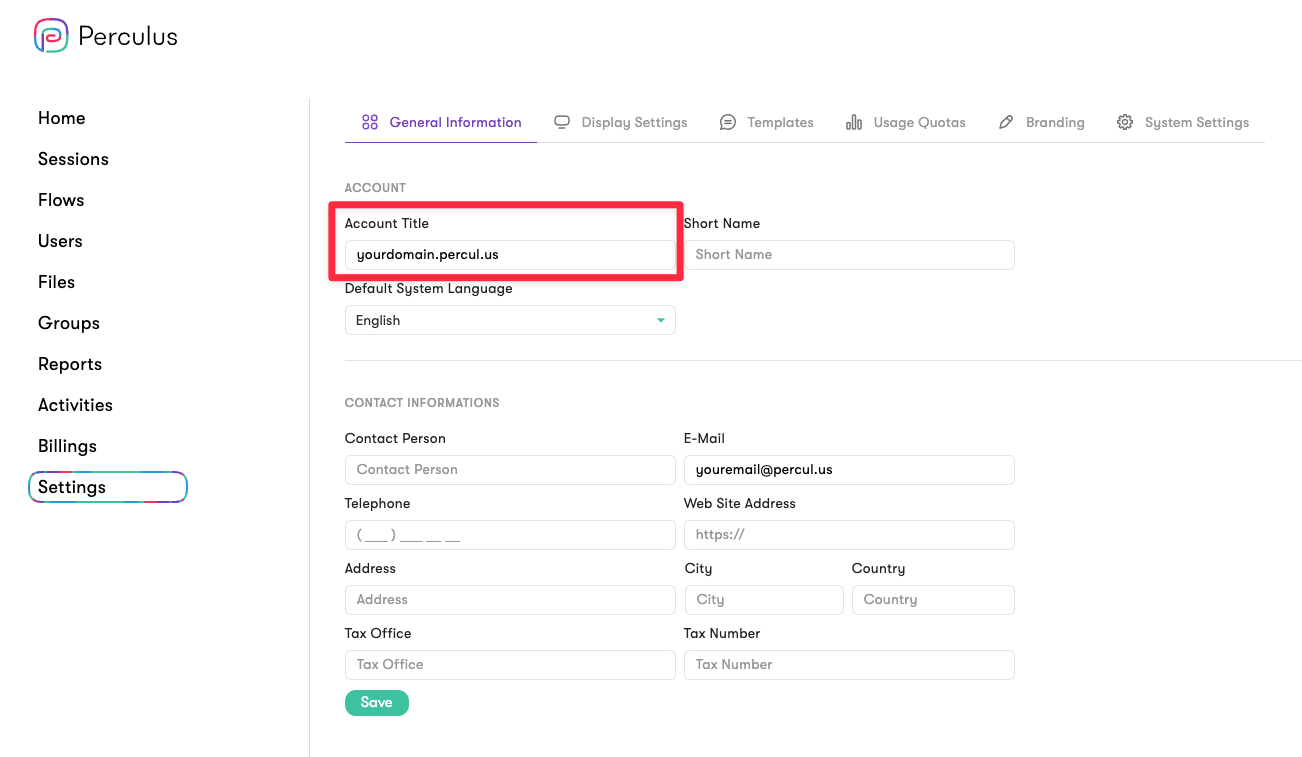
<table><thead><tr><th>Parameter</th><th>Type</th><th width="106">Required</th><th>Default</th><th>Description</th></tr></thead><tbody><tr><td>user_id</td><td>string</td><td>Yes</td><td>n/a</td><td>GUID of the user that will be added to the session as a participant</td></tr><tr><td>role</td><td>string</td><td>No</td><td>User's role. <em><mark style="color:green;">See information Hint below</mark></em></td><td>Role of the participant(<a href="/accepted-formats/roles">see</a>)</td></tr></tbody></table>

{% hint style="info" %}
If the role parameter is not sent, the user will be added to the session with the role she has. <mark style="color:yellow;">Sending the parameter with a non null value will override this.</mark>

For example:

* User with ID: a4cfd141-ea72-42e1-9b9b-d325ca3b255f has role 'e'
* Try add user to session with payload:&#x20;

{% code fullWidth="false" %}

```json
{
    "user_id": "a4cfd141-ea72-42e1-9b9b-d325ca3b255f"
}
```

{% endcode %}

* Attendee will be added with role 'e'
  {% endhint %}

**Example Payload:**

{% tabs %}
{% tab title="CURL" %}

```bash
curl --location --request POST \
'https://<DOMAIN>/xapi/session/<SESSION_ID>/attendees' \
--header 'Authorization: Bearer <ACCESS_TOKEN>' \
--header 'Content-Type: application/json' \
--data '[{
    "user_id": "<USER_ID>",
    "role": "u"
}]'
```

{% endtab %}

{% tab title="Python" %}

```python
from perculus_sdk.client import APIClient

# API client
client = APIClient()
...

# Add an Attendee
attendee = client.attendees.add_by_user_id("<SESSION_ID>", "<USER_ID>")
print(attendee)

# Add Multiple Attendees
attendees = client.attendees.add_multiple_by_user_id("<SESSION_ID>", [
    { "user_id": "<USER_ID1>" },
    { "user_id": "<USER_ID2>" }
])
print(attendees)
```

{% endtab %}

{% tab title="C#" %}

```
// ASAP :)
```

{% endtab %}

{% tab title="NodeJS" %}

```javascript
import APIClient from "perculus-sdk"

// API client
const client = new APIClient()
...

// Add an attendee
const attendee = client.attendees.addAttendee("<SESSION_ID>", "<USER_ID>")
console.log(attendee)

// Add Multiple Attendees
const attendees = client.attendees.addMultipleAttendees("<SESSION_ID>", [
    { user_id: "<USER_ID1>" },
    { user_id: "<USER_ID2>" }
])
console.log(attendees)
```

{% endtab %}

{% tab title="GO" %}

```
// ASAP :)
```

{% endtab %}
{% endtabs %}

***

{% hint style="info" %}
Using the same calls, you can make a batch operation for adding attendees to a session, which will significantly reduce overhead by making a request for each attendee to add.

**Example payload for batch operation:**

```json
[
    {
        "user_id": "<USER_ID1>",
        "role": "u"
    },
    {
        "user_id": "<USER_ID2>"
    }
]
```

{% endhint %}

**Example Response:**

```json
{
    "approved": [
        {
            "session_id": "<SESSION_ID>",
            "user_id": "<USER_ID>",
            "attendee_id": "***",
            "attendance_code": "<ATTENDANCE_CODE>",
            "name": "john",
            "surname": "Doe",
            "email": "john@doe.com",
            "role": "u",
            "mobile": "",
            "avatar": null,
            "creation_date": "2024-08-16T01:55:15.7991084Z",
            "updating_date": null
        }
    ],
    "rejected": []
}
```

{% hint style="danger" %}
You will need to work with the **'ATTENDANCE\_CODE'** data in the example response you see above if you are making an edit to the settings of a participant in that session. You must therefore store this data securely.

To obtain the attendance link for participants to join the session, please see the [relevant section](/services/participant-management/attendance-link).
{% endhint %}

:red\_circle: You will see two objects as approved and rejected in the response, you can see their details below:

* approved:
  * Lists the records successfully added from the users.
* rejected:
  * Lists the records that cannot be added from users.&#x20;

**Example Response:**

```json
{
    "approved": [],
    "rejected": [
        {
            "model": null,
            "state": {
                "code": 10,
                "details": "Object reference not set to an instance of an object."
            }
        }
    ]
}
```


# Guests

{% hint style="danger" %}
**Important Note!**\
\
Constructor Groups’ V1 API has been retired and is no longer available to new customers. Please use the Groups V2 API going forward.\
\
Link to V2 API documentation: <https://developer.perculus.com/v2-en>
{% endhint %}

{% hint style="danger" %}
Adding a guest participant will deprive you from <mark style="color:red;">some</mark> functionalities as opposed to adding an existing user to a session as a participant.
{% endhint %}

External participants are attendees of a session that doesn't belong to an account. Below, you can see the parameters which you can send:

<table><thead><tr><th>Parameter</th><th width="161">Type</th><th width="158">Required</th><th>Default</th><th>Description</th></tr></thead><tbody><tr><td>name</td><td>string</td><td>Yes</td><td>n/a</td><td>Name of the participant</td></tr><tr><td>surname</td><td>string</td><td>Yes</td><td>n/a</td><td>Surname of the participant</td></tr><tr><td>email</td><td>string</td><td>Yes</td><td>n/a</td><td>Email address of the participant</td></tr><tr><td>mobile</td><td>string</td><td>No</td><td>null</td><td>Mobile of the participant</td></tr><tr><td>role</td><td>string</td><td>No</td><td>u</td><td>Role of the participant(<a href="/accepted-formats/roles">see</a>)</td></tr></tbody></table>

{% hint style="danger" %}
`email` parameter is a unique constraint for a session, therefore, if there exists a participant with that email, the call will update the existing participant.
{% endhint %}

**Example Payload:**

{% tabs %}
{% tab title="CURL" %}

```bash
curl --location --request POST \
'https://<DOMAIN>/xapi/session/<SESSION_ID>/attendees' \
--header 'Authorization: Bearer <ACCESS_TOKEN>' \
--header 'Content-Type: application/json' \
--data '[
    {
        "name": "John",
        "surname": "Doe",
        "email": "john.doe@example.com",
        "role" "a"
    }
]'
```

{% endtab %}

{% tab title="Python" %}

```python
from perculus_sdk.client import APIClient

# API client
client = APIClient()
...

# Add a Guest Attendee
attendee = client.attendees.add_attendee("<SESSION_ID>", {
    "name": "John",
    "surname": "Doe",
    "email": "john.doe@example.com",
    "role" "a"
})
print(attendee)

# Add Multiple Guest Attendees
attendees = client.attendees.add_multiple("<SESSION_ID>", [
    {
        "name": "John",
        "surname": "Doe",
        "email": "john.doe@example.com"
    },
    {
        "name": "John",
        "surname": "Doe2",
        "email": "john.doe2@example.com",
        "role" "a"
    }
])
print(attendees)
```

{% endtab %}

{% tab title="C#" %}

```
// ASAP :)
```

{% endtab %}

{% tab title="NodeJS" %}

```javascript
import APIClient from "perculus-sdk"

// API client
const client = new APIClient()
...

// Add an attendee
const attendee = client.attendees.addAttendee("<SESSION_ID>", "<USER_ID>")
console.log(attendee)

// Add Multiple Attendees
const attendees = client.attendees.addMultipleAttendees("<SESSION_ID>", [
    {
        "name": "John",
        "surname": "Doe",
        "email": "john.doe@example.com",
        "role" "a"
    }
])
console.log(attendees)
```

{% endtab %}

{% tab title="GO" %}

```
// ASAP :)
```

{% endtab %}
{% endtabs %}

### Creating an external participant


# Attendance Link

This page will describe how to obtain the attendance link for the participant to enter the session.

{% hint style="danger" %}
**Important Note!**\
\
Constructor Groups’ V1 API has been retired and is no longer available to new customers. Please use the Groups V2 API going forward.\
\
Link to V2 API documentation: <https://developer.perculus.com/v2-en>
{% endhint %}

To create the attendance link for a participant, you can utilize the attendance\_code returned by requests like so:

```
https://<DOMAIN>/app/?c=<ATTENDANCE_CODE>
```

The constructed string is the link that participants can use the attend the session.


# Updating Participants

This step shows how to update participants in a Groups session.

{% hint style="danger" %}
**Important Note!**\
\
Constructor Groups’ V1 API has been retired and is no longer available to new customers. Please use the Groups V2 API going forward.\
\
Link to V2 API documentation: <https://developer.perculus.com/v2-en>
{% endhint %}

There are two ways to update participant details for a session:

* [ATTENDANCE\_CODE](#with-attendance_code)
* [EMAIL](#with-email)

### With ATTENDANCE\_CODE

{% hint style="warning" %}
You need the **SESSION\_ID** of the session and the **ATTENDANCE\_CODE**, which is the participant ID of the user, to update the participant in a session.
{% endhint %}

Available parameters:

| Parameters | Type   | Description                                                          |
| ---------- | ------ | -------------------------------------------------------------------- |
| name       | string | Name of the participant                                              |
| surname    | string | Surname of the participant                                           |
| email      | string | Email of the participant                                             |
| role       | string | Role of the user([see](/accepted-formats/roles) for possible values) |
| mobile     | string | Mobile phone of the participant                                      |

**Example Payload:**

{% tabs %}
{% tab title="CURL" %}

```bash
curl --location --request PUT 'https://<DOMAIN>/xapi/session/<SESSION_ID>/attendee/<ATTENDANCE_CODE>' \
--header 'Authorization: Bearer <ACCESS_TOKEN>' \
--header 'Content-Type: application/json' \
--data '{
    "name": "test",
    "surname": "surname"
    "role": "u"
}'
```

{% endtab %}

{% tab title="Python" %}

```python
from perculus_sdk.client import APIClient

# API client
client = APIClient()
...

# Update an Attendee by ATTENDANCE_CODE
attendee = client.attendees.update_by_attendance_code(
    session_id="<SESSION_ID>",
    attendance_code="<ATTENDANCE_CODE>",
    attendee={
        "name": "<NAME>",
        "surname": "<SURNAME>"
        "role": "<ROLE>"
    }
)
print(attendee)
```

{% endtab %}

{% tab title="C#" %}

```
// ASAP :)
```

{% endtab %}

{% tab title="NodeJS" %}

```javascript
import APIClient from "perculus-sdk"

// API client
const client = new APIClient()
...

// Update Attendee
const attendee = client.attendees.updateAttendee(
    "<SESSION_ID>", "<ATTENDANCE_CODE>",
    {
        name: "test",
        surname: "surname"
        role: "u"   
    }    
)
console.log(attendee)
```

{% endtab %}

{% tab title="GO" %}

```
// ASAP :)
```

{% endtab %}
{% endtabs %}

### With EMAIL

{% hint style="warning" %}
You need the **SESSION\_ID** of the session and the **EMAIL,** which is the email of the user, to update the participant in a session.
{% endhint %}

Available parameters:
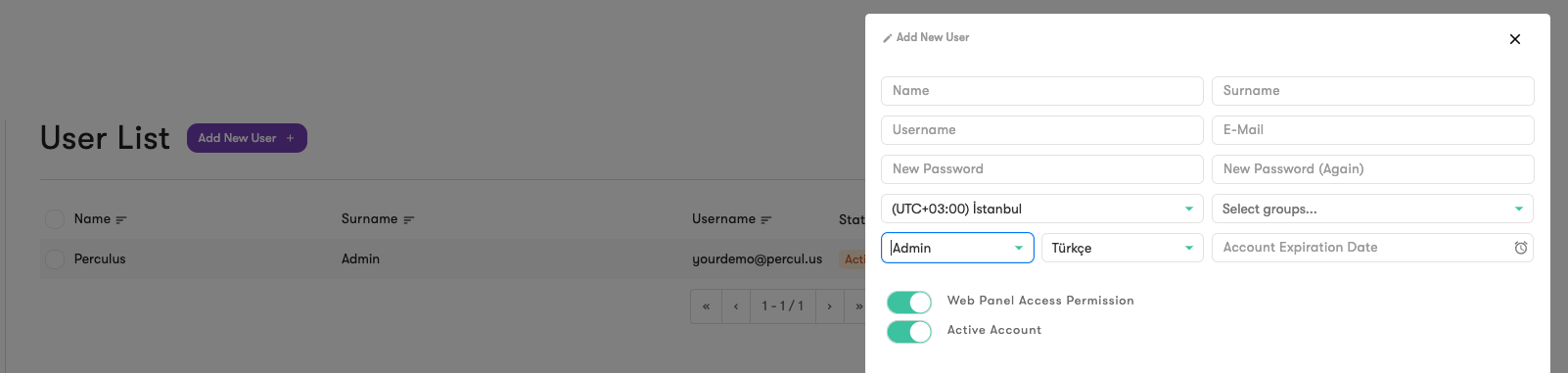
| Parameters | Type   | Description                                                          |
| ---------- | ------ | -------------------------------------------------------------------- |
| name       | string | Name of the participant                                              |
| surname    | string | Surname of the participant                                           |
| email      | string | Email of the participant                                             |
| role       | string | Role of the user([see](/accepted-formats/roles) for possible values) |
| mobile     | string | Mobile phone of the participant                                      |

**Example payload:**

{% tabs %}
{% tab title="CURL" %}

```bash
curl --location --request PUT 'https://<DOMAIN>/xapi/session/<SESSION_ID>/attendee/<EMAIL>' \
--header 'Authorization: Bearer <ACCESS_TOKEN>' \
--header 'Content-Type: application/json' \
--data '{
    "name": "test",
    "surname": "surname"
    "role": "u"
}'
```

{% endtab %}

{% tab title="Python" %}

```python
from perculus_sdk.client import APIClient

# API client
client = APIClient()
...

# Update an Attendee by EMAIL
attendee = client.attendees.update_by_email(
    session_id="<SESSION_ID>",
    email="<EMAIL>",
    attendee={
        "name": "<NAME>",
        "surname": "<SURNAME>"
        "role": "<ROLE>"
    }
)
print(attendee)
```

{% endtab %}

{% tab title="C#" %}

```
// ASAP :)
```

{% endtab %}

{% tab title="NodeJS" %}

```javascript
import APIClient from "perculus-sdk"

// API client
const client = new APIClient()
...

// Update Attendee
const attendee = client.attendees.updateAttendee(
    "<SESSION_ID>", "<EMAIL>",
    {
        name: "test",
        surname: "surname"
        role: "u"   
    }    
)
console.log(attendee)
```

{% endtab %}

{% tab title="GO" %}

```
// ASAP :)
```

{% endtab %}
{% endtabs %}


# Removing Participants

This step shows how to remove participants from a session via GroupsAPI

{% hint style="danger" %}
**Important Note!**\
\
Constructor Groups’ V1 API has been retired and is no longer available to new customers. Please use the Groups V2 API going forward.\
\
Link to V2 API documentation: <https://developer.perculus.com/v2-en>
{% endhint %}

There are three ways to remove a participant from a session:

* ATTENDANCE\_CODE&#x20;
* USER\_ID&#x20;
* EMAIL

Examples:

{% tabs %}
{% tab title="CURL" %}
**With ATTENDANCE\_CODE parameter**

```bash
curl --location --request DELETE 'https://<DOMAIN>/xapi/session/<SESSION_ID>/attendee/<ATTENDANCE_CODE>' \
--header 'Authorization: Bearer <ACCESS_TOKEN>' \
--header 'Content-Type: application/json' \
--data ''
```

**With USER\_ID parameter**

```bash
curl --location --request DELETE 'https://<DOMAIN>/xapi/session/<SESSION_ID>/attendee/<USER_ID>' \
--header 'Authorization: Bearer <ACCESS_TOKEN>' \
--header 'Content-Type: application/json' \
--data ''
```

**With EMAIL parameter**

```bash
curl --location --request DELETE 'https://<DOMAIN>/xapi/session/<SESSION_ID>/attendee/<EMAIL>' \
--header 'Authorization: Bearer <ACCESS_TOKEN>' \
--header 'Content-Type: application/json' \
--data ''
```

{% endtab %}

{% tab title="Python" %}

```python
from perculus_sdk.client import APIClient

# API client
client = APIClient()
...

# Delete the attandee by ATTENDANCE_CODE
client.attendees.delete_by_attendance_code_or_user_id(
    session_id="<SESSION_ID>",
    attendance_code_or_user_id="<ATTENDANCE_CODE>"
)

# Delete the attandee by USER_ID
client.attendees.delete_by_attendance_code_or_user_id(
    session_id="<SESSION_ID>",
    attendance_code_or_user_id="<USER_ID>"
)

# Delete the attandee by EMAIL
client.attendees.delete_by_email(
    session_id="<SESSION_ID>",
    email="<EMAIL>"
)
```

{% endtab %}

{% tab title="C#" %}

```
// ASAP :)
```

{% endtab %}

{% tab title="NodeJS" %}

```javascript
import APIClient from "perculus-sdk"

// API client
const client = new APIClient()
...

// Delete the attandee by ATTENDANCE_CODE
client.attendees.deleteAttendee("<SESSION_ID>", "<ATTENDANCE_CODE>")

// Delete the attandee by USER_ID
client.attendees.deleteAttendee("<SESSION_ID>", "<USER_ID>")

// Delete the attandee by EMAIL
client.attendees.deleteAttendee("<SESSION_ID>", "<EMAIL>")
```

{% endtab %}

{% tab title="GO" %}

```
// ASAP :)
```

{% endtab %}
{% endtabs %}


# Filtering Participants

This step shows how to filter participants via GroupsAPI

{% hint style="danger" %}
**Important Note!**\
\
Constructor Groups’ V1 API has been retired and is no longer available to new customers. Please use the Groups V2 API going forward.\
\
Link to V2 API documentation: <https://developer.perculus.com/v2-en>
{% endhint %}

{% hint style="info" %}
If you like to see all participants belonging to a session, you can achieve this by not sending any parameters to the request.
{% endhint %}

Available parameters:

| Parameter        | Type    | Description                                                                 |
| ---------------- | ------- | --------------------------------------------------------------------------- |
| user\_id         | string  | GUID of the user                                                            |
| attendance\_code | string  | Attendance code of the participant                                          |
| name             | string  | Name of the participant                                                     |
| surname          | string  | Surname of the participant                                                  |
| email            | string  | Email of the participant                                                    |
| role             | string  | Role of the participant([see](/accepted-formats/roles) for possible values) |
| mobile           | string  | Mobile of the participant                                                   |
| page\_size       | integer | Page size                                                                   |
| page\_number     | integer | Page number                                                                 |

Example payload:

{% tabs %}
{% tab title="CURL" %}

```bash
curl --location --request GET 'https://<DOMAIN>/xapi/session/<SESSION_ID>/attendee/<EMAIL>' \
--header 'Authorization: Bearer <ACCESS_TOKEN>' \
--header 'Content-Type: x-www-form-urlencoded' \
--data-urlencode 'name=john' \
--data-urlencode 'surname=doe'
```

{% endtab %}

{% tab title="Python" %}

```python
from perculus_sdk.client import APIClient

# API client
client = APIClient()
...

# Filter Attendees
attendees = client.attendees.search_attendees(
    session_id="<SESSION_ID>",
    params={
        "name": "<NAME>",
        "role": "<ROLE>"
    }
)
print(attendees)
```

{% endtab %}

{% tab title="C#" %}

```
// ASAP :)
```

{% endtab %}

{% tab title="NodeJS" %}
{% code fullWidth="false" %}

```javascript
import APIClient from "perculus-sdk"

// API client
const client = new APIClient()
...

// Get Attendees
const attendees = client.attendees.searchAttendees("<SESSION_ID>",
    {
        name: "<NAME>",
        role: "<ROLE>"
    }
)
console.log(attendees)
```

{% endcode %}
{% endtab %}

{% tab title="GO" %}

```
// ASAP :)
```

{% endtab %}
{% endtabs %}


# Participant Details

This page describes how to obtain details of a participant.

{% hint style="danger" %}
**Important Note!**\
\
Constructor Groups’ V1 API has been retired and is no longer available to new customers. Please use the Groups V2 API going forward.\
\
Link to V2 API documentation: <https://developer.perculus.com/v2-en>
{% endhint %}

In Groups API, there are two ways to obtain details of a participant:

* [via Attendance Code of a participant](#filtering-with-attendance_code)
* [via Email of a participant](#by-email)

Both methods require **SESSION\_ID** and respective parameter when making requests.

### By ATTENDANCE\_CODE

{% hint style="warning" %}
You need the **SESSION\_ID** of the session and the **ATTENDANCE\_CODE**, which is the participant ID of the user, to get the participant details for a session.
{% endhint %}

**Example Payload:**

{% tabs %}
{% tab title="CURL" %}

```bash
curl --location --request GET 'https://<DOMAIN>/xapi/session/<SESSION_ID>/attendee/<ATTENDANCE_CODE>' \
--header 'Authorization: Bearer <ACCESS_TOKEN>' \
--header 'Content-Type: application/json' \
--data ''
```

{% endtab %}

{% tab title="Python" %}

```python
from perculus_sdk.client import APIClient

# API client
client = APIClient()
...

# Get the attandee by ATTENDANCE_CODE
attendee = client.attendees.get_by_attendance_code(
    session_id="<SESSION_ID>",
    attendance_code="<ATTENDANCE_CODE>"
)
print(attendee)
```

{% endtab %}

{% tab title="C#" %}

```
// ASAP :)
```

{% endtab %}

{% tab title="NodeJS" %}

```javascript
import APIClient from "perculus-sdk"

// API client
const client = new APIClient()
...

// Get Attendee
const attendee = client.attendees.getAttendee(
    "<SESSION_ID>", "<ATTENDANCE_CODE>" 
)
console.log(attendee)
```

{% endtab %}

{% tab title="GO" %}

```
// ASAP :)
```

{% endtab %}
{% endtabs %}

### By EMAIL

{% hint style="warning" %}
You need the **SESSION\_ID** of the session and the **EMAIL,** which is the email of the user, to update the participant in a session.
{% endhint %}

**Example Payload:**

{% tabs %}
{% tab title="CURL" %}

```bash
curl --location --request GET 'https://<DOMAIN>/xapi/session/<SESSION_ID>/attendee/<EMAIL>' \
--header 'Authorization: Bearer <ACCESS_TOKEN>' \
--header 'Content-Type: application/json' \
--data ''
```

{% endtab %}

{% tab title="Python" %}

```python
from perculus_sdk.client import APIClient

# API client
client = APIClient()
...

# Get the attandee by EMAIL
attendee = client.attendees.get_by_email(
    session_id="<SESSION_ID>",
    email="<EMAIL>"
)
print(attendee)
```

{% endtab %}

{% tab title="C#" %}

```
// ASAP :)
```

{% endtab %}

{% tab title="NodeJS" %}

```javascript
import APIClient from "perculus-sdk"

// API client
const client = new APIClient()
...

// Get Attendee
const attendee = client.attendees.getAttendee(
    "<SESSION_ID>", "<EMAIL>" 
)
console.log(attendee)
```

{% endtab %}

{% tab title="GO" %}

```
// ASAP :)
```

{% endtab %}
{% endtabs %}


# Reports

Reports allows you to obtain various statistics regarding a session or a participant.

{% hint style="danger" %}
**Important Note!**\
\
Constructor Groups’ V1 API has been retired and is no longer available to new customers. Please use the Groups V2 API going forward.\
\
Link to V2 API documentation: <https://developer.perculus.com/v2-en>
{% endhint %}


# Participant Stats

In this page, you will find information on how to obtain stats for a session with SESSION\_ID, along with participant stats.

{% hint style="danger" %}
**Important Note!**\
\
Constructor Groups’ V1 API has been retired and is no longer available to new customers. Please use the Groups V2 API going forward.\
\
Link to V2 API documentation: <https://developer.perculus.com/v2-en>
{% endhint %}

{% hint style="info" %}
You don't need a seperate request to get a sessions stats. This method will provide you with session stats, as well as participants' stats
{% endhint %}

To get a session's statistics with participant stats via SESSION\_ID, you can make a request like so:

{% tabs %}
{% tab title="CURL" %}

```
curl --location --request POST 'https://<DOMAIN>/xapi/report/session/<SESSION_ID>/attendees' \
--header 'Authorization: Bearer <ACCESS_TOKEN>' \
--header 'Content-Type: application/json'
```

{% endtab %}
{% endtabs %}

**Example response:**

<table data-full-width="false"><thead><tr><th>Parameter</th><th>Type</th><th>Description</th></tr></thead><tbody><tr><td>session_name</td><td>string</td><td>Session's name</td></tr><tr><td>duration</td><td>int</td><td>Session's duration in seconds</td></tr><tr><td>duration_active</td><td>int</td><td>Session's active time in seconds</td></tr><tr><td>duration_interrupt</td><td>int</td><td>Session break duration in seconds</td></tr><tr><td>user_count</td><td>int</td><td>Session's total participant count</td></tr><tr><td>banned_count</td><td>int</td><td>Session's total banned participant count</td></tr><tr><td>cam_count</td><td>int</td><td>Session's total camera count</td></tr><tr><td>mic_count</td><td>int</td><td>Session's total microphone count</td></tr><tr><td>screen_share_count</td><td>int</td><td>Session's total screen share count</td></tr><tr><td>chat_message_count</td><td>int</td><td>Session's total chat message count</td></tr><tr><td>doc_count</td><td>int</td><td>Session's document count</td></tr><tr><td>poll_count</td><td>int</td><td>Session's poll/question count</td></tr><tr><td>error_code</td><td>string?</td><td>Error that occurred during packing process, will be <code>NONE</code> if no errors occur.</td></tr><tr><td>creation_date</td><td>DateTimeOffset</td><td>Report's creation date</td></tr><tr><td>updating_date</td><td>DateTimeOffset?</td><td>Report's updating date</td></tr><tr><td>actual_start_date</td><td>DateTimeOffset</td><td>Session's start date</td></tr><tr><td>actual_finish_date</td><td>DateTimeOffset</td><td>Session's finish date</td></tr><tr><td>user_stats</td><td><a href="/services/reports/participant-stats/participantstat">ParticipantStat</a>[]</td><td>Statistics for participants</td></tr></tbody></table>


# ParticipantStat

Below, you can find the details of the ParticipantStat object

{% hint style="danger" %}
**Important Note!**\
\
Constructor Groups’ V1 API has been retired and is no longer available to new customers. Please use the Groups V2 API going forward.\
\
Link to V2 API documentation: <https://developer.perculus.com/v2-en>
{% endhint %}

<table><thead><tr><th>Parameter</th><th width="174">Type</th><th>Description</th></tr></thead><tbody><tr><td>session_name</td><td>string</td><td>Session's name</td></tr><tr><td>attendance_code</td><td>string</td><td>Participant's attendance code</td></tr><tr><td>username</td><td>string</td><td>Participant's username</td></tr><tr><td>email</td><td>string</td><td>Participant's email</td></tr><tr><td>user_id</td><td>string</td><td>Participant's user_id</td></tr><tr><td>duration_live</td><td>int</td><td>Participant's attendance time</td></tr><tr><td>duration_active</td><td>int</td><td>Participant's time in an active session duration</td></tr><tr><td>duration_passive</td><td>int</td><td>Participant's time in an passive session duration</td></tr><tr><td>duration_replay</td><td>int</td><td>Participant's time spent in replay of the session</td></tr><tr><td>duration_interrupt</td><td>int</td><td></td></tr><tr><td>first_attempt_live</td><td>DateTimeOffset</td><td>Date of  first attempt to connect to the session</td></tr><tr><td>last_attempt_live</td><td>DateTimeOffset</td><td>Date of  last attempt to connect to the session</td></tr><tr><td>first_attempt_replay</td><td>DateTimeOffset</td><td>Date of  first attempt to watch the replay of the session</td></tr><tr><td>last_attempt_replay</td><td>DateTimeOffset</td><td>Date of  last attempt to watch the replay of the session</td></tr><tr><td>last_exit_live</td><td>DateTimeOffset</td><td>Date of the last attempt of exit the session</td></tr><tr><td>replay_count</td><td>int</td><td>Count of times the participant watched the replay of the session</td></tr><tr><td>cam_duration</td><td>int</td><td>Duration of participant's active camera in seconds</td></tr><tr><td>cam_count</td><td>int</td><td>Count of participant's camera</td></tr><tr><td>mic_duration</td><td>int</td><td>Duration of participant's active microphone in seconds</td></tr><tr><td>mic_count</td><td>int</td><td>Count of participant's microphone</td></tr><tr><td>screen_share_duration</td><td>int</td><td>Duration of participant's active screen share in seconds</td></tr><tr><td>screen_share_count</td><td>int</td><td>Count of participant's screen share</td></tr><tr><td>chat_message_count</td><td>int</td><td>Count of participant's chat messages</td></tr><tr><td>user_mode</td><td>string</td><td>Participant's role in the session</td></tr><tr><td>creation_date</td><td>DateTimeOffset</td><td>Participant stat's creation date</td></tr><tr><td>updating_date</td><td>DateTimeOffset</td><td>Participant stat's last updating date</td></tr><tr><td>total_attendance_score</td><td>string</td><td>Attendance score of the participant</td></tr><tr><td>engagement_score</td><td>int</td><td>Engagement score of the participant</td></tr></tbody></table>


# Session Stats

In this page, you will find information on how to obtain stats for a session with SESSION\_ID.

{% hint style="danger" %}
**Important Note!**\
\
Constructor Groups’ V1 API has been retired and is no longer available to new customers. Please use the Groups V2 API going forward.\
\
Link to V2 API documentation: <https://developer.perculus.com/v2-en>
{% endhint %}

{% hint style="info" %}
If you'd like to get session stats along side attendee stats, you can use the method described in [Participant Stats](/services/reports/participant-stats) section.
{% endhint %}

To get a session's statistics via SESSION\_ID, you can make a request like so:

{% tabs %}
{% tab title="CURL" %}

```
curl --location --request POST 'https://<DOMAIN>/xapi/report/session/<SESSION_ID>' \
--header 'Authorization: Bearer <ACCESS_TOKEN>' \
--header 'Content-Type: application/json'
```

{% endtab %}
{% endtabs %}

**Example response parameters:**

<table><thead><tr><th>Parameter</th><th width="181">Type</th><th>Description</th></tr></thead><tbody><tr><td>session_name</td><td>string</td><td>Session's name</td></tr><tr><td>duration</td><td>int</td><td>Session's duration in seconds</td></tr><tr><td>duration_active</td><td>int</td><td>Session's active time in seconds</td></tr><tr><td>duration_interrupt</td><td>int</td><td>Session break duration in seconds</td></tr><tr><td>user_count</td><td>int</td><td>Session's total participant count</td></tr><tr><td>banned_count</td><td>int</td><td>Session's total banned participant count</td></tr><tr><td>cam_count</td><td>int</td><td>Session's total camera count</td></tr><tr><td>mic_count</td><td>int</td><td>Session's total microphone count</td></tr><tr><td>screen_share_count</td><td>int</td><td>Session's total screen share count</td></tr><tr><td>chat_message_count</td><td>int</td><td>Session's total chat message count</td></tr><tr><td>doc_count</td><td>int</td><td>Session's document count</td></tr><tr><td>poll_count</td><td>int</td><td>Session's poll/question count</td></tr><tr><td>error_code</td><td>string?</td><td>Error that occurred during packing process, will be <code>NONE</code> if no errors occur.</td></tr><tr><td>creation_date</td><td>DateTimeOffset</td><td>Report's creation date</td></tr><tr><td>updating_date</td><td>DateTimeOffset?</td><td>Report's updating date</td></tr><tr><td>actual_start_date</td><td>DateTimeOffset</td><td>Session's start date</td></tr><tr><td>actual_finish_date</td><td>DateTimeOffset</td><td>Session's finish date</td></tr></tbody></table>


# Webhooks

Groups Webhook System

{% hint style="danger" %}
**Important Note!**\
\
Constructor Groups’ V1 API has been retired and is no longer available to new customers. Please use the Groups V2 API going forward.\
\
Link to V2 API documentation: <https://developer.perculus.com/v2-en>
{% endhint %}

## **Introduction**&#x20;

Groups uses webhooks to notify external systems about particular events. To use this functionality, a webhook should be registered to store information, including the webhook endpoint URL (a.k.a listener URL) and the event type. When an event associated with a webhook happens, an HTTP POST payload is sent to the associated URL. Please contact the support team if you want to use this feature and register your webhook URL.

## Events and Messages&#x20;

The following is the list of Groups events and corresponding messages to notify the associated webhooks.

### **SessionReportEvent**

This event is dispatched after a session is packed and report data are available. The status can be *ready* or *failed*. If an error occurred during the preparation of the report, an error text is also included in the message.

#### SessionReportEvent Message (Successful Operation)

```json
{ 
    "request_id": "bd943129-f2eb-4b52-9bf9-784c87d1b80e",
    "type": "SessionReportEvent",
    "session_id": "805368AF-B096-42D4-8233-1B0C0EBF1DB2",
    "token": "63833938902|Uu4T7EFsl6dfBfLjFbVKizWerUJ4q9/pA9UokdW+Vv0=",
    "status": "ready"     
} 
```

#### SessionReportEvent Message (Failed Operation)

```json
{
    "request_id": "bd943129-f2eb-4b52-9bf9-784c87d1b80e",
    "type": "SessionReportEvent",
    "session_id": "805368AF-B096-42D4-8233-1B0C0EBF1DB2",
    "token": "63833938902|Uu4T7EFsl6dfBfLjFbVKizWerUJ4q9/pA9UokdW+Vv0=",     
    "status": "failed",
    "error": "error text comes here" 
} 
```

### **SingleVideoEvent**

This event is dispatched after the video file is ready to be downloaded. If the status is failed, an error text is also included in the message.

#### SingleVideoEvent Message (Successful Operation)

```json
{ 
    "request_id": "0489b550-df7f-4807-a693-22fcd6c9ccf5", 
    "type": "SingleVideoEvent",
    "session_id": "AF7F81CA-167B-43C0-94F7-E6835B30B043",
    "token": "63833938902|Uu4T7EFsl6dfBfLjFbVKizWerUJ4q9/pA9UokdW+Vv0=",
    "status": "ready",
    "video_url": "https://storage-system.perculus.com/files/0f19be98e5442ec8f9439c7435f5a7f.mp4?token=xhiUZSLoFe4y9VLCYz17TZiKcZk%3D" 
} 
```

#### SingleVideoEvent Message (Failed Operation)

```json
{
    "request_id": "bd943129-f2eb-4b52-9bf9-784c87d1b80e",
    "type": "SingleVideoEvent",
    "session_id": "AF7F81CA-167B-43C0-94F7-E6835B30B043",
    "token": "63833938902|Uu4T7EFsl6dfBfLjFbVKizWerUJ4q9/pA9UokdW+Vv0=",
    "status": "failed",
    "error": "error text comes here" 
} 
```

### **SessionStatusEvent**

This event is dispatched after a session is *started* or *finished*.&#x20;

The event data is encapsulated as a JSON payload and included in an HTTP POST request to the webhook endpoint URL.&#x20;

#### SessionStatusEvent Message&#x20;

```json
{ 
    "request_id": "bd943129-f2eb-4b52-9bf9-784c87d1b80e",
    "type": "SessionStatusEvent",
    "session_id": "805368AF-B096-42D4-8233-1B0C0EBF1DB2",
    "token": "63833938902|Uu4T7EFsl6dfBfLjFbVKizWerUJ4q9/pA9UokdW+Vv0=",
    "status": "started",
    "date": "2024-01-23T17:41:07"
} 
```

## Message Fields

<table><thead><tr><th width="130">Name</th><th width="436">Description</th><th>Types</th></tr></thead><tbody><tr><td><strong>request_id</strong></td><td>This unique identifier identifies the message. It can be used to track messages and troubleshoot problems.</td><td>All</td></tr><tr><td><strong>type</strong></td><td>The type of the message.</td><td>All</td></tr><tr><td><strong>session_id</strong></td><td>This is the unique identifier of the Perculus session.</td><td>All</td></tr><tr><td><strong>token</strong></td><td>This is the authentication token used by the webhook endpoint to verify the Perculus platform.<br>See <a href="#token-generation-and-verification">"Token Generation and Verification</a>".</td><td>All</td></tr><tr><td><strong>status</strong></td><td>This can have two values for SessionReportEvent and SingleVideoEvent messages, which are <em>ready</em> and <em>failed</em>. The <em>status</em> field in the SessionReportEvent payload indicates whether the session has been correctly packaged. Similarly, the <em>status</em> field in the SingleVideoEvent payload indicates whether the session video has been successfully created. If the status is <em>failed,</em> an error message is transmitted within the error element. <br>It can take <em>started</em> or <em>finished</em> values for SessionStatusEvent.</td><td>All</td></tr><tr><td><strong>video_url</strong></td><td>This element specifies the URL where the video content is located. This URL can be utilized to access the video content and expires after 24 hours. </td><td>SingleVideoEvent</td></tr><tr><td><strong>date</strong></td><td>This element specifies when the session started or finished depending on the value of the status field.</td><td>SessionStatusEvent</td></tr><tr><td><strong>error</strong></td><td>This element contains the error text of the event in case of any errors. It’s an optional element which is omitted if there is no error.</td><td>SessionReportEvent<br>SingleVideoEvent</td></tr></tbody></table>

## Token Generation and Verification&#x20;

The receiver system can authenticate the Perculus system by verifying the authentication token sent within the messages. As shown in the sections above, Perculus includes a token element in each webhook URL request payload. It is in the following format:&#x20;

`token = <timestamp>|<hmac>`

The **hmac** is a hash-based message authentication code. It’s generated by using a secret and a timestamp.&#x20;

The **timestamp** is the number of seconds passed from 1/1/1970 UTC to the token creation time. It is also known as the [Unix time](https://en.wikipedia.org/wiki/Unix_time).

The **secret** is a private piece of information that is only known by the Perculus and the receiver side.&#x20;

The pseudo-code of the token generation is as follows:&#x20;

```csharp
var token_content = utf8_bytes(timestamp);
var hmac_sha256_key = utf8_bytes(secret);
var hmac_sha256_generator = hmac_sha256(hmac_sha256_key);
var hmac = hmac_sha256_generator.compute_hash(token_content);
var token = timestamp + "|" + hmac;
```

Since the secret is also known by the receiver side, the receiver can re-generate the hmac by using the timestamp, which is embedded in the token and the secret by using the above algorithm. Thus, the receiver can verify:

* The validity of the request by checking that the token has not expired if the timestamp is at most N minutes old. Here, deciding the N parameter is up to the receiver side.
* The authenticity of the request (by checking whether the hmacs are equal). The following C# code snippet is a method that generates an authentication token using a secret and a timestamp, as explained above in the document.

### Sample C# Code to Generate an Authentication Token

```csharp
public static string CreateAuthToken(string secret, DateTime httpRequestUTCDate) { 
    if (String.IsNullOrEmpty(secret)) 
        throw new ArgumentException("secret cannot be empty"); 
    // Calculate Unix timestamp which is 
    // the total seconds passed since 1/1/1970 UTC 
    var timestamp = Math.Floor((httpRequestUTCDate - new DateTime(1970, DateTimeKind.Utc)).TotalSeconds).ToString(); 
    // Generate an hmac using HMAC-SHA256 algorithm 
    var keyBytes = System.Text.Encoding.UTF8.GetBytes(secret); 
    var hmacsha256 = new System.Security.Cryptography.HMACSHA256(keyBytes);
    var messageBytes = System.Text.Encoding.UTF8.GetBytes(timestamp);
    var hmac = Convert.ToBase64String(hmacsha256.ComputeHash(messageBytes));
    // Return the token, which combines unix timestamp and hmac 
    return timestamp + "|" + hmac; 
} 
```


# Error Codes

This page describes error codes that the Groups API returns if any problem occurs during an operation

{% hint style="danger" %}
**Important Note!**\
\
Constructor Groups’ V1 API has been retired and is no longer available to new customers. Please use the Groups V2 API going forward.\
\
Link to V2 API documentation: <https://developer.perculus.com/v2-en>
{% endhint %}

When encountered by an expected error, Groups API returns an object like so:

```json
{
    "code": 40,
    "details": "Attendee not found."
}
```

In this object:

* code: Field that will be explored in this page, it parameterizes errors so they can be easily managed by Groups and other integrations.
* details: Field that contains the error message.

{% hint style="info" %}
Groups supports details being displayed in Turkish and English.&#x20;
{% endhint %}

Below, you can find every error code that is returned by Groups API when something goes wrong:

<table><thead><tr><th>Error Code</th><th>Status Code</th><th width="247">Description</th></tr></thead><tbody><tr><td>10</td><td>500</td><td>General Error</td></tr><tr><td>11</td><td>500</td><td>Server Error</td></tr><tr><td>12</td><td>400</td><td>Validation Error</td></tr><tr><td>13</td><td>400</td><td>Multiple Errors</td></tr><tr><td>14</td><td>401</td><td>Unauthorized</td></tr><tr><td>15</td><td>400</td><td>IncompatibleValues</td></tr><tr><td>17</td><td>401</td><td>AuthorizationError</td></tr><tr><td>19</td><td>400</td><td>BadRequest</td></tr><tr><td>25</td><td>404</td><td>AccountNotFound</td></tr><tr><td>30</td><td>404</td><td>SessionNotFound</td></tr><tr><td>31</td><td>404</td><td>SessionStatNotFound</td></tr><tr><td>32</td><td>500</td><td>SessionInvalidStatus</td></tr><tr><td>35</td><td>400</td><td>SessionLicenseLimitExceed</td></tr><tr><td>36</td><td>400</td><td>SessionLicenseAlert</td></tr><tr><td>38</td><td>400</td><td>SessionListLimitExceed</td></tr><tr><td>40</td><td>404</td><td>AttendeeNotFound</td></tr><tr><td>41</td><td>400</td><td>AttendeeListLimitExceed</td></tr><tr><td>42</td><td>400</td><td>AttendeeLicenseLimitExceed</td></tr><tr><td>50</td><td>409</td><td>UserNameConflict</td></tr><tr><td>51</td><td>409</td><td>UserMailConflict</td></tr><tr><td>52</td><td>404</td><td>UserNotFound</td></tr><tr><td>53</td><td>500</td><td>UserInvalidStatus</td></tr><tr><td>60</td><td>500</td><td>FileUnsupportedTypes</td></tr></tbody></table>


# Setup Issues

WIP


# Dates

This page describes the date format accepted by Groups API

{% hint style="danger" %}
**Important Note!**\
\
Constructor Groups’ V1 API has been retired and is no longer available to new customers. Please use the Groups V2 API going forward.\
\
Link to V2 API documentation: <https://developer.perculus.com/v2-en>
{% endhint %}

When sending a date parameter from a request, the date should be in ISO-8601(YYYY-MM-DDTHH:MM:SS) format without an included timezone.

{% hint style="info" %}
An example to a valid date string would be "2024-10-22T14:15:00"
{% endhint %}


# Languages

This page describes languages that are implemented in Groups and their accepted format

{% hint style="danger" %}
**Important Note!**\
\
Constructor Groups’ V1 API has been retired and is no longer available to new customers. Please use the Groups V2 API going forward.\
\
Link to V2 API documentation: <https://developer.perculus.com/v2-en>
{% endhint %}

As of now, Groups supports three languages: Turkish, English and Arabic. When sending a language parameter, it is important to send the language in format defined by IETF.

Below, you will find languages supported by Groups and the key to send them in your requests:

| Language Name | Language Key |
| ------------- | ------------ |
| Turkish       | tr-TR        |
| English       | en-US        |
| Arabic        | ar-SA        |


# Roles

This page describes role variable that can be used on users and participants(attendees).

{% hint style="danger" %}
**Important Note!**\
\
Constructor Groups’ V1 API has been retired and is no longer available to new customers. Please use the Groups V2 API going forward.\
\
Link to V2 API documentation: <https://developer.perculus.com/v2-en>
{% endhint %}

Groups implements user roles for permission management in a session(as a participant) or in the panel(as a user). Below, you can find the table which contains which keys to send when making a request that accepts a \`role\` field.

| Role Name  | Role Key |
| ---------- | -------- |
| Admin      | a        |
| Instructor | e        |
| User       | u        |


# Timezones

{% hint style="danger" %}
**Important Note!**\
\
Constructor Groups’ V1 API has been retired and is no longer available to new customers. Please use the Groups V2 API going forward.\
\
Link to V2 API documentation: <https://developer.perculus.com/v2-en>
{% endhint %}

Groups API accepts timezone parameters as strings in the format defined by [IANA TZ](https://data.iana.org/time-zones/tzdb-2024b/zone1970.tab) standart in English.&#x20;

To get all timezones, along with their strings, you can use the call below:

{% tabs %}
{% tab title="CURL" %}

```bash
curl --location 'https://<DOMAIN>/xapi/session/timezones' \
--header 'Authorization: Bearer <ACCESS_TOKEN>''
```

{% endtab %}
{% endtabs %}

**Example Response:**

```json
[
    {
        "label": "(UTC+00:00) Dublin, Edinburgh, Lisbon, London",
        "value": "Europe/London"
    },
    {
        "label": "(UTC+00:00) Monrovia, Reykjavik",
        "value": "Africa/Abidjan"
    },
	.
	.
	.
]
```

{% hint style="info" %}
You can use the `value` parameter as the timezone string when making calls.
{% endhint %}

***

If you don't want to make a call, you can find accepted timezone strings below:

```json
[
    "Pacific/Niue",
    "Pacific/Midway",
    "Pacific/Pago_Pago",
    "Pacific/Rarotonga",
    "America/Adak",
    "Pacific/Honolulu",
    "Pacific/Tahiti",
    "Pacific/Marquesas",
    "America/Anchorage",
    "America/Juneau",
    "America/Metlakatla",
    "America/Nome",
    "America/Sitka",
    "America/Yakutat",
    "Pacific/Gambier",
    "America/Los_Angeles",
    "America/Tijuana",
    "America/Vancouver",
    "Pacific/Pitcairn",
    "America/Hermosillo",
    "America/Mazatlan",
    "America/Boise",
    "America/Cambridge_Bay",
    "America/Ciudad_Juarez",
    "America/Creston",
    "America/Dawson_Creek",
    "America/Denver",
    "America/Edmonton",
    "America/Fort_Nelson",
    "America/Inuvik",
    "America/Phoenix",
    "America/Dawson",
    "America/Whitehorse",
    "America/Bahia_Banderas",
    "America/Belize",
    "America/North_Dakota/Beulah",
    "America/North_Dakota/Center",
    "America/Chicago",
    "America/Chihuahua",
    "America/Costa_Rica",
    "America/El_Salvador",
    "America/Guatemala",
    "America/Indiana/Knox",
    "America/Managua",
    "America/Matamoros",
    "America/Menominee",
    "America/Mexico_City",
    "America/Monterrey",
    "America/Merida",
    "America/North_Dakota/New_Salem",
    "America/Ojinaga",
    "America/Rankin_Inlet",
    "America/Regina",
    "America/Resolute",
    "America/Swift_Current",
    "America/Tegucigalpa",
    "America/Indiana/Tell_City",
    "America/Winnipeg",
    "Pacific/Easter",
    "Pacific/Galapagos",
    "America/Eirunepe",
    "America/Rio_Branco",
    "America/Bogota",
    "America/Havana",
    "America/Atikokan",
    "America/Cancun",
    "America/Cayman",
    "America/Detroit",
    "America/Grand_Turk",
    "America/Indiana/Indianapolis",
    "America/Iqaluit",
    "America/Jamaica",
    "America/Kentucky/Louisville",
    "America/Indiana/Marengo",
    "America/Kentucky/Monticello",
    "America/Nassau",
    "America/New_York",
    "America/Panama",
    "America/Indiana/Petersburg",
    "America/Port-au-Prince",
    "America/Toronto",
    "America/Indiana/Vevay",
    "America/Indiana/Vincennes",
    "America/Indiana/Winamac",
    "America/Guayaquil",
    "America/Lima",
    "America/Boa_Vista",
    "America/Campo_Grande",
    "America/Cuiaba",
    "America/Manaus",
    "America/Porto_Velho",
    "America/Anguilla",
    "America/Antigua",
    "America/Aruba",
    "America/Barbados",
    "Atlantic/Bermuda",
    "America/Blanc-Sablon",
    "America/Curacao",
    "America/Dominica",
    "America/Glace_Bay",
    "America/Goose_Bay",
    "America/Grenada",
    "America/Guadeloupe",
    "America/Halifax",
    "America/Kralendijk",
    "America/Lower_Princes",
    "America/Marigot",
    "America/Martinique",
    "America/Moncton",
    "America/Montserrat",
    "America/Port_of_Spain",
    "America/Puerto_Rico",
    "America/Santo_Domingo",
    "America/St_Barthelemy",
    "America/St_Kitts",
    "America/St_Lucia",
    "America/St_Thomas",
    "America/St_Vincent",
    "America/Thule",
    "America/Tortola",
    "America/La_Paz",
    "America/Santiago",
    "America/Guyana",
    "America/Asuncion",
    "America/Caracas",
    "America/St_Johns",
    "America/Argentina/Buenos_Aires",
    "America/Argentina/Catamarca",
    "America/Argentina/Cordoba",
    "America/Argentina/Jujuy",
    "America/Argentina/La_Rioja",
    "America/Argentina/Mendoza",
    "America/Argentina/Rio_Gallegos",
    "America/Argentina/Salta",
    "America/Argentina/San_Juan",
    "America/Argentina/San_Luis",
    "America/Argentina/Tucuman",
    "America/Argentina/Ushuaia",
    "America/Araguaina",
    "America/Bahia",
    "America/Belem",
    "America/Fortaleza",
    "America/Maceio",
    "America/Recife",
    "America/Santarem",
    "America/Sao_Paulo",
    "Atlantic/Stanley",
    "America/Cayenne",
    "Antarctica/Palmer",
    "America/Punta_Arenas",
    "Antarctica/Rothera",
    "America/Miquelon",
    "America/Paramaribo",
    "America/Montevideo",
    "America/Noronha",
    "America/Nuuk",
    "Atlantic/South_Georgia",
    "Atlantic/Azores",
    "Atlantic/Cape_Verde",
    "America/Scoresbysund",
    "UTC",
    "Africa/Ouagadougou",
    "Africa/Abidjan",
    "America/Danmarkshavn",
    "Africa/Banjul",
    "Africa/Accra",
    "Europe/Guernsey",
    "Africa/Conakry",
    "Africa/Bissau",
    "Atlantic/Reykjavik",
    "Europe/Dublin",
    "Europe/Isle_of_Man",
    "Europe/Jersey",
    "Africa/Monrovia",
    "Africa/Bamako",
    "Africa/Nouakchott",
    "Africa/Casablanca",
    "Africa/Dakar",
    "Africa/Freetown",
    "Atlantic/St_Helena",
    "Africa/Sao_Tome",
    "Africa/Lome",
    "Antarctica/Troll",
    "Europe/London",
    "Atlantic/Canary",
    "Atlantic/Faroe",
    "Europe/Lisbon",
    "Atlantic/Madeira",
    "Africa/El_Aaiun",
    "Africa/Algiers",
    "Europe/Amsterdam",
    "Europe/Andorra",
    "Europe/Belgrade",
    "Europe/Berlin",
    "Europe/Bratislava",
    "Europe/Brussels",
    "Europe/Budapest",
    "Europe/Busingen",
    "Africa/Ceuta",
    "Europe/Copenhagen",
    "Europe/Gibraltar",
    "Europe/Ljubljana",
    "Arctic/Longyearbyen",
    "Europe/Luxembourg",
    "Europe/Madrid",
    "Europe/Malta",
    "Europe/Monaco",
    "Europe/Oslo",
    "Europe/Paris",
    "Europe/Podgorica",
    "Europe/Prague",
    "Europe/Rome",
    "Europe/San_Marino",
    "Europe/Sarajevo",
    "Europe/Skopje",
    "Europe/Stockholm",
    "Europe/Tirane",
    "Africa/Tunis",
    "Europe/Vaduz",
    "Europe/Vatican",
    "Europe/Vienna",
    "Europe/Warsaw",
    "Europe/Zagreb",
    "Europe/Zurich",
    "Africa/Bangui",
    "Africa/Brazzaville",
    "Africa/Douala",
    "Africa/Kinshasa",
    "Africa/Lagos",
    "Africa/Libreville",
    "Africa/Luanda",
    "Africa/Malabo",
    "Africa/Ndjamena",
    "Africa/Niamey",
    "Africa/Porto-Novo",
    "Africa/Blantyre",
    "Africa/Bujumbura",
    "Africa/Gaborone",
    "Africa/Harare",
    "Africa/Juba",
    "Africa/Khartoum",
    "Africa/Kigali",
    "Africa/Lubumbashi",
    "Africa/Lusaka",
    "Africa/Maputo",
    "Africa/Windhoek",
    "Europe/Athens",
    "Asia/Beirut",
    "Europe/Bucharest",
    "Africa/Cairo",
    "Europe/Chisinau",
    "Asia/Gaza",
    "Asia/Hebron",
    "Europe/Helsinki",
    "Europe/Kaliningrad",
    "Europe/Kyiv",
    "Europe/Mariehamn",
    "Asia/Nicosia",
    "Europe/Riga",
    "Europe/Sofia",
    "Europe/Tallinn",
    "Africa/Tripoli",
    "Europe/Vilnius",
    "Asia/Famagusta",
    "Asia/Jerusalem",
    "Africa/Johannesburg",
    "Africa/Maseru",
    "Africa/Mbabane",
    "Asia/Aden",
    "Asia/Baghdad",
    "Asia/Bahrain",
    "Asia/Kuwait",
    "Asia/Qatar",
    "Asia/Riyadh",
    "Europe/Minsk",
    "Africa/Addis_Ababa",
    "Indian/Antananarivo",
    "Africa/Asmara",
    "Indian/Comoro",
    "Africa/Dar_es_Salaam",
    "Africa/Djibouti",
    "Africa/Kampala",
    "Indian/Mayotte",
    "Africa/Mogadishu",
    "Africa/Nairobi",
    "Asia/Amman",
    "Europe/Kirov",
    "Europe/Moscow",
    "Europe/Simferopol",
    "Antarctica/Syowa",
    "Asia/Damascus",
    "Europe/Istanbul",
    "Europe/Volgograd",
    "Asia/Tehran",
    "Asia/Yerevan",
    "Europe/Astrakhan",
    "Asia/Baku",
    "Asia/Tbilisi",
    "Asia/Dubai",
    "Asia/Muscat",
    "Indian/Mauritius",
    "Indian/Reunion",
    "Europe/Samara",
    "Europe/Saratov",
    "Indian/Mahe",
    "Europe/Ulyanovsk",
    "Asia/Kabul",
    "Indian/Kerguelen",
    "Indian/Maldives",
    "Antarctica/Mawson",
    "Asia/Karachi",
    "Asia/Dushanbe",
    "Asia/Ashgabat",
    "Asia/Samarkand",
    "Asia/Tashkent",
    "Antarctica/Vostok",
    "Asia/Almaty",
    "Asia/Aqtau",
    "Asia/Aqtobe",
    "Asia/Atyrau",
    "Asia/Qostanay",
    "Asia/Oral",
    "Asia/Qyzylorda",
    "Asia/Yekaterinburg",
    "Asia/Colombo",
    "Asia/Kolkata",
    "Asia/Kathmandu",
    "Asia/Dhaka",
    "Asia/Thimphu",
    "Indian/Chagos",
    "Asia/Bishkek",
    "Asia/Omsk",
    "Asia/Urumqi",
    "Indian/Cocos",
    "Asia/Yangon",
    "Asia/Barnaul",
    "Indian/Christmas",
    "Antarctica/Davis",
    "Asia/Hovd",
    "Asia/Bangkok",
    "Asia/Ho_Chi_Minh",
    "Asia/Phnom_Penh",
    "Asia/Vientiane",
    "Asia/Krasnoyarsk",
    "Asia/Novokuznetsk",
    "Asia/Novosibirsk",
    "Asia/Tomsk",
    "Asia/Jakarta",
    "Asia/Pontianak",
    "Antarctica/Casey",
    "Australia/Perth",
    "Asia/Brunei",
    "Asia/Makassar",
    "Asia/Macau",
    "Asia/Shanghai",
    "Asia/Hong_Kong",
    "Asia/Irkutsk",
    "Asia/Kuala_Lumpur",
    "Asia/Kuching",
    "Asia/Manila",
    "Asia/Singapore",
    "Asia/Taipei",
    "Asia/Ulaanbaatar",
    "Asia/Choibalsan",
    "Australia/Eucla",
    "Asia/Dili",
    "Asia/Jayapura",
    "Asia/Tokyo",
    "Asia/Pyongyang",
    "Asia/Seoul",
    "Pacific/Palau",
    "Asia/Yakutsk",
    "Asia/Chita",
    "Asia/Khandyga",
    "Australia/Adelaide",
    "Australia/Broken_Hill",
    "Australia/Darwin",
    "Pacific/Guam",
    "Pacific/Saipan",
    "Pacific/Chuuk",
    "Antarctica/DumontDUrville",
    "Australia/Brisbane",
    "Australia/Hobart",
    "Australia/Lindeman",
    "Antarctica/Macquarie",
    "Australia/Melbourne",
    "Australia/Sydney",
    "Pacific/Port_Moresby",
    "Asia/Vladivostok",
    "Asia/Ust-Nera",
    "Australia/Lord_Howe",
    "Pacific/Bougainville",
    "Pacific/Kosrae",
    "Asia/Magadan",
    "Pacific/Noumea",
    "Pacific/Norfolk",
    "Pacific/Pohnpei",
    "Asia/Sakhalin",
    "Pacific/Guadalcanal",
    "Asia/Srednekolymsk",
    "Pacific/Efate",
    "Asia/Anadyr",
    "Pacific/Fiji",
    "Pacific/Tarawa",
    "Pacific/Majuro",
    "Pacific/Kwajalein",
    "Pacific/Nauru",
    "Pacific/Auckland",
    "Antarctica/McMurdo",
    "Asia/Kamchatka",
    "Pacific/Funafuti",
    "Pacific/Wake",
    "Pacific/Wallis",
    "Pacific/Chatham",
    "Pacific/Kanton",
    "Pacific/Apia",
    "Pacific/Fakaofo",
    "Pacific/Tongatapu",
    "Pacific/Kiritimati"
]
```


# Creating API Keys

## Introduction to Groups API

You can integrate Groups into your platform or application with the help of our REST API. It allows you to carry out most of the functions that can be performed on Groups, such as managing sessions and users and creating reports.The API can be utilized in two ways:

* Direct access: You can directly call the API endpoints. We provide sample cURL commands throughout the documentation.
* *Software development kits (SDKs):* We currently have an SDK for NodeJS and Pyhton SDK is on its way.

## API Keys

In order to create an API Key, first go to the Development section under Settings, and click the Create new API Key button.

<figure><img src="https://3182635281-files.gitbook.io/~/files/v0/b/gitbook-x-prod.appspot.com/o/spaces%2Fo2PZqfZsGl6eG74SFeoi%2Fuploads%2FVmPqAU1FzbaJMma0vxaB%2FScreenshot%202025-02-07%20at%2017.45.59.png?alt=media&amp;token=8ac2a883-bdde-4ebc-ae4c-48cc65a4d7bc" alt=""><figcaption></figcaption></figure>

After naming your API Key and press Create, you will see a window with your Access Key and Secret Key. <mark style="color:red;">**Make sure to copy your Secret Key to a safe location, since you will not be seeing it again.**</mark>

{% hint style="warning" %}
Compromise of your secret key may result in unauthorized access to your data. Make sure to store it in a safe location and never share it.
{% endhint %}

<figure><img src="https://3182635281-files.gitbook.io/~/files/v0/b/gitbook-x-prod.appspot.com/o/spaces%2Fo2PZqfZsGl6eG74SFeoi%2Fuploads%2FMhq2zlTru0qMP7yeubxF%2FScreenshot%202025-02-07%20at%2017.49.05.png?alt=media&amp;token=ca1844f9-33b0-45de-98fb-33324dcd19be" alt=""><figcaption></figcaption></figure>

You can authorize your requests using these credentials, please [see this](/v2-en/quick-start/authorization) page in order to figure out how.


# Authorization

This page describes how to authenticate your requests to Groups API

{% hint style="info" %}
The constructed Authorization token has to be added to every requests' header like so: `-H 'Authorization: Bearer <AUTH_TOKEN>'` .&#x20;

If you are using any of the [SDKs](/v2-en/quick-start/authorization/authorization-with-python), construction of the AUTH\_TOKEN will be handled by it. You just need to supply the ACCESS\_KEY and SECRET\_KEY.
{% endhint %}

To construct your token, you should have your ACCESS\_KEY and SECRET\_KEY ready. The format accepted by Groups is like the following:

`Bearer ACCESS_KEY|SHA256(ACCESS_KEY|SECRET_KEY)`&#x20;

An example of the construction of the token is below:

```javascript
// Get the access and secret from environment variables
const access = pm.variables.get("x2-access-key");
const secret = pm.variables.get("x2-secret-key");

// Combine them into a single string with '|'
const str = access + '|' + secret;

// Compute the SHA256 hash of the combined string
const hash = CryptoJS.SHA256(str).toString(CryptoJS.enc.Hex);

// Set the Authorization header with 'Bearer {hash}'
request.headers.set({ key: 'Authorization', value: 'Bearer ' + access + '|' + hash });
```

{% hint style="info" %}
All of these data can be collected from your environment variables as well. Just suffix each variable with `GROUPS_` , and SDKs will try to collect those information.
{% endhint %}


# Authorization with Python

If you are integrating with your application, you can utilize Python SDK for V2 API. All you need to do is define API Keys on your environment and,

install to SDK:

```
pip install constructor-groups
```

import the SDK in your code:

```
from constructor_groups.client import APIClient

# API client
client = APIClient()

# Set your domain
client.set_domain("<DOMAIN>")

# Set your credentials
client.set_credentials(
    access_key="<ACCESS_KEY>",
    secret_key="<SECRET_KEY>"
)
```


# User Management


# Creating a User

This step shows how to create Groups users via GroupsAPI

Below is a list of available parameters when creating a user.

<table data-full-width="false"><thead><tr><th>Parameter</th><th width="134">Type</th><th width="113">Required</th><th width="116">Default</th><th>Description</th></tr></thead><tbody><tr><td>name</td><td>string</td><td>Yes</td><td>n/a</td><td>Name of the user</td></tr><tr><td>surname</td><td>string</td><td>Yes</td><td>n/a</td><td>Surname of the user</td></tr><tr><td>email</td><td>string</td><td>Yes</td><td>n/a</td><td>Email of the user</td></tr><tr><td>username</td><td>string</td><td>Yes</td><td>n/a</td><td>Username of the user</td></tr><tr><td>role</td><td>string</td><td>No</td><td>u</td><td>Role of the user(<a href="/v2-en/accepted-formats/roles">see</a>)</td></tr><tr><td>psd</td><td>string</td><td>No</td><td>null</td><td>Password of the user</td></tr><tr><td>mobile</td><td>string</td><td>No</td><td>null</td><td>Mobile of the user</td></tr><tr><td>login_allowed</td><td>bool</td><td>No</td><td>true</td><td>Flag if the login is allowed</td></tr><tr><td>active</td><td>bool</td><td>No</td><td>true</td><td>Flag if the user is active</td></tr><tr><td>lang</td><td>string</td><td>No</td><td>tr-TR</td><td>Language of the user(<a href="/v2-en/accepted-formats/languages">see</a>). This option modifies: <mark style="color:green;">session interface, panel interface and mails.</mark></td></tr><tr><td>timezone</td><td>string</td><td>No</td><td>Europe/Istanbul</td><td>Timezone of the user(<a href="/v2-en/accepted-formats/timezones">see</a>) This option modifies: how the user sees <mark style="color:green;">sessions' hours.</mark></td></tr><tr><td>expires_at</td><td>string</td><td>No</td><td>null</td><td>Date which the user will expire(<a href="/v2-en/accepted-formats/dates">see</a>)</td></tr></tbody></table>

{% hint style="warning" %}
For an account, `email` and `username` of a user should be **unique** across **its users**.
{% endhint %}

**Example request**

{% tabs %}
{% tab title="CURL" %}

```bash
curl -L -X POST 'https://<DOMAIN>/api/groups/xapi/user' \
-H 'Content-Type: application/json' \
--data-raw '{
    "name": "John",
    "surname": "Doe",
    "username": "johndoe",
    "email": "john.doe@example.com"
}'
```

{% endtab %}

{% tab title="Python" %}

```python
client.users.upsert_user(
     {
            name: "John",
            surname: "Doe",
            email: "johndoe@example.com",
            username: "johndoe"
     }
)
```

{% endtab %}
{% endtabs %}

**Example response**

{% hint style="info" %}
You must securely store the **USER\_GUID** to perform other operations for the user.
{% endhint %}

A successful create operation will return `201 Created`  with body including the following information:

```json
{
  "user_guid": "6D9D158D-5A41-4FE5-A151-DE008BC978DE",
  "name": "John",
  "surname": "Doe",
  "username": "johndoe",
  "email": "john.doe@example.com",
  "role": "u",
  "mobile": null,
  "login_allowed": true,
  "status": 1,
  "lang": "en-US",
  "timezone": "Europe/Istanbul",
  "expires_at": null,
  "creation_date": null,
  "updating_date": null
}
```


# Updating a User

This step shows how to update Groups users.

{% hint style="info" %}
Create and update operations for Users use the same endpoint. The only difference is that if you send a `user_guid` along with other parameters, the endpoint will treat it as an update request.
{% endhint %}

Below is a list of available parameters for updating users:

<table><thead><tr><th>Parameter</th><th width="134">Type</th><th>Required</th><th>Description</th></tr></thead><tbody><tr><td>user_guid</td><td>string</td><td>Yes</td><td>GUID of the user</td></tr><tr><td>name</td><td>string</td><td>No</td><td>Name of the user</td></tr><tr><td>surname</td><td>string</td><td>No</td><td>Surname of the user</td></tr><tr><td>email</td><td>string</td><td>No</td><td>Email of the user</td></tr><tr><td>username</td><td>string</td><td>No</td><td>Username of the user</td></tr><tr><td>role</td><td>string</td><td>No</td><td>Role of the user(<a href="/v2-en/accepted-formats/roles">see</a>)</td></tr><tr><td>psd</td><td>string</td><td>No</td><td>Password of the user</td></tr><tr><td>mobile</td><td>string</td><td>No</td><td>Mobile of the user</td></tr><tr><td>login_allowed</td><td>bool</td><td>No</td><td>Flag if the login is allowed</td></tr><tr><td>active</td><td>bool</td><td>No</td><td>Flag if the user is active</td></tr><tr><td>lang</td><td>string</td><td>No</td><td>Language of the user(<a href="/v2-en/accepted-formats/languages">see</a>). This option modifies: <mark style="color:green;">session interface, panel interface and mails.</mark></td></tr><tr><td>timezone</td><td>string</td><td>No</td><td>Timezone of the user(<a href="/v2-en/accepted-formats/timezones">see</a>) This option modifies: how the user sees <mark style="color:green;">sessions' hours.</mark></td></tr><tr><td>expires_at</td><td>string</td><td>No</td><td><p>Date which the user will </p><p>expire(<a href="/v2-en/accepted-formats/dates">see</a>)</p></td></tr></tbody></table>

**Example request:**

{% tabs %}
{% tab title="CURL" %}

```bash
curl -L -X POST 'https://<DOMAIN>/api/groups/xapi/user' \
-H 'Content-Type: application/json' \
-d '{
  "user_guid": "6D9D158D-5A41-4FE5-A151-DE008BC978DE",
  "name": "UPDATED JOHN"
}'
```

{% endtab %}

{% tab title="Python" %}

```python
client.users.upsert_user(
   {
     "user_guid": "6D9D158D-5A41-4FE5-A151-DE008BC978DE",
     "name": "UPDATED JOHN"
   }
)
```

{% endtab %}
{% endtabs %}

**Example response:**

A successful update operation will return `200 OK`  with body including the following information:

```json
{
    "user_guid": "6D9D158D-5A41-4FE5-A151-DE008BC978DE",
    "name": "UPDATED JOHN",
    "surname": "Doe",
    "username": "johndoe2",
    "email": "john.doe@constructor.tech",
    "role": "u",
    "mobile": null,
    "login_allowed": true,
    "status": 1,
    "lang": "en-US",
    "timezone": "Europe/Istanbul",
    "expires_at": null,
    "creation_date": "2025-01-30T10:21:59.01073+03:00",
    "updating_date": "2025-01-30T10:21:59.01073+03:00"
}
```


# Deleting a User

This step shows how to remove users from your Groups platform.

**Example request:**

{% tabs %}
{% tab title="CURL" %}

```bash
curl -L -X DELETE 'https://<DOMAIN>/api/groups/xapi/user/:USER_GUID'
```

{% endtab %}

{% tab title="Python" %}

```python
client.users.delete_by_user_id("6D9D158D-5A41-4FE5-A151-DE008BC978DE");
```

{% endtab %}
{% endtabs %}

**Example response:**

A successful delete operation will return `204 No Content` without any body.


# Selecting a User

This step shows how to get details of a specific user.

**Example payload:**

{% tabs %}
{% tab title="CURL" %}

```bash
curl --location --request GET 'https://<DOMAIN>/api/groups/xapi/user/:USER_GUID' \
--header 'Content-Type: x-www-form-urlencoded'
```

{% endtab %}

{% tab title="Python" %}

```python
#get user by user_id
client.users.get_user_by_id("C9FE6854-8147-4D55-AE55-C5F2A1D65855");

#get user by name
client.users.get_user_by_username("John");
```

{% endtab %}
{% endtabs %}

Example response:

A successful operation will return `200 OK` with the following body:

```json
{
    "user_guid": "C9FE6854-8147-4D55-AE55-C5F2A1D65855",
    "name": "John",
    "surname": "Doe",
    "username": "johndoe",
    "email": "johndoe@constructor.tech",
    "role": "u",
    "mobile": "",
    "login_allowed": true,
    "status": 1,
    "lang": "en-US",
    "timezone": "Europe/Istanbul",
    "expires_at": null,
    "creation_date": "2024-06-04T11:48:52.285253+03:00",
    "updating_date": "2025-01-20T10:59:33.080894+03:00"
}
```


# Searching Users

This step shows how to filter users

Available parameters:

<table><thead><tr><th width="337">Parameter</th><th>Type</th><th>Description</th></tr></thead><tbody><tr><td>name</td><td>string</td><td>Name of the user</td></tr><tr><td>surname</td><td>string</td><td>Surname of the user</td></tr><tr><td>email</td><td>string</td><td>Email of the user</td></tr><tr><td>username</td><td>string</td><td>Username of the user</td></tr><tr><td>user_id</td><td>string</td><td>GUID of the user</td></tr><tr><td>role</td><td>string</td><td>Role of the user (<a href="/v2-en/accepted-formats/roles">see</a>)</td></tr><tr><td>mobile</td><td>string</td><td>Mobile of the user</td></tr><tr><td>page_size</td><td>integer</td><td>Page size</td></tr><tr><td>page_number</td><td>integer</td><td>Page number</td></tr></tbody></table>

{% hint style="info" %}
If you like to see all users belonging to your account, you can achieve this by not sending any parameters to the request.
{% endhint %}

**Example request:**

{% tabs %}
{% tab title="CURL" %}

```bash
curl -L -X POST 'https://<DOMAIN>/api/groups/xapi/user/search' \
-H 'Content-Type: application/json' \
-d '{
    "name": "john",
    "page_size": 10,
    "page_number": 1
}'
```

{% endtab %}

{% tab title="Python" %}

```python
#user_id, name, surname, username, email, role, mobile, page_size, page_number
client.users.search_user({
    "name": "John"
})
```

{% endtab %}
{% endtabs %}

Example response:

```json
[
    {
        "user_id": "<USER_ID>",
        "name": "john",
        "surname": "Doe",
        "username": "johndoe",
        "email": "john@doe.com",
        "role": "u",
        "mobile": "",
        "login_allowed": true,
        "status": 1,
        "lang": "tr-TR",
        "timezone": null,
        "expires_at": null,
        "creation_date": "2024-08-01T00:45:03.8888474+00:00",
        "updating_date": null
    }
]
```


# Session Management


# Creating and Updating Sessions

This page explains how you can both create, and update sessions in a single request.

In order to create and update sessions, the request needs to include a JSON array body that has the session objects. The objects can be of type [CreateSession](/v2-en/services/session-management/creating-and-updating-sessions/create-session-object) or [UpdateSession](/v2-en/services/session-management/creating-and-updating-sessions/update-session-object).

{% hint style="info" %}
The same endpoint handles both create and update operations for sessions. The operation type is determined by the presence of the `session_guid` parameter in the request body. Including `session_guid` indicates an **update operation**, while omitting it indicates a **create operation**.
{% endhint %}

***

**Example Request:**

{% hint style="warning" %}
Avoid making individual API calls in a loop since this endpoint accepts multiple session objects (both create and update operations) in a single request.
{% endhint %}

{% tabs %}
{% tab title="CURL" %}

```bash
curl -L -X POST 'https:https://<DOMAIN>/api/groups/xapi/session/batch' \
-H 'Content-Type: application/json' \
-d '[
    // Insert session
    {
        "name": "CS201",
        "description": "Let's learn the fundemental technologies used in Web Development",
        "start_date": "2025-08-05T12:00:00Z",
        "duration": 120,
        "lang": "en-US"
    },
    // Insert session with an incorrect start_date
    {
        "name": "TR102",
        "start_date": "2020-08-05T14:00:00Z",
        "duration": 120,
        "lang": "tr-TR",
        "options": {
            "allow_rating": false
        }
    },
    // Update session
    {
        "session_guid": "61E3D504-13EE-447F-9B36-6686C5C39FEB",
        "duration": 100
    },
    // Update session that doesn't exists
    {
        "session_guid": "8293D504-13EE-447F-9B36-6686C5C39FEB",
        "duration": 100
    }
]'
```

{% endtab %}

{% tab title="Python" %}

```python
client.sessions.upsert_sessions([
        #Insert session
        {
            "name": "CS201",
            "description": "Let's learn the fundemental technologies used in Web Development",
            "start_date": "2025-08-05T12:00:00Z",
            "duration": 120,
            "lang": "en-US"
        },
        #Insert session with an incorrect start_date
        {
            "name": "TR102",
            "start_date": "2020-08-05T14:00:00Z",
            "duration": 120,
            "lang": "tr-TR",
            "options": {
                "allow_rating": false
            }
        },
        #Update session
        {
            "session_guid": "61E3D504-13EE-447F-9B36-6686C5C39FEB",
            "duration": 100
        },
        #Update session that doesn't exist
        {
            "session_guid": "8293D504-13EE-447F-9B36-6686C5C39FEB",
            "duration": 100
        }
    ]);
```

{% endtab %}
{% endtabs %}

**Example Response:**

The response for this operation includes a json object like so:

```json
{
    "approved": [
        // JSON objects for session
    ],
    "rejected": [
        // JSON objects for session
    ]
}
```

{% hint style="info" %}
Response Status Codes will vary depending on how the operations went:

* <mark style="color:green;">**200 OK**</mark><mark style="color:green;">:</mark> All operations completed successfully
* <mark style="color:green;">**207 Multi-Status**</mark><mark style="color:green;">:</mark> Partial success - some operations failed
* <mark style="color:red;">**400 Bad Request**</mark><mark style="color:red;">:</mark> All operations failed
  {% endhint %}

<pre class="language-json"><code class="lang-json">{
    "approved": [
        {
            "session_guid": "1B27EB7F-6ECD-42B1-8CEC-4FE78B53A468",
            "name": "CS201",
            "description": null,
            "tags": null,
            "start_date": "2025-08-05T12:00:00+03:00",
            "timezone": "Europe/Istanbul",
            "duration": 120,
            "lang": "en-US",
            "status": 1,
            "replay_status": 0,
            "options": {
                "allow_rating": true,
                "preparation_time": 15,
                "session_duration": 120,
                "chat": {
                    "offMessageModule": false,
                    "offGeneralMsging": false,
                    "offGeneralMsgLimitForUser": false,
                    "offSpecialMsging": false,
                    "offSpecialMsgToAdmin": false,
                    "offSpecialMsgToUser": false,
                    "offNewMsgSound": false,
                    "offClearForReplay": false,
                    "onNewMsgSoundInAll": false,
                    "onNewMsgNotifyInAll": false
                },
                "duration": {
                    "allowExtendTime": true,
                    "useRemainingTime": false
                },
                "allow_users_stream_self_cam_mic": true,
                "hide_user_streams": false,
                "enable_attendance_check": true,
                "enable_simultaneous_interpretation": false,
                "enable_simultaneous_interpretation_for_users": false,
                "start_active": false,
                "return_url": "",
                "allow_reactions": true,
                "enable_recording_auto_start": null,
                "skip_approval_on_join": null,
                "enable_session_auto_start": null,
                "enable_session_auto_finish": null
            },
            "creation_date": "2025-02-06T16:07:35.488565+03:00",
            "updating_date": "2025-02-06T16:07:35.488565+03:00"
        },
        {
            "session_guid": "61E3D504-13EE-447F-9B36-6686C5C39FEB",
            "name": "Web Development 101",
            "description": null,
            "tags": null,
            "start_date": "2025-08-05T12:00:00+03:00",
            "timezone": "Europe/Istanbul",
            "duration": 100,
            "lang": "en-US",
            "status": 1,
            "replay_status": 0,
            "options": {
                "allow_rating": true,
                "preparation_time": 15,
                "session_duration": 100,
                "chat": {
                    "offMessageModule": false,
                    "offGeneralMsging": false,
                    "offGeneralMsgLimitForUser": false,
                    "offSpecialMsging": false,
                    "offSpecialMsgToAdmin": false,
                    "offSpecialMsgToUser": false,
                    "offNewMsgSound": false,
                    "offClearForReplay": false,
                    "onNewMsgSoundInAll": false,
                    "onNewMsgNotifyInAll": false
                },
                "duration": {
                    "allowExtendTime": true,
                    "useRemainingTime": false
                },
                "allow_users_stream_self_cam_mic": true,
                "hide_user_streams": false,
                "enable_attendance_check": true,
                "enable_simultaneous_interpretation": false,
                "enable_simultaneous_interpretation_for_users": false,
                "start_active": false,
                "return_url": "",
                "allow_reactions": true,
                "enable_recording_auto_start": null,
                "skip_approval_on_join": null,
                "enable_session_auto_start": null,
                "enable_session_auto_finish": null
            },
            "creation_date": "2025-02-06T15:23:48.490759+03:00",
            "updating_date": "2025-02-06T16:07:35.488565+03:00"
        }
    ],
    "rejected": [
        {
<strong>            "model": {
</strong>                "session_id": 0,
                "string_session_id": null,
                "the_guid": "8293D504-13EE-447F-9B36-6686C5C39FEB",
                "name": null,
                "description": null,
                "tags": null,
                "start_date": "1970-01-01T00:00:00+00:00",
                "duration": 100,
                "lang": "en-US",
                "account_id": 1329,
                "realtime_server": null,
                "conference_server": null,
                "file_server": null,
                "status": 1,
                "replay_status": 0,
                "ui_options": "{\"allow_rating\":true,\"preparation_time\":15,\"session_duration\":100,\"Chat\":{\"OffMessageModule\":false,\"OffGeneralMsging\":false,\"OffGeneralMsgLimitForUser\":false,\"OffSpecialMsging\":false,\"OffSpecialMsgToAdmin\":false,\"OffSpecialMsgToUser\":false,\"OffNewMsgSound\":false,\"OffClearForReplay\":false,\"OnNewMsgSoundInAll\":false,\"OnNewMsgNotifyInAll\":false},\"Duration\":{\"AllowExtendTime\":true,\"UseRemainingTime\":false},\"allow_users_stream_self_cam_mic\":true,\"hide_user_streams\":false,\"enable_attendance_check\":true,\"enable_simultaneous_interpretation\":false,\"enable_simultaneous_interpretation_for_users\":false,\"start_active\":false,\"return_url\":\"\",\"allow_reactions\":true,\"enable_recording_auto_start\":null,\"skip_approval_on_join\":null,\"enable_session_auto_start\":null,\"enable_session_auto_finish\":null}",
                "user_started": null,
                "user_finished": null,
                "user_added": 4490,
                "user_updated": 4490,
                "creation_date": null,
                "updating_date": null,
                "custom_field1": null,
                "custom_field2": null,
                "custom_field3": null,
                "custom_field4": null,
                "custom_field5": null,
                "repeating_options": null,
                "replay_access": "on",
                "allow_recording": true,
                "planned_duration": 100,
                "timezone": "Europe/Istanbul",
                "groups": [],
                "attendees": [],
                "owner": null,
                "files": [],
                "questions": [],
                "enrollOptions": null,
                "sessionGroups": [],
                "_isValid": null,
                "_errors": null
            },
            "state": {
                "code": 30,
                "details": "session_not_found"
            }
        },
        {
            "model": {
                "session_guid": null,
                "name": "TR102",
                "description": null,
                "tags": null,
                "start_date": "2020-08-05T14:00:00+00:00",
                "duration": 120,
                "lang": "tr-TR",
                "allow_recording": true,
                "inaccessible_replay": false,
                "options": {
                    "allow_rating": false,
                    "preparation_time": null,
                    "session_duration": null,
                    "chat": null,
                    "duration": null,
                    "allow_users_stream_self_cam_mic": null,
                    "hide_user_streams": null,
                    "enable_attendance_check": null,
                    "enable_simultaneous_interpretation": null,
                    "enable_simultaneous_interpretation_for_users": null,
                    "start_active": null,
                    "return_url": null,
                    "allow_reactions": null,
                    "enable_recording_auto_start": null,
                    "skip_approval_on_join": null,
                    "enable_session_auto_start": null,
                    "enable_session_auto_finish": null
                },
                "timezone": "Europe/Istanbul"
            },
            "state": {
                "code": 12,
                "details": [
                    "Invalid session start date."
                ]
            }
        }
    ]
}
</code></pre>


# Create Session Object

This page shows the object structure of the json body that is accepted when creating a session

<table data-full-width="false"><thead><tr><th width="155">Parameter</th><th width="126">Type</th><th width="128">Required</th><th width="102">Default</th><th>Description</th></tr></thead><tbody><tr><td>name</td><td>string</td><td>Yes</td><td>n/a</td><td>Session's name</td></tr><tr><td>description</td><td>string</td><td>No</td><td><em>n/a</em></td><td>Session's description</td></tr><tr><td>tags</td><td>string</td><td>No</td><td>null</td><td>A comma separated list of tags</td></tr><tr><td>start_date</td><td>string</td><td>Yes</td><td>n/a</td><td>Date which the session will start(<a href="/v2-en/accepted-formats/dates">see</a>)</td></tr><tr><td>duration</td><td>integer</td><td>Yes</td><td>n/a</td><td>Session duration in minutes. It can be between 5 and 360 minutes.</td></tr><tr><td>lang</td><td>string</td><td>No</td><td>tr-TR</td><td>Language code(<a href="/v2-en/accepted-formats/languages">see</a>)</td></tr><tr><td>timezone</td><td>string</td><td>No</td><td>Europe/Istanbul</td><td>TZ identifier (<a href="/v2-en/accepted-formats/timezones">see</a>)</td></tr><tr><td>options</td><td><a href="/v2-en/services/session-management/creating-and-updating-sessions/session-options-object">Session Options Object</a></td><td>No</td><td><em>See object</em></td><td>Contains various session options(<a href="#options-object">see</a>)</td></tr><tr><td>allow_recording</td><td>bool</td><td>No</td><td>true</td><td>Flag to determine if the session will be recorded</td></tr><tr><td>inaccessible_replay</td><td>bool</td><td>No</td><td>false</td><td>Flag to determine if the session's replay should be inaccessible</td></tr></tbody></table>


# Update Session Object

This page shows the object structure of the json body that is accepted when updating a session

<table data-full-width="false"><thead><tr><th width="155">Parameter</th><th width="126">Type</th><th width="128">Required</th><th width="102">Default</th><th>Description</th></tr></thead><tbody><tr><td>session_guid</td><td>string</td><td>Yes</td><td>n/a</td><td>Session's GUID</td></tr><tr><td>name</td><td>string</td><td>No</td><td>n/a</td><td>Session's name</td></tr><tr><td>description</td><td>string</td><td>No</td><td><em>n/a</em></td><td>Session's description</td></tr><tr><td>tags</td><td>string</td><td>No</td><td>null</td><td>A comma separated list of tags</td></tr><tr><td>start_date</td><td>string</td><td>Yes</td><td>n/a</td><td>Date which the session will start(<a href="/v2-en/accepted-formats/dates">see</a>)</td></tr><tr><td>duration</td><td>integer</td><td>Yes</td><td>n/a</td><td>Session duration in minutes. It can be between 5 and 360 minutes.</td></tr><tr><td>lang</td><td>string</td><td>No</td><td>tr-TR</td><td>Language code(<a href="/v2-en/accepted-formats/languages">see</a>)</td></tr><tr><td>timezone</td><td>string</td><td>No</td><td>Europe/Istanbul</td><td>TZ identifier (<a href="/v2-en/accepted-formats/timezones">see</a>)</td></tr><tr><td>options</td><td><a href="/v2-en/services/session-management/creating-and-updating-sessions/session-options-object">Session Options Object</a></td><td>No</td><td><em>See object</em></td><td>Contains various session options(<a href="/v2-en/services/session-management/creating-and-updating-sessions/session-options-object">see</a>)</td></tr><tr><td>allow_recording</td><td>bool</td><td>No</td><td>true</td><td>Flag to determine if the session will be recorded</td></tr><tr><td>inaccessible_replay</td><td>bool</td><td>No</td><td>false</td><td>Flag to determine if the session's replay should be inaccessible</td></tr></tbody></table>


# Session Options Object

This page describes the Options objects that Create Session and Update Session endpoints use

{% hint style="info" %}
**Since usage of** [***Options Object***](#options-object) **is optional, none of the fields are required by default.**
{% endhint %}

### Options Object

<table data-full-width="false"><thead><tr><th width="185">Parameter</th><th width="120">Type</th><th width="105">Default</th><th>Description</th></tr></thead><tbody><tr><td>allow_rating</td><td>boolean</td><td>true</td><td>Show 5-scale likert evaluation question at the end of the session. </td></tr><tr><td>preparation_time</td><td>integer</td><td>15</td><td>It allows administrators and instructors to join the session specified minutes before the planned time.</td></tr><tr><td>session_duration</td><td>integer</td><td>60</td><td>When the session is finished by the instructor, the session duration is also updated. If you want to store the planned session duration, you can use this option.</td></tr><tr><td>allow_users_stream_self_cam_mic</td><td>boolean</td><td>true</td><td>If it's set to true, the participants other than admins and instructors can open up their cameras and microphones.</td></tr><tr><td>hide_user_streams</td><td>boolean</td><td>false</td><td>Participants other than admins and instructors (unprivileged participants) cannot see other unprivileged participants.</td></tr><tr><td>enable_attendance_check</td><td>boolean</td><td>true</td><td>If it is set to true, a pop-up is displayed periodically to take attendance of (every 10 minutes) to every participant to let them click and engage. This option can be used to take attendance during session.</td></tr><tr><td>enable_simultaneous_interpretation</td><td>boolean</td><td>false</td><td>If this is set to true, the simultaneous interpretation module can be used.</td></tr><tr><td>enable_simultaneous_interpretation_for_users</td><td>boolean</td><td>false</td><td>If this is set to true, the simultaneous interpretation module can be used by all the participants.</td></tr><tr><td>start_active</td><td>boolean</td><td>false</td><td>By default, a Groups session should be started by an instructor. If this is set to true, all users are sent in without waiting in the lobby.</td></tr><tr><td>return_url</td><td>string</td><td>null</td><td>If a valid URL is provided, the user is redirected to this URL at the end of the session. This is a useful feature for integrating Groups into other platforms.</td></tr><tr><td>chat</td><td><a href="#chat-options"><mark style="color:blue;">Chat</mark></a></td><td>See object</td><td>Please see the Chat object below.</td></tr><tr><td>duration</td><td><a href="#duration-object"><mark style="color:blue;">Duration</mark></a></td><td>See object</td><td>Please see the Duration object below.</td></tr><tr><td>enforce_recording</td><td><a href="#enforce-recording">Enforce Recording</a></td><td>None (0)</td><td>Session-level recording enforcement.</td></tr><tr><td>enable_recording_auto_start_default</td><td>boolean</td><td>true</td><td>Whether recording automatically starts when the session begins.</td></tr><tr><td>display_join_leave_notifications</td><td>boolean</td><td>false</td><td>If set to true, join and leave notifications will be displayed to participants during the session.</td></tr><tr><td>display_transcriptions_in_recordings</td><td>boolean</td><td>false</td><td>Whether transcription display is enabled in session recordings. This setting can be overridden by the account-level enforcement policy. See <a href="/v2-en/policies/transcription-display-policy">Transcription Display Policy</a> for details.</td></tr></tbody></table>

### Chat Options

<table data-full-width="false"><thead><tr><th width="232">Parameter</th><th width="90">Type</th><th width="98">Default</th><th>Description</th></tr></thead><tbody><tr><td>offMessageModule</td><td>boolean</td><td>false</td><td>Disable all chat messaging, including private and public messaging.</td></tr><tr><td>offGeneralMsging</td><td>boolean</td><td>false</td><td>Disable public messaging</td></tr><tr><td>offGeneralMsgLimitForUser</td><td>boolean</td><td>false</td><td>Only admins and instructors can see participants' messages</td></tr><tr><td>offSpecialMsging</td><td>boolean</td><td>false</td><td>Disable private messaging</td></tr><tr><td>offSpecialMsgToAdmin</td><td>boolean</td><td>false</td><td>Disable sending private messages to admins</td></tr><tr><td>offSpecialMsgToUser</td><td>boolean</td><td>false</td><td>Disable private messaging between users</td></tr><tr><td>offClearForReplay</td><td>boolean</td><td>false</td><td>Clear messaging history and delete all of the chat messages when the session is finished</td></tr><tr><td>onNewMsgSoundInAll</td><td>boolean</td><td>false</td><td>Play sound for each new message</td></tr><tr><td>onNewMsgNotifyInAll</td><td>boolean</td><td>false</td><td>Show browser notification for each new message</td></tr></tbody></table>

### Duration Object

<table><thead><tr><th width="167">Parameter</th><th width="87">Type</th><th width="100">Default</th><th>Description</th></tr></thead><tbody><tr><td>allowExtendTime</td><td>boolean</td><td>true</td><td>Allow time extension</td></tr><tr><td>useRemainingTime</td><td>boolean</td><td>false</td><td>Forces a session to finish at the remaining time regardless of active participation.</td></tr></tbody></table>

### Enforce  Recording

{% hint style="info" %}
For complete information about enforcement hierarchy, behavior, and API integration, see [**Recording Enforcement Policy**](/v2-en/policies/recording-enforcement-policy).
{% endhint %}

Recording enforcement modes control whether recording is mandatory, forbidden, or optional. These values work in a hierarchical system where account-level enforcement takes priority over session-level settings.

<table><thead><tr><th width="117">Parameter</th><th width="94">Type</th><th width="85">Value</th><th>Description</th></tr></thead><tbody><tr><td>None</td><td>integer</td><td>0</td><td>No enforcement applied. Users and sessions can control their own recording settings.</td></tr><tr><td>On</td><td>integer</td><td>1</td><td>Recording is enforced <strong>ON</strong>. Recording automatically starts and cannot be disabled by users.</td></tr><tr><td>Off</td><td>integer</td><td>2</td><td>Recording is enforced <strong>OFF</strong>. Recording cannot be started. Recording controls are hidden from users.</td></tr></tbody></table>


# Deleting a Session

This step shows how to delete a session from Groups.

**Example request:**

{% tabs %}
{% tab title="CURL" %}

```bash
curl -L -X DELETE 'https://<DOMAIN>/api/groups/xapi/session/:SESSION_GUID'
```

{% endtab %}

{% tab title="Python" %}

```python
client.sessions.delete_by_session_id("61E3D504-13EE-447F-9B36-6686C5C39FEB")
```

{% endtab %}
{% endtabs %}

**Example Response:**

A successful delete operation will return `204 No Content` without any body.


# Selecting a Session

This step shows how you can pull the details of any of your sessions with GroupsAPI.

Example below shows the code block for how to retrieve the session details for a specific session:

{% tabs %}
{% tab title="CURL" %}

```bash
curl -L -X GET  'https://<DOMAIN>/api/groups/xapi/session/:SESSION_GUID'
```

{% endtab %}

{% tab title="Python" %}

```python
client.sessions.get_session("61E3D504-13EE-447F-9B36-6686C5C39FEB");
```

{% endtab %}
{% endtabs %}

Below is an example response from the service:

```json
{
    "session_guid": "3240EBC0-19EA-4208-97CC-BFF1F50562EB",
    "name": "Mechanical Keyboards 101",
    "description": null,
    "tags": null,
    "start_date": "2026-09-05T11:00:00+03:00",
    "timezone": "Europe/Istanbul",
    "duration": 20,
    "lang": "en-US",
    "status": 1,
    "replay_status": 0,
    "options": {
        "allow_rating": true,
        "preparation_time": 250,
        "session_duration": 20,
        "chat": {
            "offMessageModule": true,
            "offGeneralMsging": false,
            "offGeneralMsgLimitForUser": false,
            "offSpecialMsging": false,
            "offSpecialMsgToAdmin": false,
            "offSpecialMsgToUser": false,
            "offNewMsgSound": false,
            "offClearForReplay": false,
            "onNewMsgSoundInAll": false,
            "onNewMsgNotifyInAll": true
        },
        "duration": {
            "allowExtendTime": true,
            "useRemainingTime": false
        },
        "allow_users_stream_self_cam_mic": true,
        "hide_user_streams": false,
        "enable_attendance_check": true,
        "enable_simultaneous_interpretation": false,
        "enable_simultaneous_interpretation_for_users": false,
        "start_active": false,
        "return_url": "",
        "allow_reactions": true,
        "enable_recording_auto_start": null,
        "skip_approval_on_join": null,
        "enable_session_auto_start": null,
        "enable_session_auto_finish": null
    },
    "creation_date": "2024-09-27T18:04:35.546946+03:00",
    "updating_date": "2024-09-30T13:28:41.69466+03:00"
}
```


# Searching Sessions

This step shows to how to filter sessions with GroupsAPI.

<table data-full-width="false"><thead><tr><th width="155">Parameter</th><th width="126">Type</th><th>Description</th></tr></thead><tbody><tr><td>session_id</td><td>string</td><td>Session's GUID</td></tr><tr><td>name</td><td>string</td><td>Session's name</td></tr><tr><td>description</td><td>string</td><td>Session's description</td></tr><tr><td>tags</td><td>string</td><td>A comma separated list of tags</td></tr><tr><td>duration</td><td>integer</td><td>Session duration in minutes.</td></tr><tr><td>begin_date</td><td>string</td><td>Beginning date to filter by start date of the session</td></tr><tr><td>end_date</td><td>string</td><td>Ending date to filter by start date of the session</td></tr><tr><td>page_number</td><td>integer</td><td>Page size</td></tr><tr><td>page_size</td><td>integer</td><td>Page number</td></tr></tbody></table>

**Below is an example of session filtering:**

{% tabs %}
{% tab title="CURL" %}

```bash
curl -L -X POST 'https://<DOMAIN>/api/groups/xapi/session/search' \
-H 'Content-Type: application/json' \
-d '{
    "begin_date": "2025-08-05",
    "end_date": "2025-09-05",
    "page_number": 1,
    "page_size": 10
}'
```

{% endtab %}

{% tab title="Python" %}

```python
client.sessions.search_session({
    "begin_date": "2025-08-05",
    "end_date": "2025-09-05",
    "page_number": 1,
    "page_size": 10
});
```

{% endtab %}
{% endtabs %}

**Example response:**

```json
[
    {
        "session_guid": "61E3D504-13EE-447F-9B36-6686C5C39FEB",
        "name": "Web Development 101",
        "description": "Let's learn the fundemental technologies used in Web Development",
        "tags": null,
        "start_date": "2025-08-05T12:00:00+03:00",
        "timezone": "Europe/Istanbul",
        "duration": 100,
        "lang": "en-US",
        "status": 1,
        "replay_status": 0,
        "options": {
            "allow_rating": true,
            "preparation_time": 15,
            "session_duration": 100,
            "chat": {
                "offMessageModule": false,
                "offGeneralMsging": false,
                "offGeneralMsgLimitForUser": false,
                "offSpecialMsging": false,
                "offSpecialMsgToAdmin": false,
                "offSpecialMsgToUser": false,
                "offNewMsgSound": false,
                "offClearForReplay": false,
                "onNewMsgSoundInAll": false,
                "onNewMsgNotifyInAll": false
            },
            "duration": {
                "allowExtendTime": true,
                "useRemainingTime": false
            },
            "allow_users_stream_self_cam_mic": true,
            "hide_user_streams": false,
            "enable_attendance_check": true,
            "enable_simultaneous_interpretation": false,
            "enable_simultaneous_interpretation_for_users": false,
            "start_active": false,
            "return_url": "",
            "allow_reactions": true,
            "enable_recording_auto_start": null,
            "skip_approval_on_join": null,
            "enable_session_auto_start": null,
            "enable_session_auto_finish": null
        },
        "creation_date": "2025-02-06T12:23:48.490759+00:00",
        "updating_date": "2025-02-06T13:25:07.50595+00:00"
    },
    {
        "session_guid": "9DDA6E4D-BE1B-460E-9AFB-86F6D07009D9",
        "name": "CS201",
        "description": "Let's learn the fundemental technologies used in Web Development",
        "tags": null,
        "start_date": "2025-08-05T12:00:00+03:00",
        "timezone": "Europe/Istanbul",
        "duration": 120,
        "lang": "en-US",
        "status": 1,
        "replay_status": 0,
        "options": {
            "allow_rating": true,
            "preparation_time": 15,
            "session_duration": 120,
            "chat": {
                "offMessageModule": false,
                "offGeneralMsging": false,
                "offGeneralMsgLimitForUser": false,
                "offSpecialMsging": false,
                "offSpecialMsgToAdmin": false,
                "offSpecialMsgToUser": false,
                "offNewMsgSound": false,
                "offClearForReplay": false,
                "onNewMsgSoundInAll": false,
                "onNewMsgNotifyInAll": false
            },
            "duration": {
                "allowExtendTime": true,
                "useRemainingTime": false
            },
            "allow_users_stream_self_cam_mic": true,
            "hide_user_streams": false,
            "enable_attendance_check": true,
            "enable_simultaneous_interpretation": false,
            "enable_simultaneous_interpretation_for_users": false,
            "start_active": false,
            "return_url": "",
            "allow_reactions": true,
            "enable_recording_auto_start": null,
            "skip_approval_on_join": null,
            "enable_session_auto_start": null,
            "enable_session_auto_finish": null
        },
        "creation_date": "2025-02-06T13:25:07.50595+00:00",
        "updating_date": "2025-02-06T13:25:07.50595+00:00"
    }
]
```


# Attendee Management


# Creating and Updating Attendees

In order to create and update attendees, the request needs to include a JSON array body that has at least one of the attendee objects. The objects can be of type:

* [UpsertByUser](/v2-en/services/attendee-management/creating-and-updating-attendees/upsert-by-user)
* [UpsertByEmail](/v2-en/services/attendee-management/creating-and-updating-attendees/upsert-by-email-guests)
* [UpdateByAttendanceCode](/v2-en/services/attendee-management/creating-and-updating-attendees/update-by-attendance-code)

{% hint style="info" %}
For all attendees in a session, an attendee's email, and user guid(*if applicable*) has to be unique.
{% endhint %}

**Example Request:**

{% hint style="warning" %}
Avoid making individual API calls in a loop since this endpoint accepts multiple attendee objects (both create and update operations) in a single request.
{% endhint %}

The request below shows the usage of all possible objects:

{% tabs %}
{% tab title="CURL" %}

```powershell
curl -L -X POST 'https://<DOMAIN>/api/groups/xapi/session/:SESSION_GUID/attendee/batch' \
--data-raw '
[
     // you can use a user_guid to insert or update, and it will parse all variables of that user to the attendee like email, mobile, and role(sending a role will override)
     // the response for this will show insert
    {
        "user_guid": "44EF7B95-81B0-419D-BB0D-DFBD545F6008"
    },
     // you can use a user_guid to insert or update, and it will parse all variables of that user to the attendee like email, mobile, and role(sending a role will override)
     // the response for this will show update
    {
        "user_guid": "7fd2b7ab-dfbe-4b35-a217-ec11791a4a80",
        "role": "a"
    },
     // a non existing user guid will get rejected
    {
        "user_guid": "7fd2b7ab-dfbe-4b35-a217-ec11791a4a8x"
    },
    // you can insert or update a user with email, name, surname and role(defaults to 'u' if not present)
    // this is the correct format to use when adding external attendees (meaning they are not registered as a user)
    // response will show insert
    {
        "email": "doe@example.com",
        "name": "John",
        "surname": "Doe",
        "role": "e"
    },
    // you can insert or update a user with email, name, surname and role(defaults to 'u' if not present)
    // response will show update
    {
        "email": "doe2@example.com",
        "name": "updated_name",
        "surname": "Doe",
        "role": "u"
    },
    // you can update an existing attendee with its attendance_code
    {
        "attendance_code": "5786FF4C-4A93-45A2-BAF1-9461F376E8C5",
        "role": "e"
    },
    // non existent attendance_code will get rejected
    {
        "attendance_code": "2BA64ED7-EE65-4164-A0A0-85A45E8D0BFx",
        "mobile": "+00 000 00 00"
    }
]
'
```

{% endtab %}

{% tab title="Python" %}

```python
client.attendees.upsert_attendees(
        "7E040E2D-D1EC-4853-A3FB-8C69FE9BDD1F",
        [
            {
                "user_guid": "44EF7B95-81B0-419D-BB0D-DFBD545F6008"
            },
            {
                "user_guid": "7fd2b7ab-dfbe-4b35-a217-ec11791a4a80",
                "role": "a"
            },
            {
                "user_guid": "7fd2b7ab-dfbe-4b35-a217-ec11791a4a8x"
            },
            {
                "email": "doe@example.com",
                "name": "John",
                "surname": "Doe",
                "role": "e"
            },
            {
                "email": "doe2@example.com",
                "name": "updated_name",
                "surname": "Doe",
                "role": "u"
            },
            {
                "attendance_code": "5786FF4C-4A93-45A2-BAF1-9461F376E8C5",
                "role": "e"
            },
            {
                "attendance_code": "2BA64ED7-EE65-4164-A0A0-85A45E8D0BFx",
                "mobile": "+00 000 00 00"
            }
        ]
    );
```

{% endtab %}
{% endtabs %}

Example Response:

The response for this operation includes a json object like so:

```json
{
    "approved": [
        // JSON objects for attendee
    ],
    "rejected": [
        // JSON objects for attendee
    ]
}
```

{% hint style="info" %}
Response Status Codes will vary depending on how the operations went:

* <mark style="color:green;">**200 OK**</mark><mark style="color:green;">:</mark> All operations completed successfully
* <mark style="color:green;">**207 Multi-Status**</mark><mark style="color:green;">:</mark> Partial success - some operations failed
* <mark style="color:red;">**400 Bad Request**</mark><mark style="color:red;">:</mark> All operations failed
  {% endhint %}

```json
{
    "approved": [
        {
            "session_id": "70826",
            "user_id": "",
            "user_guid": "",
            "attendee_id": "503735",
            "attendance_code": "5786FF4C-4A93-45A2-BAF1-9461F376E8C5",
            "name": "non-existent",
            "surname": "non-existent",
            "email": "non-existent@example.com",
            "role": "e",
            "mobile": null,
            "creation_date": "2024-10-18T21:39:21.575387+03:00",
            "updating_date": "2024-10-18T21:39:39.070343+03:00",
            "operation": "updated"
        },
        {
            "session_id": "70826",
            "user_id": "8208",
            "user_guid": "44EF7B95-81B0-419D-BB0D-DFBD545F6008",
            "attendee_id": "503736",
            "attendance_code": "F344309A-BA6C-4D92-9C5A-4F2EE65AFB34",
            "name": "logar",
            "surname": "komutan",
            "email": "44EF7B95-81B0-419D-BB0D-DFBD545F6008@example.com",
            "role": "a",
            "mobile": "",
            "creation_date": "2024-10-18T21:39:39.125758+03:00",
            "updating_date": "2024-10-18T21:39:39.125758+03:00",
            "operation": "inserted"
        },
        {
            "session_id": "70826",
            "user_id": "4490",
            "user_guid": "7fd2b7ab-dfbe-4b35-a217-ec11791a4a80",
            "attendee_id": "503725",
            "attendance_code": "D1CCAE51-7B5B-4885-A10B-8B30DFA5F014",
            "name": "Atakan",
            "surname": "Bodur",
            "email": "atakan@example.com",
            "role": "a",
            "mobile": "+905314237888",
            "creation_date": "2024-10-18T21:31:19.692427+03:00",
            "updating_date": "2024-10-18T21:39:39.125758+03:00",
            "operation": "updated"
        },
        {
            "session_id": "70826",
            "user_id": "0",
            "user_guid": null,
            "attendee_id": "503738",
            "attendance_code": "27A9E30B-48C3-4933-9E15-6752D686AB51",
            "name": "John",
            "surname": "Doe",
            "email": "doe@example.com",
            "role": "e",
            "mobile": null,
            "creation_date": null,
            "updating_date": null,
            "operation": "inserted"
        },
        {
            "session_id": "70826",
            "user_id": "0",
            "user_guid": null,
            "attendee_id": "503726",
            "attendance_code": "C937F71E-DE23-463E-A3CE-3DCB3F36830D",
            "name": "updated_name",
            "surname": "Doe",
            "email": "doe2@example.com",
            "role": "u",
            "mobile": null,
            "creation_date": null,
            "updating_date": null,
            "operation": "updated"
        }
    ],
    "rejected": [
        {
            "model": {
                "session_id": "70826",
                "user_id": "",
                "user_guid": "",
                "attendee_id": "-1",
                "attendance_code": "",
                "name": null,
                "surname": null,
                "email": null,
                "role": null,
                "mobile": "+00 000 00 00",
                "creation_date": null,
                "updating_date": null,
                "operation": "error"
            },
            "state": {
                "code": 12,
                "details": "Attendee not found"
            }
        },
        {
            "model": {
                "session_id": "-1",
                "user_id": "",
                "user_guid": "7fd2b7ab-dfbe-4b35-a217-ec11791a4a8x",
                "attendee_id": "-1",
                "attendance_code": "",
                "name": null,
                "surname": null,
                "email": null,
                "role": null,
                "mobile": null,
                "creation_date": null,
                "updating_date": null,
                "operation": "error"
            },
            "state": {
                "code": 12,
                "details": "Attendee not found"
            }
        }
    ]
}
```


# Attendance Link

This page will describe how to obtain the attendance link for the participant to enter the session.

To create an attendance link for a participant, you can utilize the attendance\_code returned by requests like so:

```
https://<DOMAIN>/app/?c=<ATTENDANCE_CODE>
```

{% tabs %}
{% tab title="NodeJS" %}

```javascript
client.attendees.getAttendanceLink("5786FF4C-4A93-45A2-BAF1-9461F376E8C5");
```

{% endtab %}
{% endtabs %}

The constructed string is the link that participants can use the attend the session.


# Upsert by User

API supports and **encourages** adding users to sessions as attendees with the help of User GUIDs. Below is all the accepted parameters for adding a user to a session as an attendee:

<table><thead><tr><th>Parameter</th><th>Type</th><th width="106">Required</th><th>Default</th><th>Description</th></tr></thead><tbody><tr><td>user_guid</td><td>string</td><td>Yes</td><td>n/a</td><td>GUID of the user that will be added to the session as a participant</td></tr><tr><td>role</td><td>string</td><td>No</td><td>See hint below</td><td>Role of the attendee(<a href="/v2-en/accepted-formats/roles">see</a>)</td></tr><tr><td>email</td><td>string</td><td>No</td><td>See hint below</td><td>Attendee's email address</td></tr><tr><td>name</td><td>string</td><td>No</td><td>See hint below</td><td>Attendee's name</td></tr><tr><td>surname</td><td>string</td><td>No</td><td>See hint below</td><td>Attendee's surname</td></tr><tr><td>mobile</td><td>string</td><td>No</td><td>See hint below</td><td>Attendee's mobile</td></tr></tbody></table>

{% hint style="warning" %}
If the optional parameters are not sent, they will default to the user's ones.
{% endhint %}


# Upsert by Email (Guests)

{% hint style="warning" %}
Adding an attendee as a guest, with email, will deprive you from <mark style="color:red;">some</mark> functionalities as opposed to adding an existing user to a session as a participant.
{% endhint %}

External participants are attendees of a session that doesn't belong to an account. Below, you can see the parameters which you can send:

<table><thead><tr><th>Parameter</th><th width="161">Type</th><th width="158">Required</th><th>Default</th><th>Description</th></tr></thead><tbody><tr><td>name</td><td>string</td><td>Yes</td><td>n/a</td><td>Name of the participant</td></tr><tr><td>surname</td><td>string</td><td>Yes</td><td>n/a</td><td>Surname of the participant</td></tr><tr><td>email</td><td>string</td><td>Yes</td><td>n/a</td><td>Email address of the participant</td></tr><tr><td>mobile</td><td>string</td><td>No</td><td>null</td><td>Mobile of the participant</td></tr><tr><td>role</td><td>string</td><td>No</td><td>u</td><td>Role of the participant(<a href="/v2-en/accepted-formats/roles">see</a>)</td></tr></tbody></table>


# Update By Attendance Code

| Parameters       | Type   | Description                                                                |
| ---------------- | ------ | -------------------------------------------------------------------------- |
| attendance\_code | string | Attendance code of the attendee                                            |
| name             | string | Name of the attendee                                                       |
| surname          | string | Surname of the attendee                                                    |
| email            | string | Email of the attendee                                                      |
| role             | string | Role of the user([see](/v2-en/accepted-formats/roles) for possible values) |
| mobile           | string | Mobile of the attendee                                                     |


# Deleting an Attendee

This step shows how to remove participants from a session via GroupsAPI

There are three ways to remove an attendee from a session:

{% tabs %}
{% tab title="CURL" %}
**With ATTENDANCE\_CODE parameter**

```bash
curl --location --request DELETE 'https://<DOMAIN>/api/groups/xapi/session/<SESSION_GUID>/attendee/<ATTENDANCE_CODE>' \
--header 'Content-Type: application/json'
```

**With USER\_GUID parameter**

```bash
curl --location --request DELETE 'https://<DOMAIN>/api/groups/xapi/session/<SESSION_GUID>/attendee/<USER_GUID>' \
--header 'Content-Type: application/json'
```

**With EMAIL parameter**

```bash
curl --location --request DELETE 'https://<DOMAIN>/api/groups/xapi/session/<SESSION_GUID>/attendee/<EMAIL>' \
--header 'Content-Type: application/json'
```

{% endtab %}

{% tab title="Python" %}
**With ATTENDANCE\_CODE parameter**

```javascript
client.attendees.delete_by_attendance_code("<SESSION_GUID>", "<ATTENDANCE_CODE>");
```

**With USER\_GUID parameter**

```javascript
client.attendees.delete_by_user_id("<SESSION_GUID>", "<USER_GUID>");
```

**With EMAIL parameter**

```javascript
client.attendees.delete_by_email("<SESSION_GUID>", "<USER_EMAIL>");
```

{% endtab %}
{% endtabs %}

**Example Response:**

A successful delete operation will return `204 No Content` without any body.


# Selecting an Attendee

This page describes how to obtain details of a participant.

### By ATTENDANCE\_CODE

**Example request:**

{% tabs %}
{% tab title="CURL" %}

```bash
curl -L -X GET 'https://<DOMAIN>/api/groups/xapi/session/:SESSION_GUID/attendee/:ATTENDANCE_CODE'
```

{% endtab %}

{% tab title="Python" %}

```python
client.attendees.get_by_attendance_code("<SESSION_ID>", "<ATTENDANCE_CODE>");
```

{% endtab %}
{% endtabs %}

### By USER\_GUID

**Example request:**

{% tabs %}
{% tab title="CURL" %}

```bash
curl -L -X GET 'https://<DOMAIN>/api/groups/xapi/session/:SESSION_GUID/attendee/:USER_GUID'
```

{% endtab %}

{% tab title="Python" %}

```python
client.attendees.get_by_user_guid("<SESSION_ID>", "<USER_GUID>");
```

{% endtab %}
{% endtabs %}

### By EMAIL

**Example request:**

{% tabs %}
{% tab title="CURL" %}

```bash
curl -L -X GET 'https://<DOMAIN>/xapi/v2/session/:SESSION_GUID/attendee/:ATTENDEE_EMAIL'
```

{% endtab %}

{% tab title="Python" %}

```python
client.attendees.get_by_email("<SESSION_ID>", "<EMAIL>");
```

{% endtab %}
{% endtabs %}

Example response:

```json
{
    "session_id": "994A34B6-DB42-4368-902A-2F9C01EE7B3F",
    "user_id": "FA376607-8D8B-499A-935D-8F74086FCD25",
    "user_guid": null,
    "attendee_id": "562630",
    "attendance_code": "19B42A55-BCCF-446A-9876-4F042AF2CA94",
    "name": "Komutan",
    "surname": "Logar",
    "email": "komutanlogar@example.com",
    "role": "a",
    "mobile": "",
    "creation_date": "2025-02-07T16:40:47.000182+03:00",
    "updating_date": "2025-02-07T16:40:47.000182+03:00",
    "operation": null
}
```


# Searching Attendees

This step shows how to filter participants via GroupsAPI

{% hint style="info" %}
If you like to see all attendees belonging to a session, you can achieve this by not sending any parameters to the request.
{% endhint %}

Available parameters:

| Parameter        | Type    | Description                                                                       |
| ---------------- | ------- | --------------------------------------------------------------------------------- |
| user\_id         | string  | GUID of the user                                                                  |
| attendance\_code | string  | Attendance code of the participant                                                |
| name             | string  | Name of the participant                                                           |
| surname          | string  | Surname of the participant                                                        |
| email            | string  | Email of the participant                                                          |
| role             | string  | Role of the participant([see](/v2-en/accepted-formats/roles) for possible values) |
| mobile           | string  | Mobile of the participant                                                         |
| page\_size       | integer | Page size                                                                         |
| page\_number     | integer | Page number                                                                       |

Example request:

{% tabs %}
{% tab title="CURL" %}

```bash
curl -L -X POST 'https://<DOMAIN>/api/groups/xapi/session/:SESSION_GUID/attendee/search' \
-H 'Content-Type: application/json' \
-d '{
    "name": "John"
}'
```

{% endtab %}

{% tab title="Python" %}

```python
client.attendees.search_attendees("<SESSION_ID>", {
        name: "John"
    });
```

{% endtab %}
{% endtabs %}

Example response:

```json
    {
        "session_id": "994A39B6-DB42-4368-902A-2F9C01EE7B3F",
        "user_id": "",
        "user_guid": null,
        "attendee_id": "503738",
        "attendance_code": "27A9E30B-48C3-4933-9E15-6752D686AB51",
        "name": "John",
        "surname": "Doe",
        "email": "doe@example.com",
        "role": "e",
        "mobile": null,
        "creation_date": "2024-10-18T21:39:39.000233+03:00",
        "updating_date": "2024-10-18T21:39:39.000233+03:00",
        "operation": null
    }
```


# Reports

Reports allows you to obtain various statistics regarding a session or a participant.


# Participant Stats

In this page, you will find information on how to obtain stats for a session with SESSION\_GUID, along with participant stats.

{% hint style="info" %}
You don't need a separate request to get a sessions stats. This method will provide you with session stats, as well as participants' stats
{% endhint %}

**Example request:**

{% tabs %}
{% tab title="CURL" %}

```
curl --location --request POST 'https://<DOMAIN>/api/groups/xapi/report/session/:SESSION_GUID/attendees' \
--header 'Content-Type: application/json'
```

{% endtab %}

{% tab title="Python" %}

```python
client.report.get_session_user_stats("<SESSION_ID>")
```

{% endtab %}
{% endtabs %}

**Example response:**

<table data-full-width="false"><thead><tr><th>Parameter</th><th>Type</th><th>Description</th></tr></thead><tbody><tr><td>session_name</td><td>string</td><td>Session's name</td></tr><tr><td>duration</td><td>int</td><td>Session's duration in seconds</td></tr><tr><td>duration_active</td><td>int</td><td>Session's active time in seconds</td></tr><tr><td>duration_interrupt</td><td>int</td><td>Session break duration in seconds</td></tr><tr><td>user_count</td><td>int</td><td>Session's total participant count</td></tr><tr><td>banned_count</td><td>int</td><td>Session's total banned participant count</td></tr><tr><td>cam_count</td><td>int</td><td>Session's total camera count</td></tr><tr><td>mic_count</td><td>int</td><td>Session's total microphone count</td></tr><tr><td>screen_share_count</td><td>int</td><td>Session's total screen share count</td></tr><tr><td>chat_message_count</td><td>int</td><td>Session's total chat message count</td></tr><tr><td>doc_count</td><td>int</td><td>Session's document count</td></tr><tr><td>poll_count</td><td>int</td><td>Session's poll/question count</td></tr><tr><td>error_code</td><td>string?</td><td>Error that occurred during packing process, will be <code>NONE</code> if no errors occur.</td></tr><tr><td>creation_date</td><td>DateTimeOffset</td><td>Report's creation date</td></tr><tr><td>updating_date</td><td>DateTimeOffset?</td><td>Report's updating date</td></tr><tr><td>actual_start_date</td><td>DateTimeOffset</td><td>Session's start date</td></tr><tr><td>actual_finish_date</td><td>DateTimeOffset</td><td>Session's finish date</td></tr><tr><td>user_stats</td><td><a href="/v2-en/services/reports/participant-stats/participantstat">ParticipantStat</a>[]</td><td>Statistics for participants</td></tr></tbody></table>


# ParticipantStat

Below, you can find the details of the ParticipantStat object

<table><thead><tr><th>Parameter</th><th width="174">Type</th><th>Description</th></tr></thead><tbody><tr><td>session_name</td><td>string</td><td>Session's name</td></tr><tr><td>attendance_code</td><td>string</td><td>Participant's attendance code</td></tr><tr><td>username</td><td>string</td><td>Participant's username</td></tr><tr><td>email</td><td>string</td><td>Participant's email</td></tr><tr><td>user_id</td><td>string</td><td>Participant's user_id</td></tr><tr><td>duration_live</td><td>int</td><td>Participant's attendance time</td></tr><tr><td>duration_active</td><td>int</td><td>Participant's time in an active session duration</td></tr><tr><td>duration_passive</td><td>int</td><td>Participant's time in an passive session duration</td></tr><tr><td>duration_replay</td><td>int</td><td>Participant's time spent in replay of the session</td></tr><tr><td>duration_interrupt</td><td>int</td><td></td></tr><tr><td>first_attempt_live</td><td>DateTimeOffset</td><td>Date of  first attempt to connect to the session</td></tr><tr><td>last_attempt_live</td><td>DateTimeOffset</td><td>Date of  last attempt to connect to the session</td></tr><tr><td>first_attempt_replay</td><td>DateTimeOffset</td><td>Date of  first attempt to watch the replay of the session</td></tr><tr><td>last_attempt_replay</td><td>DateTimeOffset</td><td>Date of  last attempt to watch the replay of the session</td></tr><tr><td>last_exit_live</td><td>DateTimeOffset</td><td>Date of the last attempt of exit the session</td></tr><tr><td>replay_count</td><td>int</td><td>Count of times the participant watched the replay of the session</td></tr><tr><td>cam_duration</td><td>int</td><td>Duration of participant's active camera in seconds</td></tr><tr><td>cam_count</td><td>int</td><td>Count of participant's camera</td></tr><tr><td>mic_duration</td><td>int</td><td>Duration of participant's active microphone in seconds</td></tr><tr><td>mic_count</td><td>int</td><td>Count of participant's microphone</td></tr><tr><td>screen_share_duration</td><td>int</td><td>Duration of participant's active screen share in seconds</td></tr><tr><td>screen_share_count</td><td>int</td><td>Count of participant's screen share</td></tr><tr><td>chat_message_count</td><td>int</td><td>Count of participant's chat messages</td></tr><tr><td>user_mode</td><td>string</td><td>Participant's role in the session</td></tr><tr><td>creation_date</td><td>DateTimeOffset</td><td>Participant stat's creation date</td></tr><tr><td>updating_date</td><td>DateTimeOffset</td><td>Participant stat's last updating date</td></tr><tr><td>total_attendance_score</td><td>string</td><td>Attendance score of the participant</td></tr><tr><td>engagement_score</td><td>int</td><td>Engagement score of the participant</td></tr></tbody></table>


# Session Stats

In this page, you will find information on how to obtain stats for a session with SESSION\_ID.

{% hint style="info" %}
If you'd like to get session stats along side attendee stats, you can use the method described in [Participant Stats](/v2-en/services/reports/participant-stats) section.
{% endhint %}

**Example request:**

{% tabs %}
{% tab title="CURL" %}

```
curl --location --request POST 'https://<DOMAIN>/api/groups/xapi/report/session/:SESSION_GUID' \
--header 'Content-Type: application/json'
```

{% endtab %}

{% tab title="Python" %}

```python
client.report.get_session_stats("<SESSION_ID>")
```

{% endtab %}
{% endtabs %}

**Example response parameters:**

<table><thead><tr><th>Parameter</th><th width="181">Type</th><th>Description</th></tr></thead><tbody><tr><td>session_name</td><td>string</td><td>Session's name</td></tr><tr><td>duration</td><td>int</td><td>Session's duration in seconds</td></tr><tr><td>duration_active</td><td>int</td><td>Session's active time in seconds</td></tr><tr><td>duration_interrupt</td><td>int</td><td>Session break duration in seconds</td></tr><tr><td>user_count</td><td>int</td><td>Session's total participant count</td></tr><tr><td>banned_count</td><td>int</td><td>Session's total banned participant count</td></tr><tr><td>cam_count</td><td>int</td><td>Session's total camera count</td></tr><tr><td>mic_count</td><td>int</td><td>Session's total microphone count</td></tr><tr><td>screen_share_count</td><td>int</td><td>Session's total screen share count</td></tr><tr><td>chat_message_count</td><td>int</td><td>Session's total chat message count</td></tr><tr><td>doc_count</td><td>int</td><td>Session's document count</td></tr><tr><td>poll_count</td><td>int</td><td>Session's poll/question count</td></tr><tr><td>error_code</td><td>string?</td><td>Error that occurred during packing process, will be <code>NONE</code> if no errors occur.</td></tr><tr><td>creation_date</td><td>DateTimeOffset</td><td>Report's creation date</td></tr><tr><td>updating_date</td><td>DateTimeOffset?</td><td>Report's updating date</td></tr><tr><td>actual_start_date</td><td>DateTimeOffset</td><td>Session's start date</td></tr><tr><td>actual_finish_date</td><td>DateTimeOffset</td><td>Session's finish date</td></tr></tbody></table>


# Room Management


# Creating a Room

Below is a list of available parameters when creating a room

<table data-full-width="false"><thead><tr><th width="155">Parameter</th><th width="126">Type</th><th width="128">Required</th><th width="102">Default</th><th>Description</th></tr></thead><tbody><tr><td>name</td><td>string</td><td>Yes</td><td>n/a</td><td>Room name</td></tr><tr><td>lang</td><td>string</td><td>No</td><td>en-US</td><td>Room session language code(<a href="/v2-en/accepted-formats/languages">see</a>)</td></tr><tr><td>tags</td><td>string</td><td>No</td><td>null</td><td>Room session tags. Separated by commas.</td></tr><tr><td>inaccessible_replay</td><td>bool</td><td>No</td><td>false</td><td>Flag indicating that the room session will be recorded</td></tr><tr><td>options</td><td><a href="/v2-en/services/session-management/creating-and-updating-sessions/session-options-object">Session Options Object</a></td><td>No</td><td><em>See object</em></td><td>Room session options(<a href="/v2-en/services/session-management/creating-and-updating-sessions/session-options-object">see</a>)</td></tr><tr><td>creator_email</td><td>string</td><td>No</td><td>null</td><td>Email address of the user who will create the room</td></tr><tr><td>room_hosts</td><td>string[]</td><td>Hayır</td><td>null</td><td>List of user GUIDs to be assigned as room instructors</td></tr></tbody></table>

{% hint style="warning" %}
&#x20;The **name** parameter must be unique for a room

Important information about **creator\_email** parameter:

* Must be in valid email format
* If a user exists with this email, that user will be set as the room creator
* If no user exists with this email, the API key owner will be the room creator
* If the parameter is left empty, the API key owner will be the room creator
* The user who created the room is automatically added as an instructor in all cases
  {% endhint %}

**Example request**

{% tabs %}
{% tab title="CURL" %}

```bash
curl -L -X POST 'https://<DOMAIN>/api/groups/xapi/room' \
-H 'Content-Type: application/json' \
--data-raw '{
  "name": "Test Room",
  "lang": "en-US",
  "tags": "test, api",
  "inaccessible_replay": false,
  "creator_email": "test@example.com",
  "room_hosts": ["<user_guid_1>", "<user_guid_2>"]
  "options": {
    "allow_rating": true,
    "preparation_time": 15,
    "session_duration": 60,
    "Chat": {
      "OffMessageModule": false,
      "OffGeneralMsging": false,
      "OffGeneralMsgLimitForUser": false,
      "OffSpecialMsging": false,
      "OffSpecialMsgToAdmin": false,
      "OffSpecialMsgToUser": false,
      "OffNewMsgSound": false,
      "OffClearForReplay": false,
      "OnNewMsgSoundInAll": false,
      "OnNewMsgNotifyInAll": false
    },
    "Duration": {
      "AllowExtendTime": true,
      "UseRemainingTime": false
    },
    "allow_users_stream_self_cam_mic": true,
    "hide_user_streams": false,
    "enable_attendance_check": true,
    "enable_simultaneous_interpretation": false,
    "enable_simultaneous_interpretation_for_users": false,
    "start_active": false,
    "return_url": "",
    "allow_reactions": true
  }
}'
```

{% endtab %}
{% endtabs %}

**Example response**

{% hint style="info" %}
You need to save the `ROOM_GUID` parameter to perform other operations related to the room
{% endhint %}

A successful create operation will return `201 Created`  with body including the following information:

```json
{
  "room_guid": "B5530B7F-6414-4046-87A6-67730D5F9F08",
  "name": "Test Room",
  "lang": "en-US",
  "url": "https://yourdomain.com/groups/room/test-room_{0}",
  "created_date": "2025-08-19T12:59:00",
  "tags": "test, api",
  "inaccessible_replay": false,
  "room_hosts": ["A1B2C3D4-E5F6-7890-ABCD-EF1234567890"],
  "ui_options": {
    "allow_rating": true,
    "preparation_time": 15,
    "session_duration": 60,
    "chat": {
      "offMessageModule": false,
      "offGeneralMsging": false,
      "offGeneralMsgLimitForUser": false,
      "offSpecialMsging": false,
      "offSpecialMsgToAdmin": false,
      "offSpecialMsgToUser": false,
      "offNewMsgSound": false,
      "offClearForReplay": false,
      "onNewMsgSoundInAll": false,
      "onNewMsgNotifyInAll": false
    },
    "duration": {
      "allowExtendTime": true,
      "useRemainingTime": false
    },
    "allow_users_stream_self_cam_mic": true,
    "hide_user_streams": false,
    "enable_attendance_check": true,
    "enable_simultaneous_interpretation": false,
    "enable_simultaneous_interpretation_for_users": false,
    "start_active": false,
    "return_url": "",
    "allow_reactions": true
  }
}

```


# Get or Create Default Room

Gets the user's default room. If it doesn't exist, creates a new default room.

Below is a list of available parameters when creating a default room

<table data-full-width="false"><thead><tr><th width="155">Parameter</th><th width="126">Type</th><th width="128">Required</th><th width="102">Default</th><th>Description</th></tr></thead><tbody><tr><td>creator_email</td><td>string</td><td>Yes</td><td>n/a</td><td>Email address of the user who will own the room. Must be registered in the system</td></tr><tr><td>name</td><td>string</td><td>Yes</td><td>n/a</td><td>Room name</td></tr><tr><td>fallback_name</td><td>string</td><td>No</td><td>null</td><td>Alternative name to use if room name conflicts</td></tr><tr><td>lang</td><td>string</td><td>No</td><td>en-US</td><td>Room session language code(<a href="/v2-en/accepted-formats/languages">see</a>)</td></tr><tr><td>options</td><td><a href="/v2-en/services/session-management/creating-and-updating-sessions/session-options-object">Session Options Object</a></td><td>No</td><td><em>See object</em></td><td>Room session options(<a href="/v2-en/services/session-management/creating-and-updating-sessions/session-options-object">see</a>)</td></tr></tbody></table>

{% hint style="warning" %}
&#x20;**General:**

* Each user can have only one default room
* When the room is created, the creator\_email owner is automatically added as a instructor

**name parameter:**

* The name parameter must be unique for a room

**creator\_email parameter:**

* Must be in valid email format
* The specified email address must belong to a user registered in the system
  {% endhint %}

**Example request**

{% tabs %}
{% tab title="CURL" %}

```bash
curl -L -X POST 'https://<DOMAIN>/api/groups/xapi/room/default' \
-H 'Content-Type: application/json' \
--data-raw '{
  "name": "Test Room",
  "fallback_name": "Test Room  Fallback",
  "lang": "en-US",
  "creator_email": "test@example.com",
  "options": {
    "allow_rating": true,
    "preparation_time": 15,
    "session_duration": 60,
    "Chat": {
      "OffMessageModule": false,
      "OffGeneralMsging": false,
      "OffGeneralMsgLimitForUser": false,
      "OffSpecialMsging": false,
      "OffSpecialMsgToAdmin": false,
      "OffSpecialMsgToUser": false,
      "OffNewMsgSound": false,
      "OffClearForReplay": false,
      "OnNewMsgSoundInAll": false,
      "OnNewMsgNotifyInAll": false
    },
    "Duration": {
      "AllowExtendTime": true,
      "UseRemainingTime": false
    },
    "allow_users_stream_self_cam_mic": true,
    "hide_user_streams": false,
    "enable_attendance_check": true,
    "enable_simultaneous_interpretation": false,
    "enable_simultaneous_interpretation_for_users": false,
    "start_active": false,
    "return_url": "",
    "allow_reactions": true
  }
}'
```

{% endtab %}
{% endtabs %}

**Example response**

{% hint style="info" %}
You need to save the `ROOM_GUID` parameter to perform other operations related to the room
{% endhint %}

* If the user's default room **already exists**, returns the existing room with `200 OK`
* If the user's default room **does not exist**, creates a new one and returns with `201 Created`

A successful response returns the following body:

```json
{
  "room_guid": "B5530B7F-6414-4046-87A6-67730D5F9F08",
  "name": "Test Room",
  "lang": "en-US",
  "url": "https://yourdomain.com/groups/room/test-room_{0}",
  "created_date": "2025-08-19T12:59:00",
  "ui_options": {
    "allow_rating": true,
    "preparation_time": 15,
    "session_duration": 60,
    "chat": {
      "offMessageModule": false,
      "offGeneralMsging": false,
      "offGeneralMsgLimitForUser": false,
      "offSpecialMsging": false,
      "offSpecialMsgToAdmin": false,
      "offSpecialMsgToUser": false,
      "offNewMsgSound": false,
      "offClearForReplay": false,
      "onNewMsgSoundInAll": false,
      "onNewMsgNotifyInAll": false
    },
    "duration": {
      "allowExtendTime": true,
      "useRemainingTime": false
    },
    "allow_users_stream_self_cam_mic": true,
    "hide_user_streams": false,
    "enable_attendance_check": true,
    "enable_simultaneous_interpretation": false,
    "enable_simultaneous_interpretation_for_users": false,
    "start_active": false,
    "return_url": "",
    "allow_reactions": true
  }
}

```


# Updating a Room

Below is a list of available parameters for updating room:

<table data-full-width="false"><thead><tr><th width="155">Parameter</th><th width="126">Type</th><th width="128">Required</th><th width="102">Default</th><th>Description</th></tr></thead><tbody><tr><td>name</td><td>string</td><td>No</td><td>null</td><td>Room name</td></tr><tr><td>lang</td><td>string</td><td>No</td><td>null</td><td>Room session language code(<a href="/v2-en/accepted-formats/languages">see</a>)</td></tr><tr><td>tags</td><td>string</td><td>No</td><td>null</td><td>Room session tags. Separated by commas.</td></tr><tr><td>inaccessible_replay</td><td>bool</td><td>No</td><td>null</td><td>Flag indicating that the room session will be recorded</td></tr><tr><td>options</td><td><a href="/v2-en/services/session-management/creating-and-updating-sessions/session-options-object">Session Options Object</a></td><td>No</td><td>null</td><td>Room session options(<a href="/v2-en/services/session-management/creating-and-updating-sessions/session-options-object">see</a>)</td></tr><tr><td>room_hosts</td><td>string[]</td><td>Hayır</td><td>null</td><td>List of user GUIDs to be assigned as room instructors</td></tr></tbody></table>

{% hint style="warning" %}
The **name** parameter must be unique for a room.

⚠️ All parameters are optional in the update operation. Only the sent parameters will be updated.
{% endhint %}

**Example request**

{% tabs %}
{% tab title="CURL" %}

```bash
curl -L -X PUT 'https://<DOMAIN>/api/groups/xapi/room/:ROOM_GUID' \
-H 'Content-Type: application/json' \
--data-raw '{
  "name": "Updated Room Name",
  "lang": "en-US",
  "tags": "test",
  "inaccessible_replay": true,
  "room_hosts": ["<user_guid_1>", "<user_guid_2>"]
  "options": {
    "allow_rating": false,
    "preparation_time": 10,
    "session_duration": 90,
    "Chat": {
      "OffMessageModule": true,
      "OffGeneralMsging": false
    },
    "Duration": {
      "AllowExtendTime": false,
      "UseRemainingTime": true
    },
    "allow_users_stream_self_cam_mic": false,
    "hide_user_streams": true,
    "enable_attendance_check": false,
    "allow_reactions": false
  }
}'
```

{% endtab %}
{% endtabs %}

**Example response**

A successful update operation will return `200 OK`  with body including the following information:

```json
{
  "room_guid": "B5530B7F-6414-4046-87A6-67730D5F9F08",
  "name": "Updated Room Name",
  "lang": "en-US",
  "url": "https://yourdomain.com/groups/room/updated-room-name_{0}",
  "created_date": "2025-08-14T13:02:00",
  "tags": "test",
  "inaccessible_replay": true,
  "room_hosts": ["A1B2C3D4-E5F6-7890-ABCD-EF1234567890"],
  "ui_options": {
    "allow_rating": false,
    "preparation_time": 10,
    "session_duration": 90,
    "chat": {
      "offMessageModule": true,
      "offGeneralMsging": false,
      "offGeneralMsgLimitForUser": false,
      "offSpecialMsging": false,
      "offSpecialMsgToAdmin": false,
      "offSpecialMsgToUser": false,
      "offNewMsgSound": false,
      "offClearForReplay": false,
      "onNewMsgSoundInAll": false,
      "onNewMsgNotifyInAll": false
    },
    "duration": {
      "allowExtendTime": false,
      "useRemainingTime": true
    },
    "allow_users_stream_self_cam_mic": false,
    "hide_user_streams": true,
    "enable_attendance_check": false,
    "enable_simultaneous_interpretation": false,
    "enable_simultaneous_interpretation_for_users": false,
    "start_active": false,
    "return_url": "",
    "allow_reactions": false
  }
}

```


# Deleting a Room

**Example request:**

{% tabs %}
{% tab title="CURL" %}

```bash
curl -L -X DELETE 'https://<DOMAIN>/api/groups/xapi/room/:ROOM_GUID'
```

{% endtab %}
{% endtabs %}

**Example response:**

A successful delete operation will return `204 No Content` without any body.


# Selecting a Room

**Example payload:**

{% tabs %}
{% tab title="CURL" %}

```bash
curl -L -X GET  'https://<DOMAIN>/api/groups/xapi/room/:ROOM_GUID'
```

{% endtab %}
{% endtabs %}

**Example response:**

A successful operation will return `200 OK` with the following body:

```json
{
    "room_guid": "3240EBC0-19EA-4208-97CC-BFF1F50562EB",
    "name": "Test Room",
    "lang": "en-US",
    "url": "https://<DOMAIN>/groups/room/test-room_{0}",
    "tags": null,
    "inaccessible_replay": false,
    "allow_recording": true,
    "flow_id": null,
    "ui_options": {
        "allow_rating": true,
        "preparation_time": 250,
        "session_duration": 20,
        "chat": {
            "offMessageModule": true,
            "offGeneralMsging": false,
            "offGeneralMsgLimitForUser": false,
            "offSpecialMsging": false,
            "offSpecialMsgToAdmin": false,
            "offSpecialMsgToUser": false,
            "offNewMsgSound": false,
            "offClearForReplay": false,
            "onNewMsgSoundInAll": false,
            "onNewMsgNotifyInAll": true
        },
        "duration": {
            "allowExtendTime": true,
            "useRemainingTime": false
        },
        "allow_users_stream_self_cam_mic": true,
        "hide_user_streams": false,
        "enable_attendance_check": true,
        "enable_simultaneous_interpretation": false,
        "enable_simultaneous_interpretation_for_users": false,
        "start_active": false,
        "return_url": "",
        "allow_reactions": true,
        "enable_recording_auto_start": null,
        "skip_approval_on_join": null,
        "enable_session_auto_start": null,
        "enable_session_auto_finish": null
    },
    "created_date": "2025-08-14T13:02:00",
}
```


# Searching Rooms

Below, you can find the parameters you can use when searching for rooms:

<table><thead><tr><th width="146.9998779296875">Parameter</th><th width="106.66650390625">Type</th><th>Description</th></tr></thead><tbody><tr><td>query</td><td>string</td><td>Search keyword (searches in room name)</td></tr><tr><td>creator_email</td><td>string</td><td>Filter by creator's email address</td></tr><tr><td>created_after</td><td>string</td><td>Creation date start</td></tr><tr><td>created_before</td><td>string</td><td>Creation date end</td></tr><tr><td>user_id</td><td>string</td><td>Filter by specific user ID</td></tr><tr><td>page</td><td>int</td><td>Page number (default: 1)</td></tr><tr><td>size</td><td>int</td><td>Page size (default: 20, max: 100)</td></tr><tr><td>sort</td><td>string</td><td>Sorting (default: created_date desc)</td></tr></tbody></table>

**Example request:**

{% tabs %}
{% tab title="CURL" %}

```bash
curl -L -X GET 'https://<DOMAIN>/api/groups/xapi/room/search' \
-H 'Content-Type: application/json' \
-G \
-d 'query=test' \
-d 'creator_email=test@example.com' \
-d 'page=1' \
-d 'page_size=10' \
-d 'created_after=2025-01-01T00:00:00Z' \
-d 'created_before=2025-12-31T23:59:59Z'
```

{% endtab %}
{% endtabs %}

**Example response:**

```json
{
  "data": [
    {
      "room_guid": "61E3D504-13EE-447F-9B36-6686C5C39FEB",
      "name": "Test Room",
      "lang": "en-US",
      "url": "https://yourdomain.com/groups/room/test-room_{0}",
      "created_date": "2025-08-18T12:48:00",
      "tags": "test, api",
      "inaccessible_replay": false,
      "allow_recording": true,
      "ui_options": {
        "allow_rating": true,
        "preparation_time": 15,
        "session_duration": 60,
        "chat": {
          "offMessageModule": false,
          "offGeneralMsging": false,
          "offGeneralMsgLimitForUser": false,
          "offSpecialMsging": false,
          "offSpecialMsgToAdmin": false,
          "offSpecialMsgToUser": false,
          "offNewMsgSound": false,
          "offClearForReplay": false,
          "onNewMsgSoundInAll": false,
          "onNewMsgNotifyInAll": false
        },
        "duration": {
          "allowExtendTime": true,
          "useRemainingTime": false
        },
        "allow_users_stream_self_cam_mic": true,
        "hide_user_streams": false,
        "enable_attendance_check": true,
        "enable_simultaneous_interpretation": false,
        "enable_simultaneous_interpretation_for_users": false,
        "start_active": false,
        "return_url": "",
        "allow_reactions": true
      }
    }
  ],
  "pagination": {
    "page": 1,
    "size": 10,
    "totalCount": 25,
    "totalPages": 3,
    "hasNextPage": true,
    "hasPreviousPage": false
  }
}
```


# Error Codes

When encountered by an expected error, Groups API returns an object like so:

```json
{
    "code": 40,
    "details": "Attendee not found."
}
```

In this object:

* code: Field that will be explored in this page, it parameterizes errors so they can be easily managed by Groups and other integrations.
* details: Field that contains the error message.

{% hint style="info" %}
Groups supports details being displayed in Turkish and English.&#x20;
{% endhint %}

Below, you can find every error code that is returned by Groups API when something goes wrong:

<table><thead><tr><th>Error Code</th><th>Status Code</th><th width="247">Description</th></tr></thead><tbody><tr><td>10</td><td>500</td><td>General Error</td></tr><tr><td>11</td><td>500</td><td>Server Error</td></tr><tr><td>12</td><td>400</td><td>Validation Error</td></tr><tr><td>13</td><td>400</td><td>Multiple Errors</td></tr><tr><td>14</td><td>401</td><td>Unauthorized</td></tr><tr><td>15</td><td>400</td><td>IncompatibleValues</td></tr><tr><td>17</td><td>401</td><td>AuthorizationError</td></tr><tr><td>19</td><td>400</td><td>BadRequest</td></tr><tr><td>25</td><td>404</td><td>AccountNotFound</td></tr><tr><td>30</td><td>404</td><td>SessionNotFound</td></tr><tr><td>31</td><td>404</td><td>SessionStatNotFound</td></tr><tr><td>32</td><td>500</td><td>SessionInvalidStatus</td></tr><tr><td>35</td><td>400</td><td>SessionLicenseLimitExceed</td></tr><tr><td>36</td><td>400</td><td>SessionLicenseAlert</td></tr><tr><td>38</td><td>400</td><td>SessionListLimitExceed</td></tr><tr><td>40</td><td>404</td><td>AttendeeNotFound</td></tr><tr><td>41</td><td>400</td><td>AttendeeListLimitExceed</td></tr><tr><td>42</td><td>400</td><td>AttendeeLicenseLimitExceed</td></tr><tr><td>50</td><td>409</td><td>UserNameConflict</td></tr><tr><td>51</td><td>409</td><td>UserMailConflict</td></tr><tr><td>52</td><td>404</td><td>UserNotFound</td></tr><tr><td>53</td><td>500</td><td>UserInvalidStatus</td></tr><tr><td>60</td><td>500</td><td>FileUnsupportedTypes</td></tr></tbody></table>


# Webhooks

## **Introduction**&#x20;

Groups uses webhooks to notify external systems about particular events. To use this functionality, a webhook should be registered to store information, including the webhook endpoint URL (a.k.a listener URL) and the event type. When an event associated with a webhook happens, an HTTP POST payload is sent to the associated URL. Please contact the support team if you want to use this feature and register your webhook URL.

## Events and Messages&#x20;

The following is the list of Groups events and corresponding messages to notify the associated webhooks.

### **SessionReportEvent**

This event is dispatched after a session is packed and report data are available. The status can be *ready* or *failed*. If an error occurred during the preparation of the report, an error text is also included in the message.

#### SessionReportEvent Message (Successful Operation)

```json
{ 
    "request_id": "bd943129-f2eb-4b52-9bf9-784c87d1b80e",
    "type": "SessionReportEvent",
    "session_id": "805368AF-B096-42D4-8233-1B0C0EBF1DB2",
    "token": "63833938902|Uu4T7EFsl6dfBfLjFbVKizWerUJ4q9/pA9UokdW+Vv0=",
    "status": "ready"     
} 
```

#### SessionReportEvent Message (Failed Operation)

```json
{
    "request_id": "bd943129-f2eb-4b52-9bf9-784c87d1b80e",
    "type": "SessionReportEvent",
    "session_id": "805368AF-B096-42D4-8233-1B0C0EBF1DB2",
    "token": "63833938902|Uu4T7EFsl6dfBfLjFbVKizWerUJ4q9/pA9UokdW+Vv0=",     
    "status": "failed",
    "error": "error text comes here" 
} 
```

### **SingleVideoEvent**

This event is dispatched after the video file is ready to be downloaded. If the status is failed, an error text is also included in the message.

#### SingleVideoEvent Message (Successful Operation)

```json
{ 
    "request_id": "0489b550-df7f-4807-a693-22fcd6c9ccf5", 
    "type": "SingleVideoEvent",
    "session_id": "AF7F81CA-167B-43C0-94F7-E6835B30B043",
    "token": "63833938902|Uu4T7EFsl6dfBfLjFbVKizWerUJ4q9/pA9UokdW+Vv0=",
    "status": "ready",
    "video_url": "https://storage-system.constructor.tech/files/0f19be98e5442ec8f9439c7435f5a7f.mp4?token=xhiUZSLoFe4y9VLCYz17TZiKcZk%3D" 
} 
```

#### SingleVideoEvent Message (Failed Operation)

```json
{
    "request_id": "bd943129-f2eb-4b52-9bf9-784c87d1b80e",
    "type": "SingleVideoEvent",
    "session_id": "AF7F81CA-167B-43C0-94F7-E6835B30B043",
    "token": "63833938902|Uu4T7EFsl6dfBfLjFbVKizWerUJ4q9/pA9UokdW+Vv0=",
    "status": "failed",
    "error": "error text comes here" 
} 
```

### **SessionStatusEvent**

This event is dispatched after a session is *started* or *finished*.&#x20;

The event data is encapsulated as a JSON payload and included in an HTTP POST request to the webhook endpoint URL.&#x20;

#### SessionStatusEvent Message&#x20;

```json
{ 
    "request_id": "bd943129-f2eb-4b52-9bf9-784c87d1b80e",
    "type": "SessionStatusEvent",
    "session_id": "805368AF-B096-42D4-8233-1B0C0EBF1DB2",
    "token": "63833938902|Uu4T7EFsl6dfBfLjFbVKizWerUJ4q9/pA9UokdW+Vv0=",
    "status": "started",
    "date": "2024-01-23T17:41:07"
} 
```

## Message Fields

<table><thead><tr><th width="130">Name</th><th width="436">Description</th><th>Types</th></tr></thead><tbody><tr><td><strong>request_id</strong></td><td>This unique identifier identifies the message. It can be used to track messages and troubleshoot problems.</td><td>All</td></tr><tr><td><strong>type</strong></td><td>The type of the message.</td><td>All</td></tr><tr><td><strong>session_id</strong></td><td>This is the unique identifier of the Groups session.</td><td>All</td></tr><tr><td><strong>token</strong></td><td>This is the authentication token used by the webhook endpoint to verify the Groups platform.<br>See <a href="#token-generation-and-verification">"Token Generation and Verification</a>".</td><td>All</td></tr><tr><td><strong>status</strong></td><td>This can have two values for SessionReportEvent and SingleVideoEvent messages, which are <em>ready</em> and <em>failed</em>. The <em>status</em> field in the SessionReportEvent payload indicates whether the session has been correctly packaged. Similarly, the <em>status</em> field in the SingleVideoEvent payload indicates whether the session video has been successfully created. If the status is <em>failed,</em> an error message is transmitted within the error element. <br>It can take <em>started</em> or <em>finished</em> values for SessionStatusEvent.</td><td>All</td></tr><tr><td><strong>video_url</strong></td><td>This element specifies the URL where the video content is located. This URL can be utilized to access the video content and expires after 24 hours. </td><td>SingleVideoEvent</td></tr><tr><td><strong>date</strong></td><td>This element specifies when the session started or finished depending on the value of the status field.</td><td>SessionStatusEvent</td></tr><tr><td><strong>error</strong></td><td>This element contains the error text of the event in case of any errors. It’s an optional element which is omitted if there is no error.</td><td>SessionReportEvent<br>SingleVideoEvent</td></tr></tbody></table>

## Token Generation and Verification&#x20;

The receiver system can authenticate the Groups system by verifying the authentication token sent within the messages. As shown in the sections above, Groups includes a token element in each webhook URL request payload. It is in the following format:&#x20;

`token = <timestamp>|<hmac>`

The **hmac** is a hash-based message authentication code. It’s generated by using a secret and a timestamp.&#x20;

The **timestamp** is the number of seconds passed from 1/1/1970 UTC to the token creation time. It is also known as the [Unix time](https://en.wikipedia.org/wiki/Unix_time).

The **secret** is a private piece of information that is only known by the Groups and the receiver side.&#x20;

The pseudo-code of the token generation is as follows:&#x20;

```csharp
var token_content = utf8_bytes(timestamp);
var hmac_sha256_key = utf8_bytes(secret);
var hmac_sha256_generator = hmac_sha256(hmac_sha256_key);
var hmac = hmac_sha256_generator.compute_hash(token_content);
var token = timestamp + "|" + hmac;
```

Since the secret is also known by the receiver side, the receiver can re-generate the hmac by using the timestamp, which is embedded in the token and the secret by using the above algorithm. Thus, the receiver can verify:

* The validity of the request by checking that the token has not expired if the timestamp is at most N minutes old. Here, deciding the N parameter is up to the receiver side.
* The authenticity of the request (by checking whether the hmacs are equal). The following C# code snippet is a method that generates an authentication token using a secret and a timestamp, as explained above in the document.

### Sample C# Code to Generate an Authentication Token

```csharp
public static string CreateAuthToken(string secret, DateTime httpRequestUTCDate) { 
    if (String.IsNullOrEmpty(secret)) 
        throw new ArgumentException("secret cannot be empty"); 
    // Calculate Unix timestamp which is 
    // the total seconds passed since 1/1/1970 UTC 
    var timestamp = Math.Floor((httpRequestUTCDate - new DateTime(1970, DateTimeKind.Utc)).TotalSeconds).ToString(); 
    // Generate an hmac using HMAC-SHA256 algorithm 
    var keyBytes = System.Text.Encoding.UTF8.GetBytes(secret); 
    var hmacsha256 = new System.Security.Cryptography.HMACSHA256(keyBytes);
    var messageBytes = System.Text.Encoding.UTF8.GetBytes(timestamp);
    var hmac = Convert.ToBase64String(hmacsha256.ComputeHash(messageBytes));
    // Return the token, which combines unix timestamp and hmac 
    return timestamp + "|" + hmac; 
} 
```


---

[Next Page](https://developer.perculus.com/llms-full.txt/1)

